Adjust screen tilt via upper
backrest
Depending on the equipment version, the tilt of
the screen in the rear passenger compartment
can be adjusted on the front passenger side:
1.
Press button to adjust the front pas‐
senger seat.
2. Push the switch forward or backward to ad‐
just the upper backrest.
Turning the screen in the rear
on/off
Press the button on the bottom edge of
the screen.
The respective screen is switched on/off.
If rear-seat entertainment was turned off when
enabling the rear seat, the system cannot be
turned on from the rear.
Additional information:
Enabling the rear seat, refer to page 58.
Touchscreen
The screens in the rear are equipped with a
touchscreen.
The operation via touchscreen is the same as in
the front.
Additional information:
Operation via touchscreen, see Owner's Manual
for the vehicle.
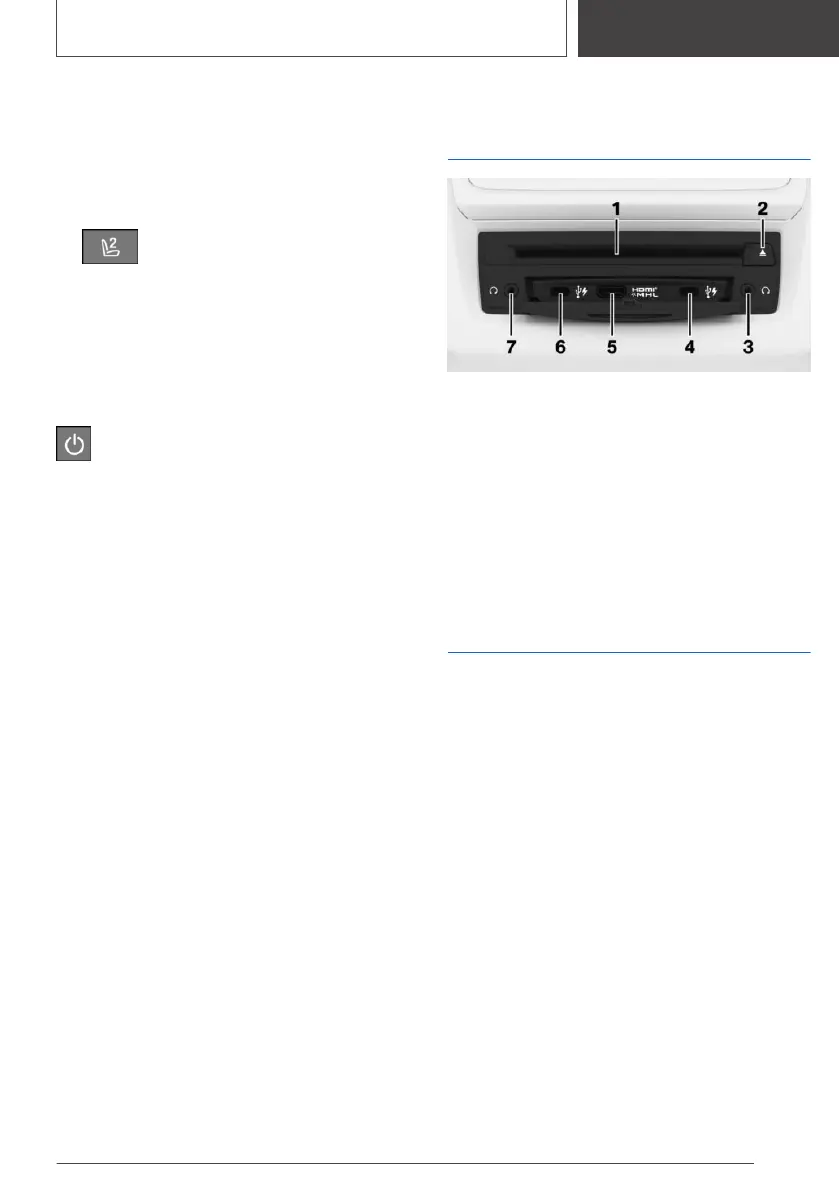
CD/DVD/Blu-ray drive in
the rear
1 CD/DVD/Blu-ray drive
2 CD/DVD/Blu-ray ejection
3 Headphone connection, right
4 USB port, right
5 HDMI/MHL connection
6 USB port, left
7 Headphone connection, left
USB port in the rear
There are two USB ports in the CD/DVD/Blu-ray
drive in the rear.
Properties:
▷ USB port Type C.
▷ For charging mobile devices and for data
transmission.
▷ Charge current: max. 3 A per connection.
Additional information:
USB port, see Owner's Manual for the vehicle.
Seite 55
Rear-seat entertainment
ENTERTAINMENT
55
Online Edition for Part no. 01405A39127 - VI/21



 To Next Page