7
The motor's support only connues as long as you keep pedalling.
If you stop pedalling, the motor will cease its support.
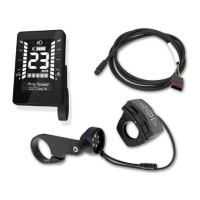
Five segments: Charge level about 81 - 100%
Four segments: Charge level about 61 - 80%
Three segments: Baery is half-charged, about 41 - 60%
Two segments: Charge level about 21 - 40%
One segment: Charge level about 11 - 20%
One segment blinking: Charge level 10% or below
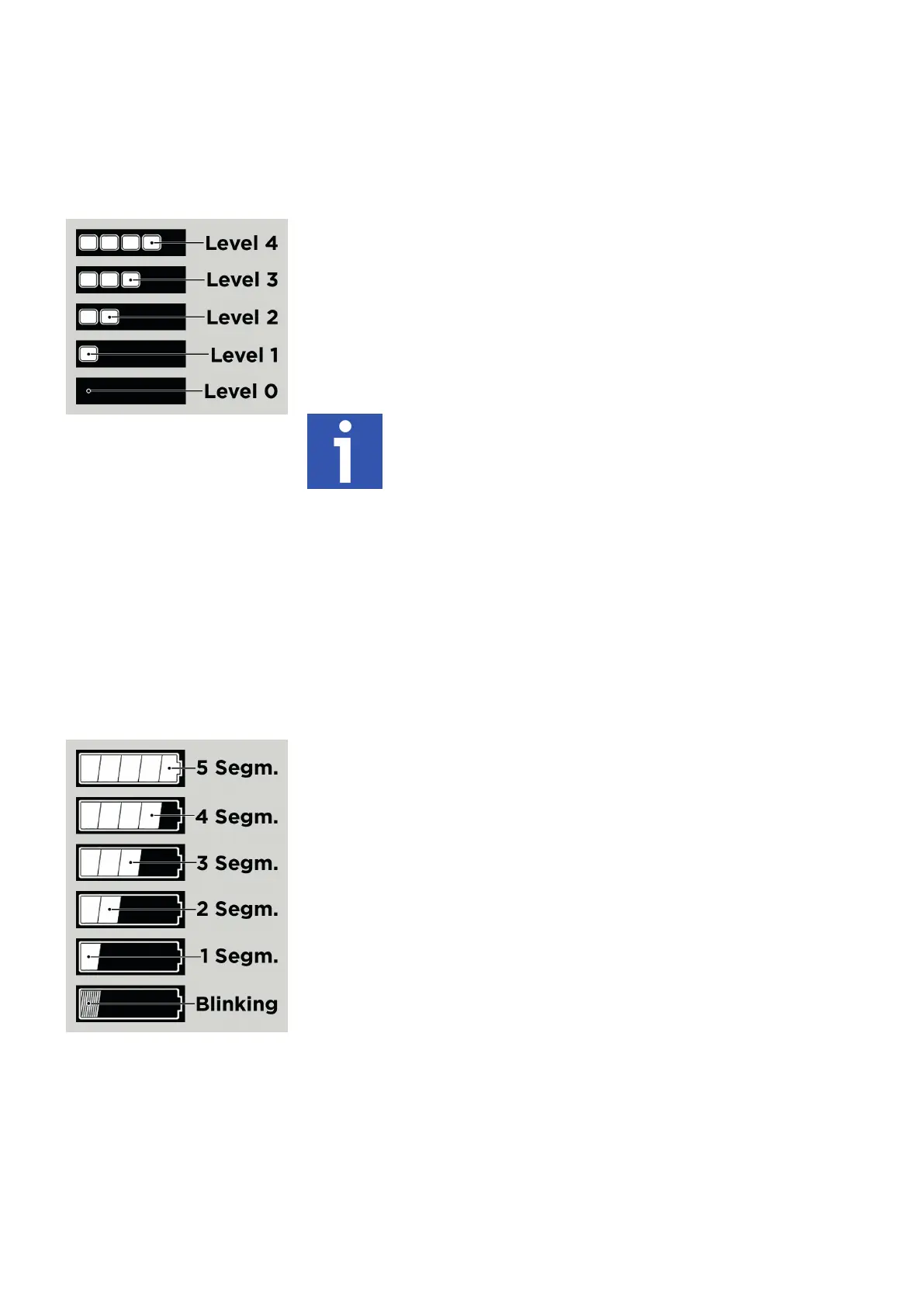
Level 4: Highest level of support, oers the most power, drains baery at the fastest rate
Level 3: The second highest support level
Level 2: The second lowest support level
Level 1: The lowest level of support, the baery retains its charge the longest
Level 0 (O): You’re riding without assistance, the pedelec is like a bicycle
5.7 Choice of support
You can press "+" and "-" on the rocker switch (chapter 4) of the BLOKS. remote 14d at any me to change the degree of motor support.
This will help you and your pedelec make opmal progress in all situaons and on all terrains. There are four levels of support and "O”,
which equals level 0, so ve levels in all. The symbols for the levels are shown below [Fig. 9].
5.8 Speed
The largest secon of the display on the remote 14d shows the pedelec's current speed [Fig. 8, number 4]. To change the speed's units
(km/h or mph), simply long press the "Set" buon (chapter 5.6 on the previous page).
5.9 Baery state of charge
The baery symbol at the boom of the display indicates the baery’s state of charge in ve segments [Fig. 10]. Please note that each
segment only indicates a range of 20%, not an absolute amount. For example, if three segments are displayed, then the baery is about
half-full, but not necessarily exactly 60% full – the charge level will be in the range of 41% to 60%. When the baery charge level falls to
10% or below, the last of the ve segments starts blinking in order to show the low state of charge.
6. Firmware updates by the bike dealer
Your bike dealer can upload rmware updates to the BLOKS. remote 14d. Such rmware updates are available at certain intervals – your
dealer will be happy to advise you and keep you informed. Please note that riding behavior may change slightly aer an update. Therefore,
aer each update, rst do a test ride on private property.
[Fig. 9] Support levels
[Fig. 10] Baery charge levels


 To Next Page