7
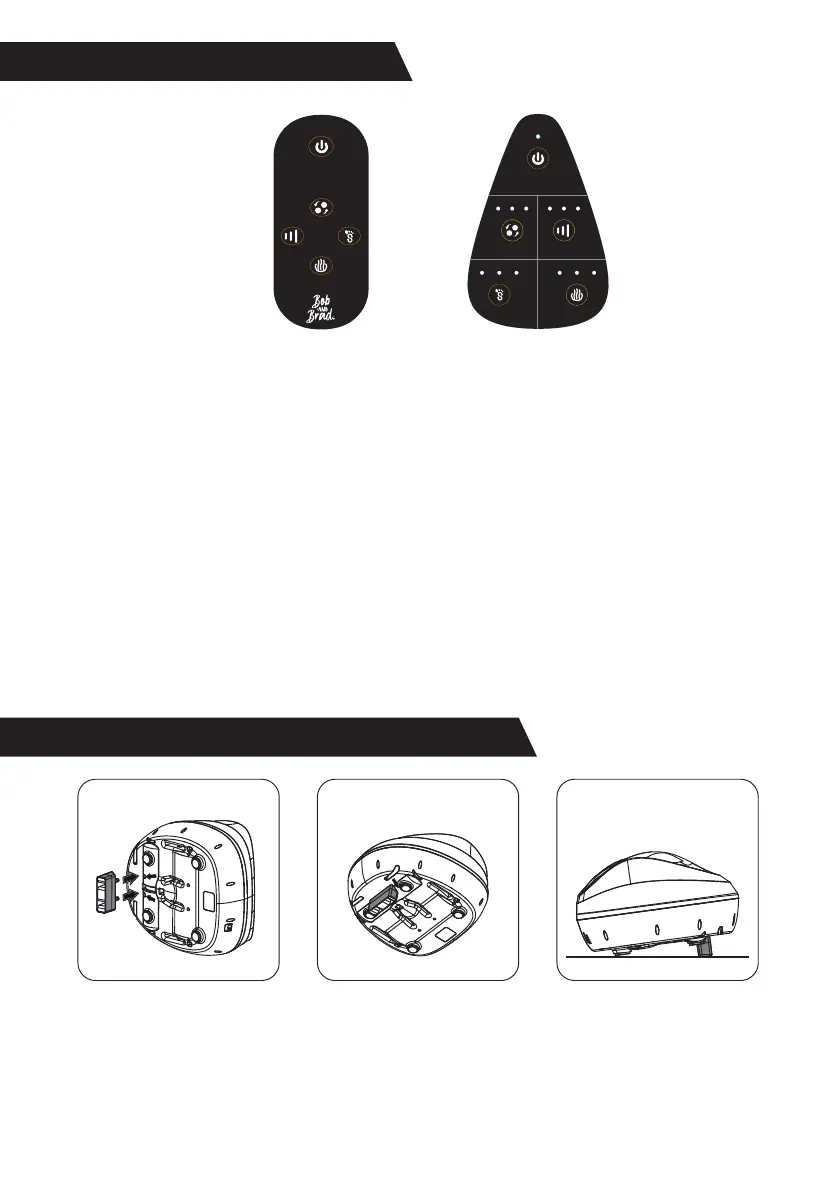
Control Panel
Power: Turn the massager ON/OFF.
Knead Intensity: Select the knead intensity low, medium, high, or
OFF.
Air Pressure: Select the air pressure low, medium, high and MAX.
Press the button four times to MAX level, or turn OFF. If the air
pressure is turned off, the air mode will turn off simultaneously.
Air Mode: Select the air mode A, B, C, or OFF.
Heat: Select the heat level low, medium, high, or OFF.
Please follow the icon prompts to control each function via the
remote control.
Power
Knead
Intensity
L M H L M H
LCBA M H
Air
Pressure
Air Mode Heat
1.
2.
3.
How to insert the stand accessory?
1.Insert the stand
accessory into its
corresponding holes at
the bottom.
2.Ensure the
accessories are installed
according to the
directions shown (Do
not install backwards).
3.Lay the product flat
on the ground.
4.
5.
6.
Power
Air
Mode
Air
Pressure
Heat
Knead Intensity


 To Next Page