Part 6 System Setting/ Menu List
After powering on the device/ in standby, long press
button to enter the menu setting, press
and C3 buttons to select the options to change,
then press the @ button to confirm.
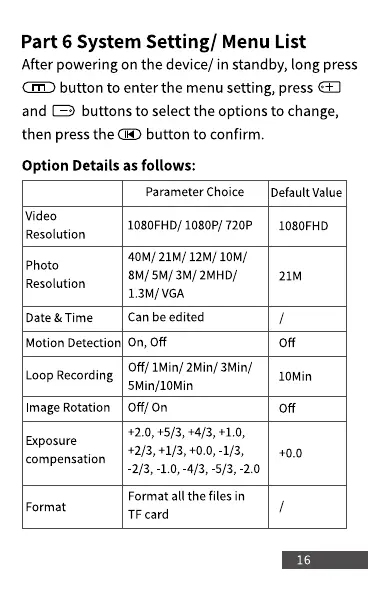
Option Details as follows:
Video
Resolution
Photo
Resolution
Date & Time
Motion Detection
Loop Recording
Image Rotation
Exposure
compensation
Format
Parameter Choice
1080FHD/ 1080P/ 720P
40M/ 21M/ 12M/ 10M/
8M/ 5M/ 3M/ 2MHD/
1.3M/ VGA
Can be edited
on, Off
Off/ 1Min/ 2Min/ 3Min/
5Min/10Min
Off/ On
+2.0, +5/3, +4/3, +1.0,
+2/3, +1/3, +0.0, -1/3,
-2/3, -1.0, -4/3, -5/3, -2.0
Format all the files in
TF card
Default Value
1080FHD
21M
Off
IOMin



 To Next Page