1
2
3
4
5
6
7
8
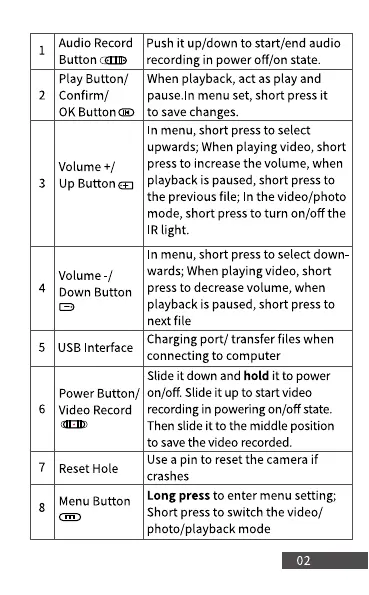
Audio Record
Button
Play Button/
Confirm/
0K Button@
Volume +/
Up Button a
Volume -l
Down Button
USB Interface
Push it up/down to start/end audio
recording in power Off/on state.
When playback, act as play and
pause.ln menu set, short press it
to save changes.
In menu, short press to select
upwards; When playing video, short
press to increase the volume, when
playback is paused, short press to
the previous file; In the video/photo
mode, short press to turn on/off the
IRlight.
In menu, short press to select down
wards; When playing video, short
press to decrease volume, when
playback is paused, short press to
next file
Charging port/ transfer files when
connecting to computer
Slide it down and hold it to power
Power Button/ on/off. Slide it up to start video
Video Record
Reset Hole
Menu Button
recording in powering on/off state.
Then slide it to the middle position
to save the video recorded.
Usea pin to reset the camera if
crashes
Long press to enter menu setting;
Short press to switch the video/
photo/playback mode
02



 To Next Page