Short press to turn off screen
Return/Off@
9
Screen Button
10 TF card slot
display; In menu, short press
to previous menu
nsert a compatible card
Part 2 Basic Operation
Note:
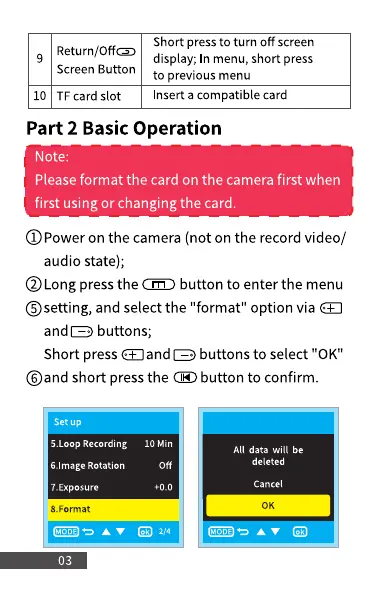
Please format the card on the camera first when
first using or changing the card.
O Poweron the camera (not on the recordvideo/
audio state);
@Long pressthe buttonto enterthe menu
Osetting, and selectthe "format" option via
buttons;
Short press €E]and buttons to select "0K"
Oand short pressthe @ button to confirm.
5.Loop Recording
6.Image Rotation
7 _Exposure
8. Format
03
10 Min
Off
+0.0
All data will be
deleted
Cancel
0K



 To Next Page