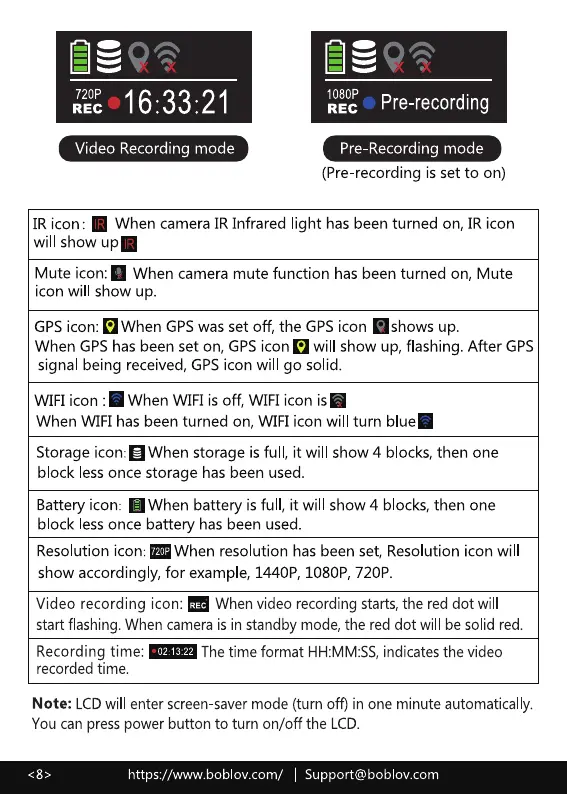
720?
Video Recording mode
1080P
REC
Pre-recording
Pre-Recording mode
(Pre-recording is set to on)
IR icon: When camera IR Infrared light has been turned on, IR icon
will show
Mute icon: When camera mute function has been turned on, Mute
icon will show up.
GPS icon: o When GPSwas set off, the GPSicon •shows up.
When GPShas been set on, GPS icon will show up, flashing. After GPS
signal being received, GPSicon will go solid.
WIFI icon When WIFI is off, WIFI icon is"
When WIFI has been turned on, WIFI icon will turn blue'
Storage icon:a When storage is ful , it will show 4 blocks, then one
block less once storage has been used.
Batteryicon: O When battery isful , it will show 4 blocks,then one
block less once battery has been used.
Resolution icon: When resolution has been set, Resolution icon will
show accordingly, for example, 1440P, 1080P, 720P.
Video recording icon: When video recording starts,the red dot will
start flashing.When camerais in standby mode, the red dot will be solid red.
Recording time:
The time format HH:MM:SS, indicates the video
0213:22
recorded time.
Note: LCDwill enter screen savermode (turn off) in one minute automatically.
You can presspower button to turn on/off the LCD.
https://wm,v.boblov.com/ I Support@boblov.com



 To Next Page