For example: for video resolution, you can change value from 720Pto 480P.
Original: #video
After change:
Date and Time Setting
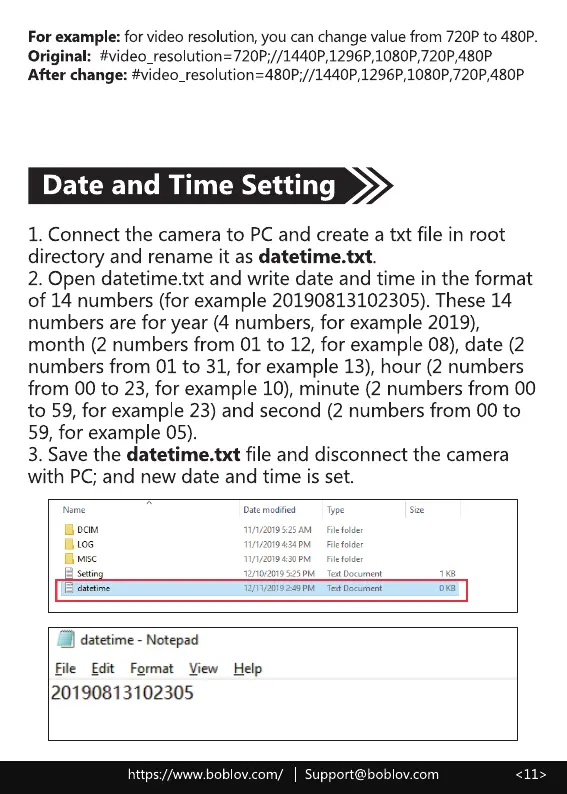
1. Connect the camera to PC and create a txt file in root
directory and rename it as datetime.txt.
2. Open datetime.txt and write date and time in the format
of 14 numbers (for example 20190813102305). These 14
numbers are for year (4 numbers, for example 2019),
month (2 numbers from 01 to 12, for example 08), date (2
numbers from 01 to 31, for example 13), hour (2 numbers
from 00 to 23, for example 10), minute (2 numbers from 00
to 59, for example 23) and second (2 numbers from 00 to
59,for example 05).
3. Save the datetime.txt file and disconnect the camera
with PC; and new date and time is set.
a L0G
datetime - Notepad
File Edit Format View
20190813102305
11/1/2019434PM
Help
File folder
File folder
folde
Text Document
Tet Document
https://www.boblov.com/ I Support@boblov.com



 To Next Page