Item
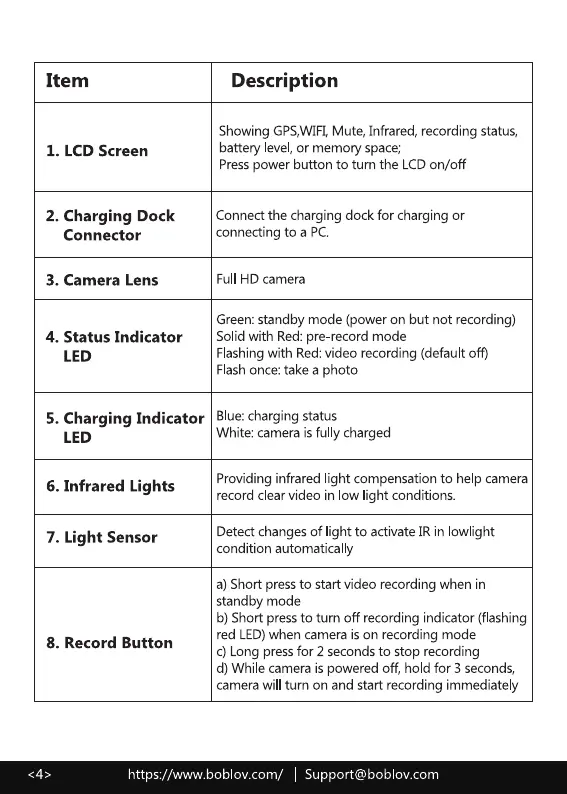
1. LCD Screen
2. Charging Dock
Connector
3. Camera Lens
4. Status Indicator
LED
Description
Showing GPS,WIFI,Mute, Infrared, recording status,
battery level,or memory space;
Presspower button to turn the LCDon/off
Connect the charging dock for charging or
connecting to a PC
Full HD camera
Green:standby mode (power on but not recording)
Solidwith Red:pre record mode
Flashingwith Red:video recording (default off)
Flashonce:take a photo
5. Charging Indicator Blue:chargingstatus
LED
6. Infrared Lights
7. Light Sensor
8. Record Button
White: camera is fu y charged
Providing infrared ight compensation to help camera
record clear video in low light conditions.
Detect changes of light to activate IR in owlight
condition automatically
a)Short pressto start video recording when in
standby mode
b) Short press to turn off recording indicator (flashing
red LED)when camera ison recording mode
c) Long pressfor 2 secondsto stop recording
d) While camera is powered off, hold for 3 seconds,
camerawill turn on and start recording immediate y
https://www.boblov.com/ I Support@boblov.com



 To Next Page