*time Notepad
Eile Edit Format View Help
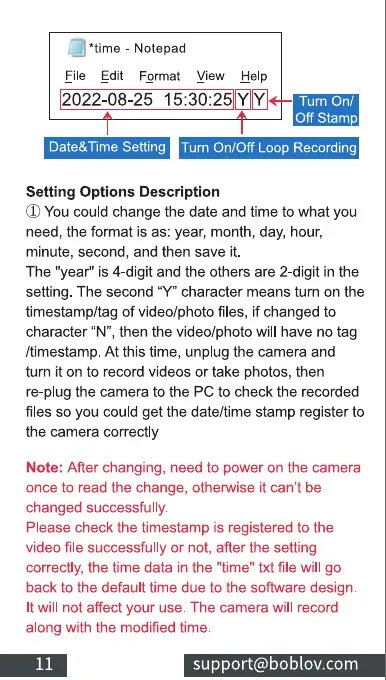
2022-08-25 YY
Turn O
Off Stamp
Date&Time Setting Turn On/Off Loop Recording
Setting Options Description
(J)Youcould change the date and time to what you
need, the format is as: year, month, day, hour,
minute, second, and then save it.
The "year" is 4-digit and the others are 2-digit in the
setting. The second "Y" character means turn on the
timestamp/tag of video/photo files, if changed to
character "N", then the video/photo will have no tag
/timestamp. At this time, unplug the camera and
turn it on to record videos or take photos, then
re-plug the camera to the PC to check the recorded
files so you could get the date/time stamp register to
the camera correctly
Note: After changing, need to power on the camera
once to read the change, otherwise it can't be
changed successfully.
Please check the timestamp is registered to the
video file successfully or not, after the setting
correctly, the time data in the "time" txt file will go
back to the default time due to the software design.
It will not affect your use. The camera will record
along with the modified time.
11
support@boblov.com



 To Next Page