How to Insert the Memory Card
It is highly recommended to use a 16GB to 128GB
(MAX) card, and choose the reliable and genuine
brand of the classic 10 micro SD card for W4
camera. Such as Sandisk/Kingston
(Card Format: S32GB choose FAT32 format;
264GB choose exFat format)
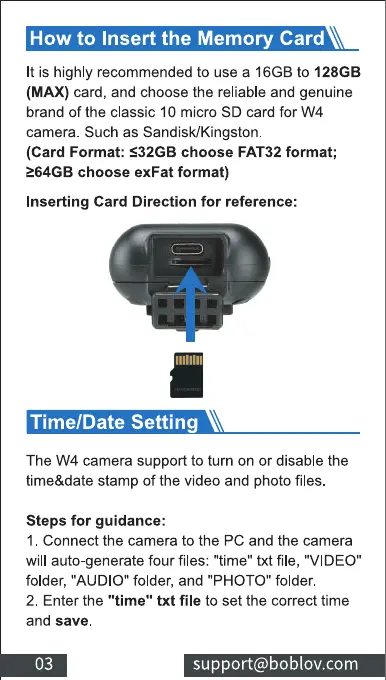
Inserting Card Direction for reference:
Time/Date Setting
The W4 camera support to turn on or disable the
time&date stamp of the video and photo files.
Steps for guidance:
I . Connect the camera to the PC and the camera
will auto-generate four files: "time" txt file, "VIDEO"
folder, "AUDIO" folder, and "PHOTO" folder.
2. Enter the "time" txt file to set the correct time
and save.
03
support@boblov.com



 To Next Page