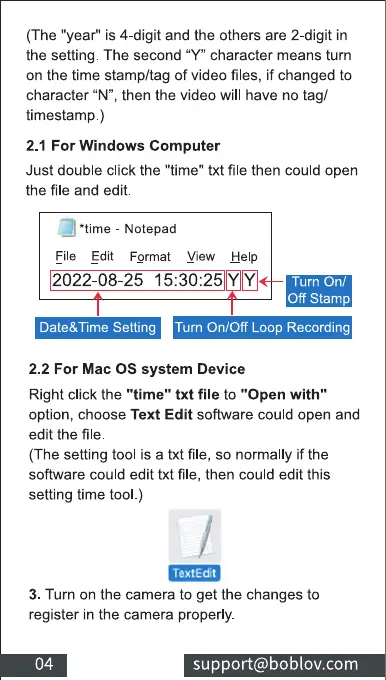
(The "year" is 4-digit and the others are 2-digit in
the setting. The second "Y" character means turn
on the time stamp/tag of video files, if changed to
character "N", then the video will have no tag/
timestamp.)
2.1 For Windows Computer
Just double click the "time" txt file then could open
the file and edit.
*time - Notepad
Eile Edit Format View Help
2022-08-25
Off stamp
Date&Time Setting Turn On/Off Loop Recording
2.2 For Mac OS system Device
Right click the "time" txt file to "Open with"
option, choose Text Edit software could open and
edit the file
(The setting tool is a txt file, so normally if the
software could edit txt file, then could edit this
setting time tool.)
3. Turn on the camera to get the changes to
register in the camera properly.
support@boblov.com



 To Next Page