3
4
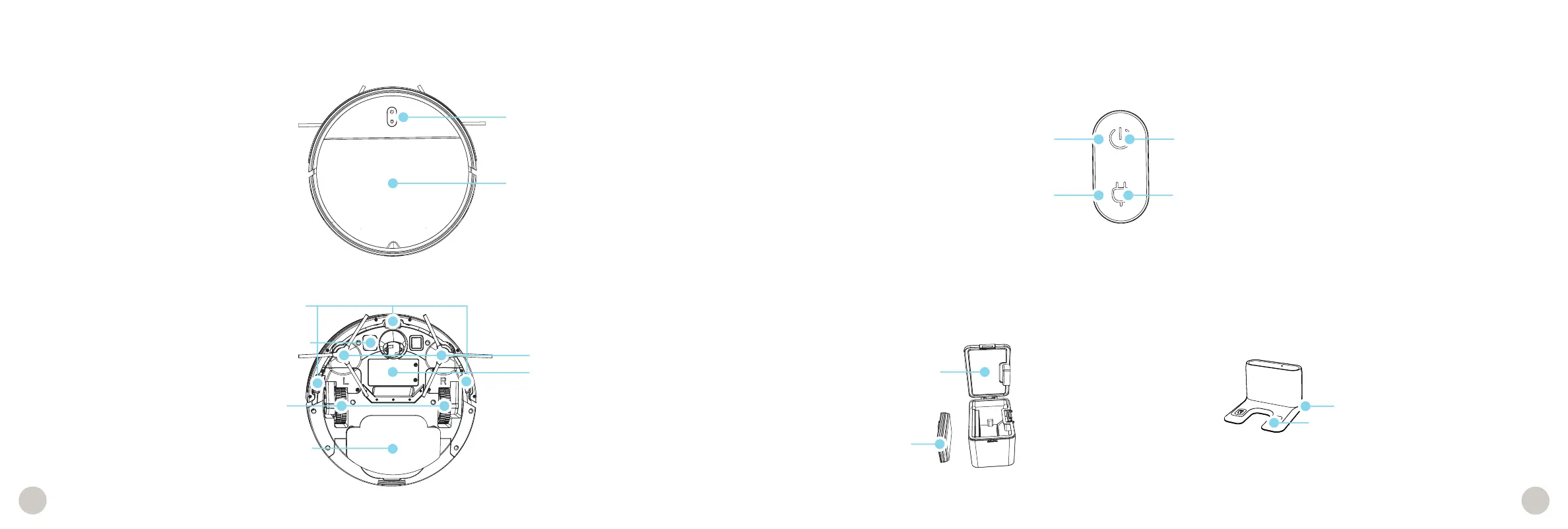
Anatomy
Top Cover (Lift for Dustbin)
Charging Plates
Edge Sensors
Water Reservoir
Battery
Top View
Bottom View
Dustbin Charging Station
L/R Side Brushes
L/R Wheels
Filter
Lid
Charging Nodes
Inlet
Buttons
Anatomy
Buttons and Indicators
Power/GO Button
Short Press - Start/Pause
Long Press - Power ON/OFF
Charge Button
Short Press - Charge/Stop
Long Press - Initiate Wi-Fi search
Power Indicator
OFF - Powered OFF / Standby
Solid Green - Powered ON and all is good!
Blinking Green - Searching for Wi-Fi
Blinking Red - Trouble detected (includes low battery)
Charge Leaf, and check the bObsweep App
Charge Indicator
Solid Yellow - Finding station
Solid Red - Finding station, critically low battery
Pulsing Green - Charging
Solid Green - Charged
Blinking Green - Searching for Wi-Fi















 To Next Page