7
8
The bObsweep App
Home
Add multiple Bots, and access digital versions of Quick Start Guide and Owner’s Manual on the Home page of the bObsweep app.
Control
Send Leaf to clean or charge, on the Control page of the bObsweep app.
Shop
Shop for parts, accessories, and extended warranty coverage plans on the Shop page of the bObsweep app.
Leaf’s First Clean
Step 3: Charge Leaf
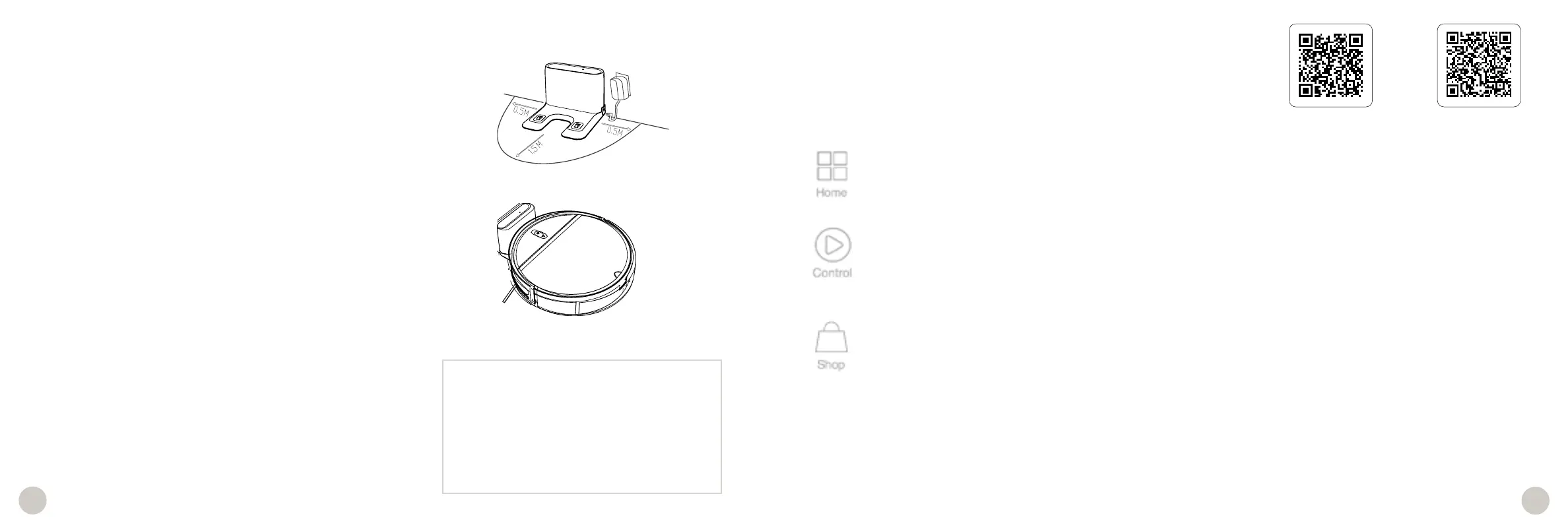
Plug in the charging station, Place it on a hard, flat surface, away from
edges and stairs, with plenty of room around it.
To charge Leaf manually, place him on his station making sure the
charging plates on Leaf align with the charging nodes on the charging
station.
Once connected to Wi-Fi, you can charge Leaf using the bObsweep
App.
Charging Indicator
While charging, Leaf’s charge indicator pulses. When fully charged,
the charging indicator shines green. Allow Leaf to charge completely
overnight before his first clean.
Step 5: Let Leaf Sweep!
Leaf is now ready to sweep! Clear away any clutter or wires and press
Start on the bObsweep app, or the power button on Leaf.
Step 4: Download the bObsweep App
Connect Leaf to Wi-Fi to gain access to his full suite of features and
important software updates. Download the bObsweep App on your
mobile phone, create your account, and follow instructions to add
Leaf to your app and connect him to Wi-Fi.
Standby Mode
When Leaf is left idle off his charging station
for more than 10 minutes, he will enter Standby
Mode to preserve his battery. In this mode Leaf’s
power indicator turns off. Press the Power Button
on Leaf to wake him up.
Whenever Leaf detects a trouble, he will stop and the power indicator will blink red. Check the bObsweep app for trouble details.
Troubleshooting
App Store
Google Play
Download the bObsweep mobile app on your mobile phone to connect Leaf.
App Controls















 To Next Page