11
12
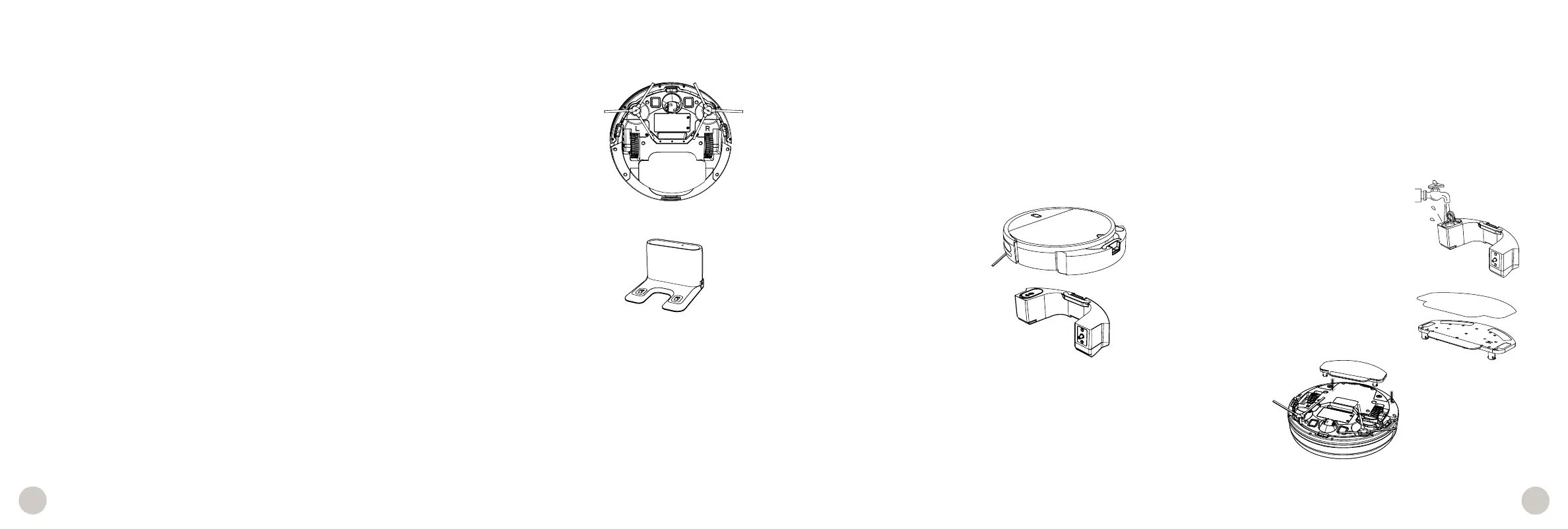
Wet Mop
Important Notes:
• The reservoir should be drained after use to avoid possible water damage.
• Do not let Leaf sit on the charging station with a wet mopping cloth, or while there’s liquid inside the reservoir.
• Use distilled water when operating in hard water areas.
1. Remove the water 2. Open the tab and fill the reservoir
reservoir. with water.
3. Press firmly to close the tab. 4. Place the mopping cloth on the mop
Replace the water reservoir. attachment.
5. Align the prongs of the mop attachment between Leaf’s wheels and press down.
Sensors
Use a soft cotton cloth to wipe the sensors around Leaf’s bumpers, edge, and wall sensors.
Front Wheel
Clean the wheel and all its components, including the assembly and wheel socket.
Charging Nodes
Wipe the charging plates on Leaf and the charging nodes on his station.
Battery
Power Leaf OFF Leaf before opening the battery compartment. Use a Phillips head screwdriver to open the battery compartment.
Maintenance Accessories















 To Next Page