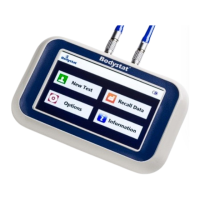
The Bodystat® QuadScan 4000 is a multi-frequency bio-impedance analysis (BIA) unit designed for assessing body composition. It measures at four distinct frequencies: 5 kHz, 50 kHz, 100 kHz, and 200 kHz. This device is an essential tool for researchers and practitioners in fields such as nutrition, exercise science, and clinical health, providing detailed insights into a participant's body water concentration, fat mass, lean mass, and other related metrics.
Function Description:
The primary function of the Bodystat® QuadScan 4000 is to non-invasively measure bio-electrical impedance, which is then used to estimate various body composition parameters. By applying a small, imperceptible electrical current through electrodes placed on the body, the device measures the resistance and reactance of the body's tissues. Different tissues (e.g., fat, muscle, water) have varying electrical properties, allowing the device's internal algorithms to differentiate and quantify them.
The device provides a comprehensive set of results, including:
- FAT (%) and FAT (kg): Percentage and weight of total body fat.
- LEAN (%) and LEAN (kg): Percentage and weight of lean muscle mass.
- TOTAL: Total actual body weight.
- DRY LEAN WEIGHT: Estimated dry lean weight, which includes muscle and bone (excluding TBW).
- TBW (%) and TBW (lt): Percentage and volume of total body water.
- ECW (%) and ECW (lt): Percentage and volume of extra-cellular water.
- ICW (%) and ICW (lt): Percentage and volume of intra-cellular water.
- BODY CELL MASS: Total mass of cells in the body where oxygen is consumed and carbon dioxide is produced.
- 3rd SPACE WATER: Estimated transcellular space water volume.
- NUTRITION: ECW/TBW Nutrition Index.
- Illness Marker: 200/5 kHz impedance Index.
- BASAL MET. RATE (BMR): Estimated basal metabolic rate.
- BMR/Body Weight: Basal metabolic rate per kg or lb of body weight.
- EST. AVERAGE REQ.: Estimated average energy requirement.
- BMI: Body mass index (Weight/height² in metric).
- BFMI: Body fat mass index (Body fat/height² in metric).
- FFMI: Fat free mass index (Lean/height² in metric, where BFMI+FFMI=BMI).
- Waist/Hip: Waist/Hip ratio.
- IMPEDANCE (5 kHz, 50 kHz, 100 kHz, 200 kHz): The resistance to the flow of the current at each specified frequency.
- RESISTANCE 50 kHz, REACTANCE 50 kHz, PHASE ANGLE 50 kHz: These values are required by certain types of BIA users for subject assessment.
The device uses regression equations (e.g., Regression Equation 1 for Full Participant Data, Regression Equation 2 for No Participant Data) to derive these body composition parameters. It also includes specific equations for children aged 6 to 17 years.
Important Technical Specifications:
- Measurement Frequencies: 5 kHz, 50 kHz, 100 kHz, 200 kHz.
- Power Source: 6 non-rechargeable AA batteries (Duracell or Procell recommended).
- Display: LCD screen.
- Connectivity: Cable leads with white and black ports for electrode connection.
- Calibration Unit: Used to ensure accurate readings, with expected impedance values between 496 and 503 Ohms at all frequencies (5, 50, 100, 200 kHz).
- Safety Features: Automatic alarm for inactivity (60 seconds) to warn the user that the unit is still on.
Usage Features:
- Calibration: Prior to each test, the device requires calibration using a dedicated calibrator unit. This involves connecting the "Red and Black 1.2m Cable Leads with White Port" to the unit's inputs, then attaching pairs of red and black leads to the calibrator's terminals. The device should display impedance readings between 496 and 503 Ohms. If readings are outside this range, lead connections should be checked, and all six batteries replaced.
- Battery Life Indicator: The LCD screen displays battery life using six black squares. Users are advised to change all six batteries when only one square of battery life is shown.
- Participant Data Entry: The device allows for entry of participant information, including physical activity level, which is categorized into "Very Low Movement Restricted," "Low/Medium Office/Light Work," "Medium Weekend Recreation," and "Medium/High Moderate Exercise," and "Very High Vigorous Exercise at Competitive Level." Each category has a description of general activity and specific examples of activities.
- Electrode Placement: Specific instructions are provided for electrode placement on the right side of the body:
- Upper body: Behind knuckles and on the wrist next to the ulna head, with a minimum 3 cm separation.
- Lower body: Behind toes and on the ankle between the medial and lateral malleoli, with a minimum 3 cm separation.
- Red leads connect to electrodes behind knuckles and toes, while black leads connect to electrodes on the wrist (ulna head) and ankle (malleoli).
- Crocodile (alligator) clips on cable leads must be attached to the exposed tab, ensuring metal contact with the foil side of the electrode.
- Pre-Test Preparation: Participants must adhere to specific guidelines to ensure accurate results:
- No eating or drinking 4 to 5 hours prior to the test.
- Avoid exercise for 12 hours prior.
- Refrain from drinking alcohol or caffeine within 24 hours.
- Turn off mobile phones and remove all jewelry, stockings/pantyhose, and/or socks.
- Lie on their back for 3-4 minutes before measurement, with feet shoulder-width apart and arms extended by their side, palms down, legs slightly apart (using a towel between limbs if necessary to prevent skin-to-skin contact).
- Electrode sites may need to be shaved and must be cleaned with an alcohol swab and allowed to dry for 30 seconds before electrode placement.
- Measurement Process: Once electrodes are connected, pressing the "enter" button initiates the measurement. An audible signal indicates completion.
- Data Retrieval:
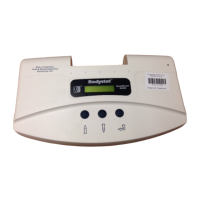
- Results are displayed on the device's LCD screen, showing estimated measure results on the top line and recommended/normal levels on the bottom line.
- Navigation buttons (left arrow, down arrow, up arrow) allow users to display subsequent or previous screens.
- To recall participant data, hold down the "enter" key while switching the unit ON. The "Recall Data" screen will appear, allowing selection of a specific test number.
- Data Export: The device can export data to a computer using "Quadscan" software. This involves switching the QuadScan ON, opening the software on a laptop (password "12345" and communications port "7" may be required), and clicking the "blue screen with red down arrow" symbol to download data. Participant files can then be viewed, and "Summary Results" accessed via "Print Preview."
- Contraindications: The device cannot be used on individuals with:
- Active implanted medical devices (e.g., cardiac pacemakers, defibrillators).
- Participants connected to electronic life support devices.
- Individuals undergoing external defibrillation.
- Pregnant individuals.
- Situations affecting body water concentration, such as just prior to, during, or just after menstruation, use of diuretics, or renal/heart failure, may affect accuracy.
- Quality Control Check: After measurement, raw data impedance values should be reviewed for reliability:
- Illness Marker/Dehydration Index must be lower than 1.00.
- Each impedance value at successive frequencies (5, 50, 100, 200 kHz) must be lower than the previous value.
Maintenance Features:
- Cleaning: The unit should be periodically wiped with a clean, damp cloth. Cable leads can also be cleaned with a damp cloth if required.
- Storage: Cables should not be wrapped around the unit, tangled, or tightly rolled when not in use.
- Environmental Protection: Avoid exposure to water, impact, excessive heat, or direct sunlight.
- Battery Replacement: Replace all six AA batteries when the battery life indicator shows only one square. Only Duracell or Procell non-rechargeable batteries are recommended.
- Electrode Usage: Only QuadScan electrodes should be used. Avoid placing electrodes on irritated skin, cutting electrodes, or using extra gel with solid gel electrodes. Electrodes should not be left attached to the skin for longer than 1 hour.
- Lead Usage: Only cable leads supplied by QuadScan should be used. Alligator clips should not be connected directly to the patient's skin.
- Disassembly: The unit should not be disassembled.
- Troubleshooting Guide: A comprehensive troubleshooting section is provided for common issues:
- Results Out Of Range: Possible causes include incorrect device setup or medications affecting fluid levels. Solutions involve rechecking input data and considering medication effects.
- Faulty Electrode Check Connection: Possible causes include improperly attached cable leads or tangled leads. Solutions include ensuring correct participant position, rechecking electrodes, ensuring leads are properly inserted and not tangled, securely attaching alligator clips, and performing calibration.
- LCD Screen Display is Blank: Possible cause is dead battery power. Solutions include checking battery insertion and replacing with new Duracell batteries.
- ECW% Fat Readings are Always Incorrect: Possible cause is malfunction of the electronic memory micro processor. Solutions include performing calibration, changing batteries, checking cables, and returning the unit to the dealer.
- Strange Characters on LCD Screen: Possible cause is malfunction of the liquid crystal display. Solution is LCD screen replacement.


 To Next Page
 General