Wired connection
LED Indicator
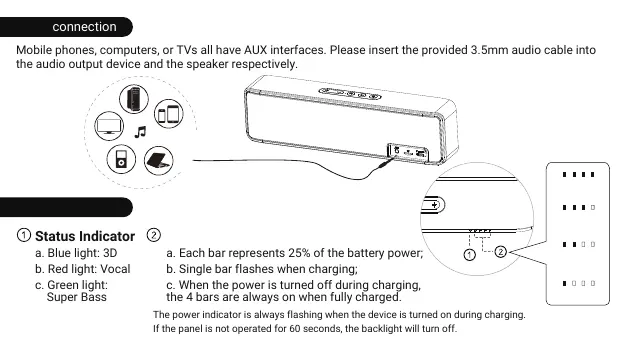
Mobile phones, computers, or TVs all have AUX interfaces. Please insert the provided 3.5mm audio cable into
the audio output device and the speaker respectively.
Status Indicator
a. Blue light: 3D
b. Red light: Vocal
c. Green light:
Super Bass
Battery Indicator
a. Each bar represents 25% of the battery power;
b. Single bar flashes when charging;
c. When the power is turned off during charging,
the 4 bars are always on when fully charged.
75%-100%
50%-75%
25%-50%
0-25%
The power indicator is always flashing when the device is turned on during charging.
If the panel is not operated for 60 seconds, the backlight will turn off.
*
*
06



 To Next Page