43
en
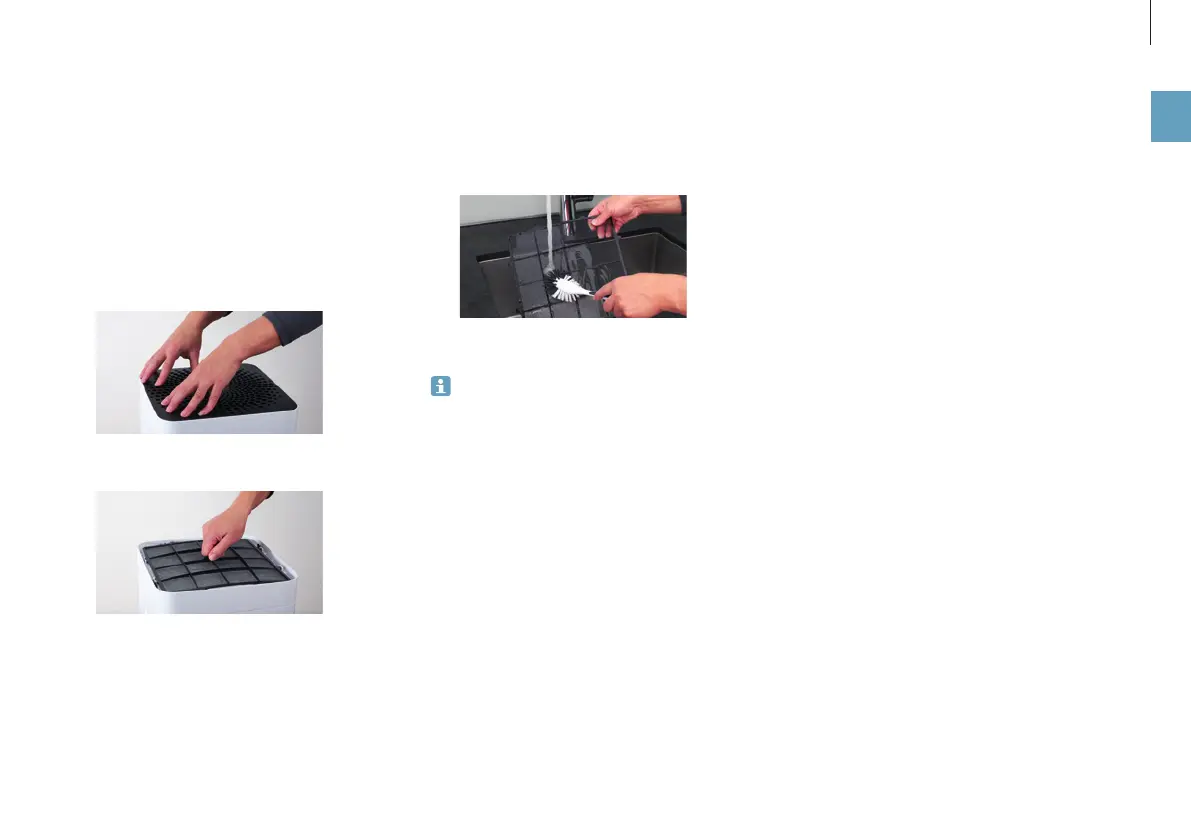
ABOUT THE PRE-FILTER
The pre-filter cleanses the air of coarse dirt particles to
relieve the strain on the AH300 pollen filter and to improve
its effectiveness. Clean the pre-filter if it looks dusty or
dirty.
1. Press down each of the four corners in sequence to
unlock them.
2. Remove the pre-filter by pulling it upwards by the lug
in its center.
3. Wash the pre-filter under running water using a
cleaning brush.
4. Let the pre-filter dry before inserting it.
A damp pre-filter can impede the quality of the
AH300 pollen filter.
REPLACING THE AH300 POLLEN FILTER
The AH300 pollen filter cannot be cleaned.
• Dirt is normal and shows that the filter is working.
• Replace the filter once a year to maintain the cleaning
performance.
• The used filter can be disposed of with your regular
household waste.
You can obtain a replacement for your used AH300 pol-
len filter from your BONECO reseller or the BONECO on-
line store at H300 www.shop.boneco.com or directly
through the BONECO app you use to control the BONECO
H300.
CLEANING THE PRE-FILTER / REPLACING THE AH300 POLLEN FILTER



 To Next Page