User’s Manual
17
4.2.2. SCREENS & MENU NAVIGATION
Many screens are menus allowing access to other screens, or lists presenting
a number of options. The presently selected item on the menu is indicated by
a ‘>’ cursor. This selection indicator is moved using the up and down buttons.
If a line on the menu represents another screen, that screen is accessed with
the Enter button. The Cancel button will return the display to the parent
screen. See Figure 4-3.
4.2.2.1. MAIN MENU
The Charge menu, Discharge Confirmation screen, and previous
measurement Results may be accessed from the Main Menu.
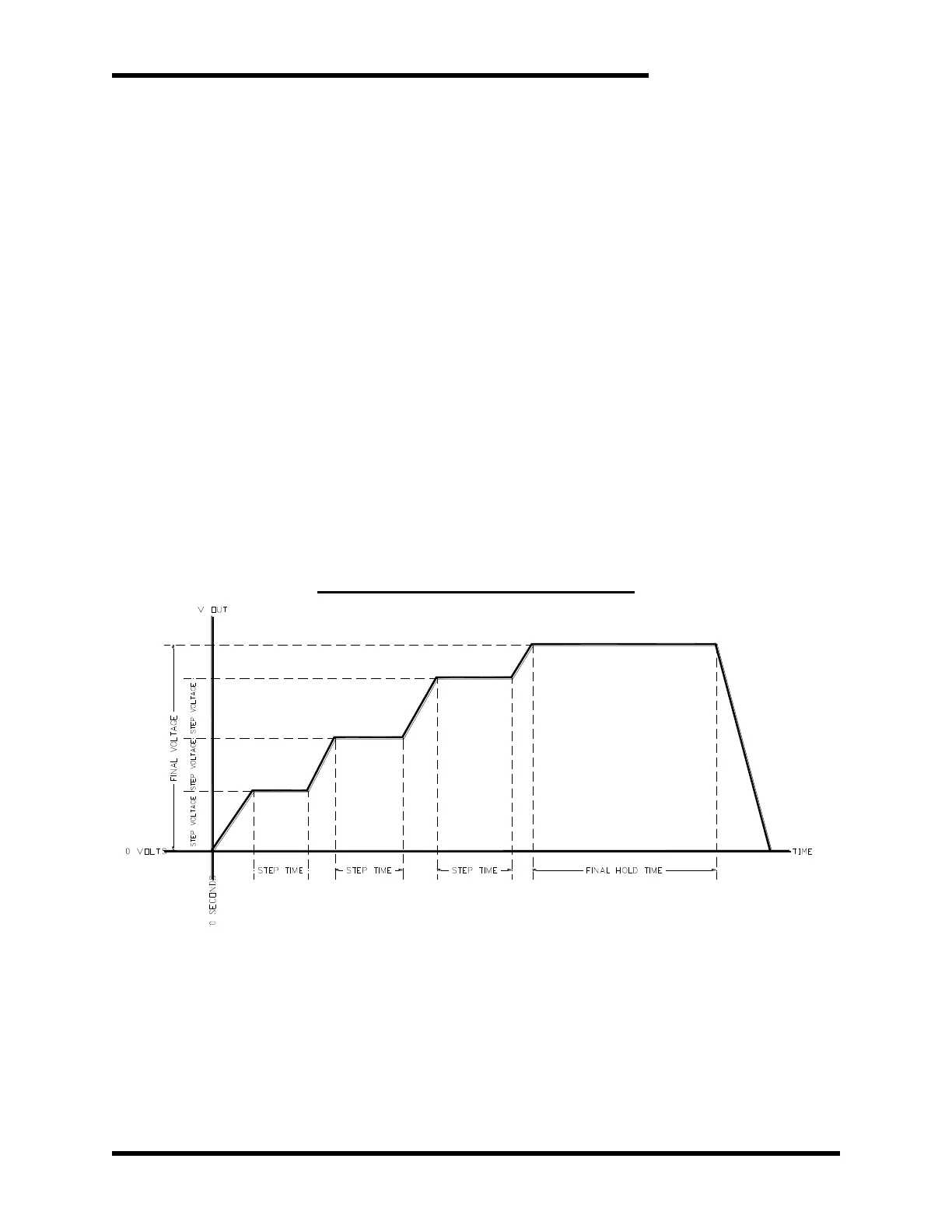
4.2.2.1.1. CHARGING PROFILE
From the Charge Menu, the user may input the variables
necessary to execute an automatic forming profile. A forming
profile charges the capacitor in steps, each step a specified voltage
apart. When each step voltage is reached, the load is held at that
voltage for a specified number of seconds before charging to the
next step voltage. When the final voltage is reached, the load is
held at that voltage for a specified number of seconds before
discharging. Voltage setpoints may vary by up to ±10V. See Figure
4-2.
Figure 4-1: M3628ACF Charging Profile



 To Next Page