EasyManua.ls Logo

BONTEC GWM01 - Step 4: Hang Monitor to Mount; Step 5: Gas Spring and Tilt Adjustment; Gas Spring Tension Adjustment; Tilt Adjustment

BONTEC GWM01
7 pages
Print Icon
To Next Page IconTo Next Page
To Previous Page IconTo Previous Page
Loading...
You
may
need
assistance
with
this
step.
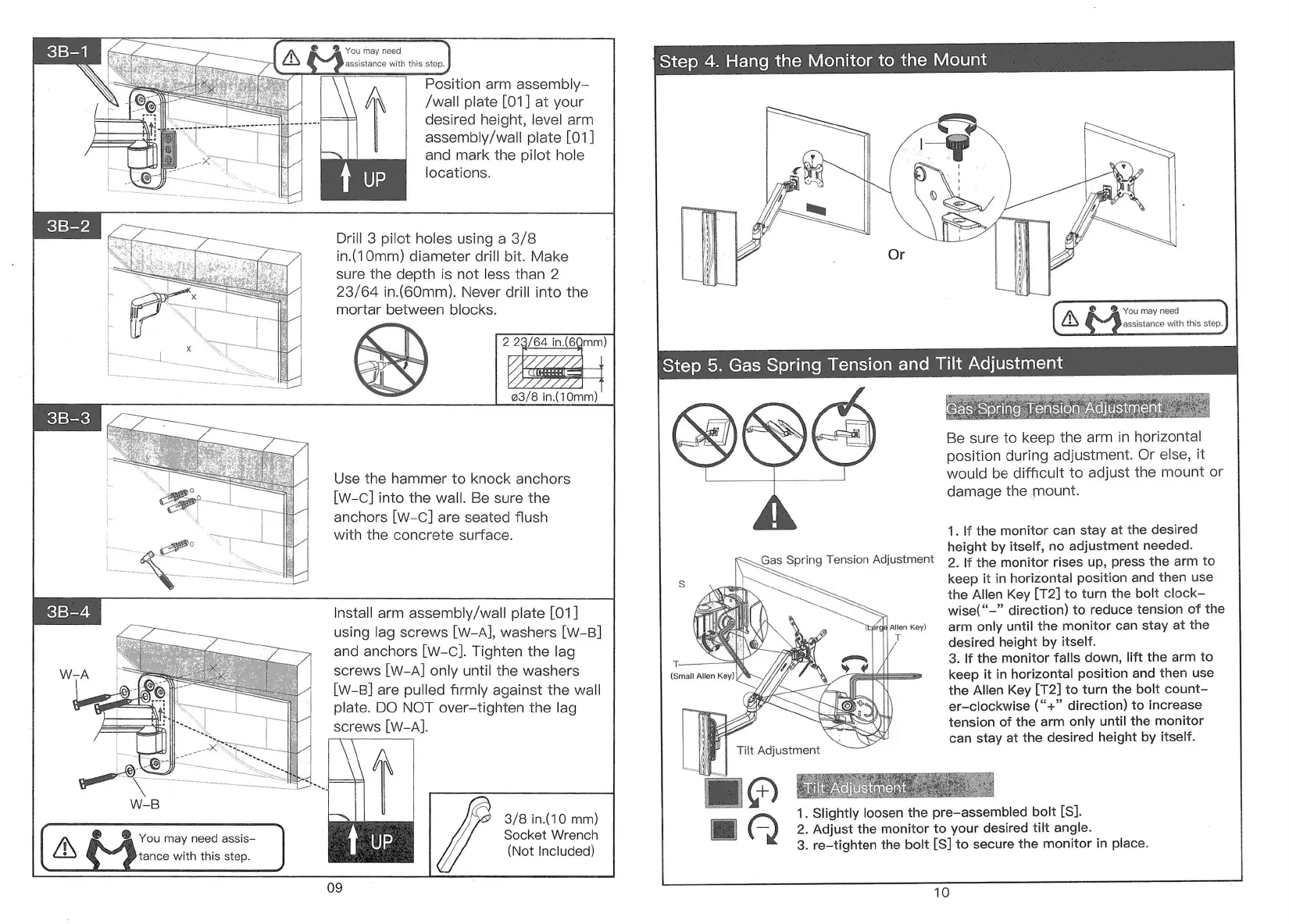
Position
arm
assembly—
/wall plate
[01]
at
your
desired
height,
level
arm
assembly/wall
plate
[01]
fiF
and
mark
the
pilot
hole
locations.
Drill
3
pilot
holes
using
a
3/8
in.(10mm)
diameter
drill
bit.
Make
sure
the
depth
is
not
less
than
2
23/64
in.(60mm).
Never
drill
into
the
mortar
between
blocks.
%
2
23/64
in.(6Qmm)
23/8
in.(10mm)
Use
the
hammer
to
knock
anchors
[w-c]
into
the
wall.
Be
sure
the
anchors
[W-C]
are
seated
flush
with
the
concrete
surface.
(A
D
vou
may
need
assis—
tance
with
this
step.
Install
arm
assembly/wall
plate
[01]
using
lag
screws
[W-A],
washers
[W-B]
and
anchors
[W-C].
Tighten
the
lag
screws
[W-A]
only
until
the
washers
[w-B]
are
pulled
firmly
against
the
wall
plate.
DO
NOT
over-tighten
the
lag
screws
[W-A].
3/8
in.(10
mm)
Socket
Wrench
(Not
Included)
Step
4.
Hang
the
Monitor
to
the
Mount
2
You
may
need
assistance
with
this
step.
Be
sure
to
keep
the
arm
in
horizontal
position
during
adjustment.
Or
else,
it
would
be
difficult
to
adjust
the
mount
or
damage
the
mount.
1.
If
the
monitor
can
stay
at
the
desired
height
by
itself,
no
adjustment
needed.
2.
If
the
monitor
rises
up,
press
the
arm
to
keep
it
in
horizontal
position
and
then
use
the
Allen
Key
[T2]
to
turn
the
bolt
clock-
wise(“~"
direction)
to
reduce
tension
of
the
arm
only
until
the
monitor
can
stay
at
the
desired
height
by
itself.
3.
If
the
monitor
falls
down,
lift
the
arm
to
keep
it
in
horizontal
position
and
then
use
the
Allen
Key
[T2]
to
turn the
bolt
count—
er—clockwise
(“+”
direction)
to
increase
tension
of
the
arm
only
until
the
monitor
can
stay
at
the
desired
height
by
itself.
gel
Allen
Key)
T
Y,
A\
T.
N
(Small
Allen
Key)
}
1.
Slightly
loosen
the
pre—assembled
bolt
[S].
2.
Adjust
the
monitor
to
your
desired
tilt
angle.
3.
re—tighten
the
bolt
[S]
to
secure
the
monitor
in
place.
10

Related product manuals