EasyManua.ls Logo

Booster BDVM-8455MPBTV - TV Reception and Controls

Booster BDVM-8455MPBTV
52 pages
Print Icon
To Next Page IconTo Next Page
To Previous Page IconTo Previous Page
Loading...
BDVM-8455MPBTV
- 40 -
TV OPERATIONS
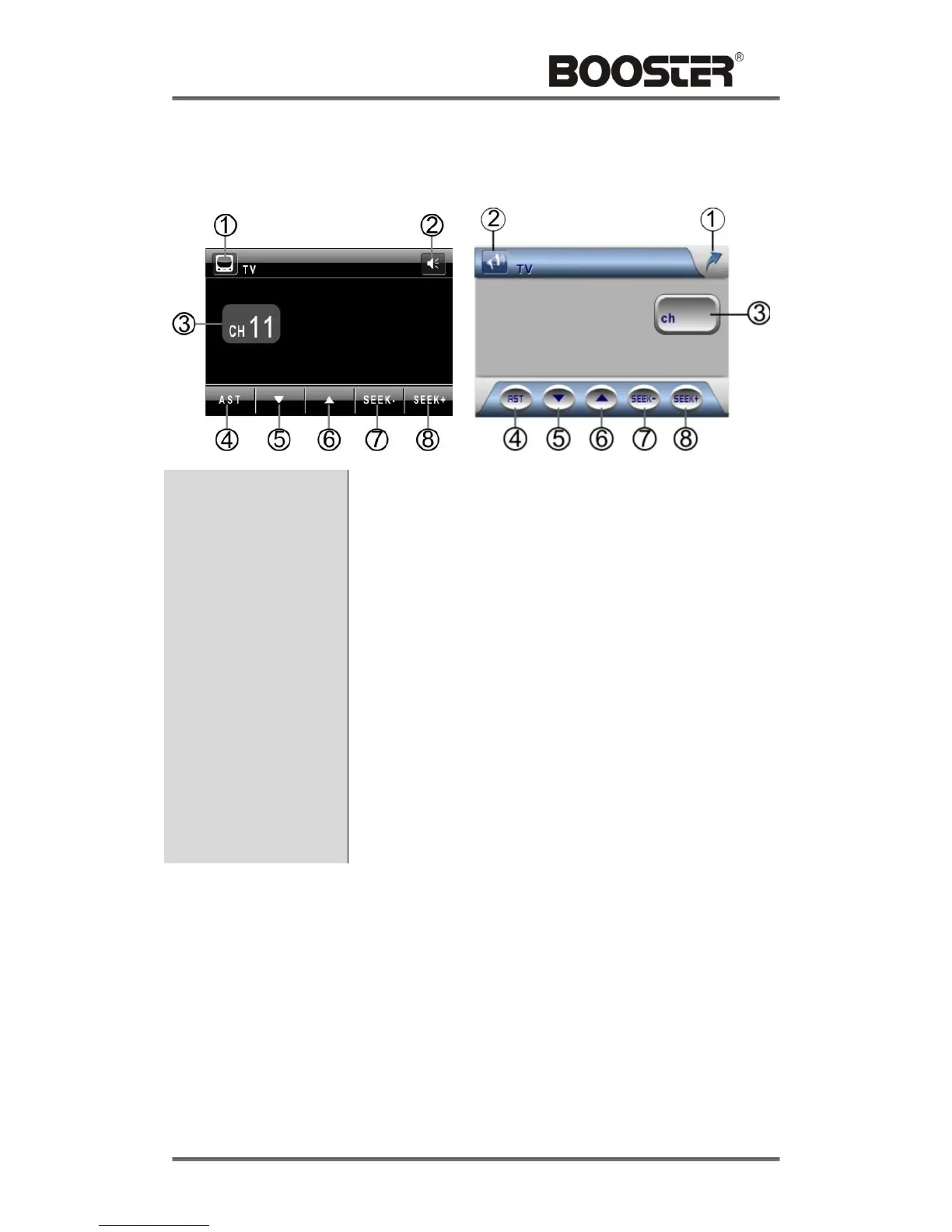
Touch the icon “TV” to enter the TV Mode:
1. Menu
Touch to return the main menu.
2. Mute
Touch to switch off the sound; touch it again to resume to the
previous volume level
3. Current Channel
Indicator
Displays the TV channel currently playing.
TV OPERATIONS - Cont’ d
4. Auto Station Tune
Touch to automatically seek all strongest stations available;
touch any icon to stop the tuning.
5. / 6. Next Station -
Down / Up
After the Auto Station Tune, touch to select the stations
downward / upward.
7. / 8. Seek Next
Station Down / Up
Touch to seek the next available channel by increasing /
decreasing the tuning frequency.

Related product manuals