EasyManua.ls Logo

Booster BDVM-8455MPBTV - Screen Saver Options

Booster BDVM-8455MPBTV
52 pages
Print Icon
To Next Page IconTo Next Page
To Previous Page IconTo Previous Page
Loading...
BDVM-8455MPBTV
- 45 -
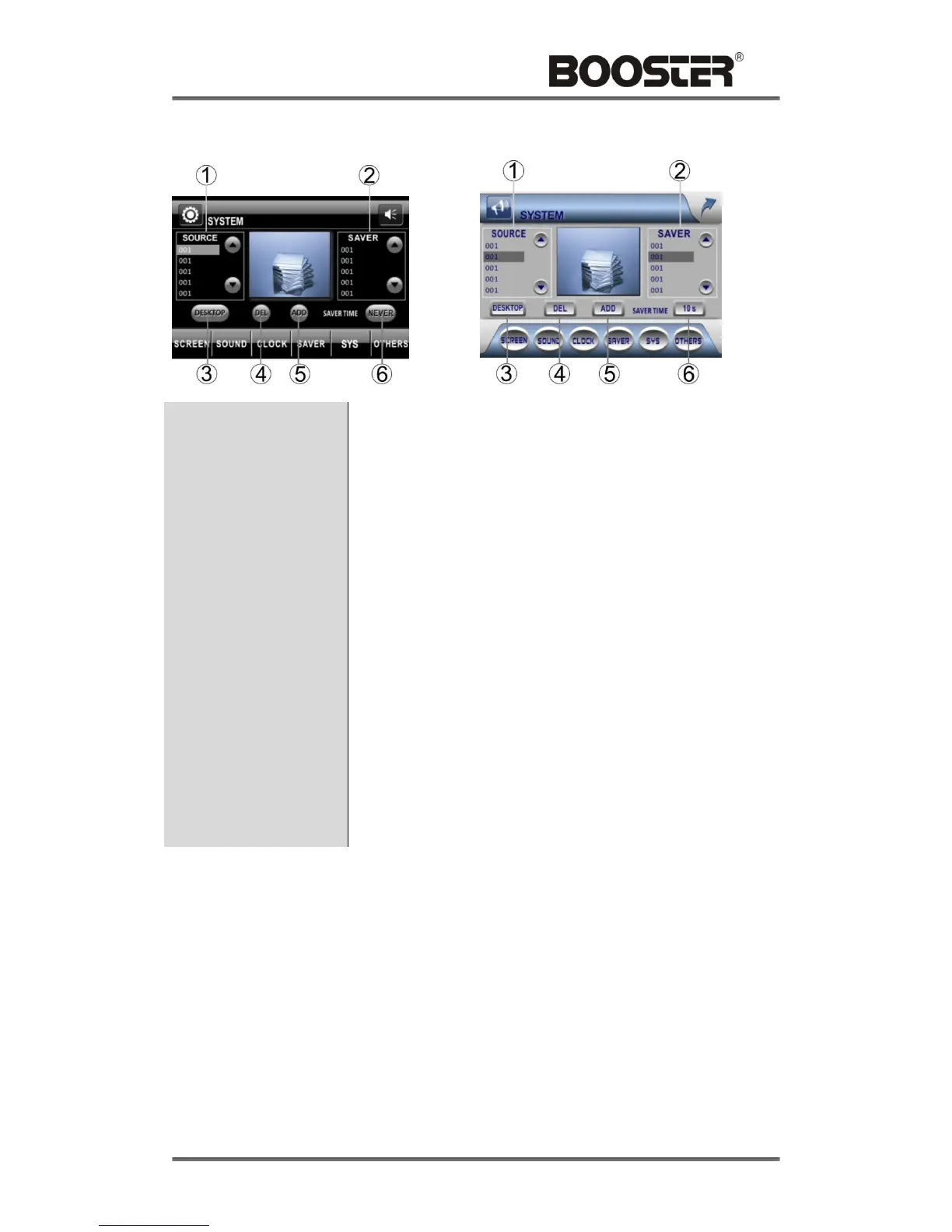
SAVER SETUP
1. Source Images List
Touch [UP] / [DOWN] icons to select the image captured
from DVD, SD card and USB.
2. Screen Saver
Images List
Touch [UP] / [DOWN] icons to select the image of screen
saver.
3. Desktop
Touch to set the selected image of source images list as
desktop image.
4. Del
Touch to delete the selected image of screen saver images
list, or delete the selected image of source images list.
5. Add
Touch to add the selected image of source images list as
screen saver.
6. Screen Saver Time
Touch to adjust the screen saver time as following:
3MIN - 5MIN NEVER-30S - 60S - 3MIN

Related product manuals