3
WWW.NIKOLAOUTOOLS.GR WWW.NIKOLAOUTOOLS.GR
EN EN
CONNECTING TO THE BATTERY
1) Idenfy polarity of baery posts. The posive baery terminal is typically marked by these leers or symbols (POS,P,+). The negave baery terminal is
typically marked by these leers or symbols (NEG,N,-).
2) Do not make any connecons to the carburetor, fuel lines, or thin metal parts.
3) Idenfy if you have a negave or posive grounded vehicle. This can be done by idenfying which baery post (NEG or POS) is connected to the chassis.
• For a negave grounded vehicle (most common): connect the RED POSITIVE baery clamp rst to the posive baery terminal, then connect the BLACK
NEGATIVE baery clamp to the vehicle chassis or negave baery terminal.
• For a posive grounded vehicle (very uncommon): connect the BLACK NEGATIVE baery clamp rst to the negave baery terminal, then connect the RED
POSITIVE baery clamp to the vehicle chassis or posive baery terminal.
4) When disconnecng, disconnect in the reverse sequence, removing the negave rst (or posive rst for posive ground systems).
NOTE: If baery clamps are reversely connected to baery terminals, the ERROR light will be on. Exchange the baery clamps to solve this problem.
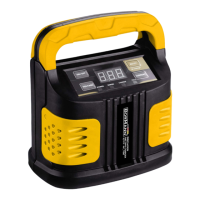
The BBC1260 is designed for charging all types of 12V lead-acid , including WET (Flooded), GEL, MF (Maintenance-Free), EFB (Enhanced Flooded Baery), AGM
(Absorbed Glass Mat) baeries. The built-in intelligent microprocessor makes charging faster, easier and safer.
This charger has safety features, including spark proof, protecon for reverse polarity, short circuit, overcurrent, overcharge and overheat.
It also features an auto-memory funcon: Aer power on, the display window of charger will show the last selected mode (except BOOST mode). The charger
will enter charging mode in about 5 seconds.
When the CHARGE indicaon light is on, the baery is charging. When the CHARGE indicaon light is o and the FULL indicaon light is on, the charging is
complete. Do not break the connecon immediately. It will automacally switch from full charge to maintenance status to maintain baeries during prolonged
periods of storage.
When the VOLTAGE buon is pressed, you can see the present voltage.
CHARGING MODES
MODE DISPLAY INDICATION LIGHT EXPLANATION
STANDBY - Keep on Not charging or providing any power. If you want charging to pause,
press the ON/OFF buon and it will enter STANDBY mode.
6V/2A 02A Keep on Connected to baery, it can turn into 2A by pressing CURRENT
buon. This mode is recommended for 2-60AH baeries.
6V/5A 05A Keep on Connected to baery, it can turn into 5A by pressing CURRENT
buon. This mode is recommended for 10-150AH baeries.
12V/2A 02A Keep on Connected to baery, it can turn into 2A by pressing CURRENT
buon. This mode is recommended for 2-60AH baeries.
12V/5A 05A Keep on Connected to baery, it can turn into 5A by pressing CURRENT
buon. This mode is recommended for 10-150AH baeries.
12V/10A 10A Keep on Connected to baery, it can turn into 10A by pressing CURRENT
buon. This mode is recommended for 40 300AH baeries.
BOOST FAS Keep on Connected to baery, it can enter BOOST mode by pressing BOOST
buon. It takes about 5 minutes to charge.
The BOOST mode is an advanced charging mode that requires your full aenon before selecng.
Using 12V BOOST
To operate BOOST, the charger must be connected to a 12V lead-acid baery with the baery clamps connected. For opmal results, allow boost to complete
its 5-minute charge. Aer 300-second boost, digital tube will show “000”, and your are ready to start your vehicle (whether FULL light is illuminated or not). If
unsuccessful when starng your vehicle, let the baery rest for 15 minutes and try boost again. Most vehicles will start with one (1) boost. Do not use boost
more than two (2) mes within a 24-hour period. If two (2) boosts cannot successfully start your vehicle, have your baery replaced or evaluated by a local
baery store.


 To Next Page
 Loading...