22
|
Control Air M/M+ Water to Water Applications Installation & Operation Manual
02.2019 | BTC 469503103 AData subject to change
9.2.8 Lead/Lag Screen
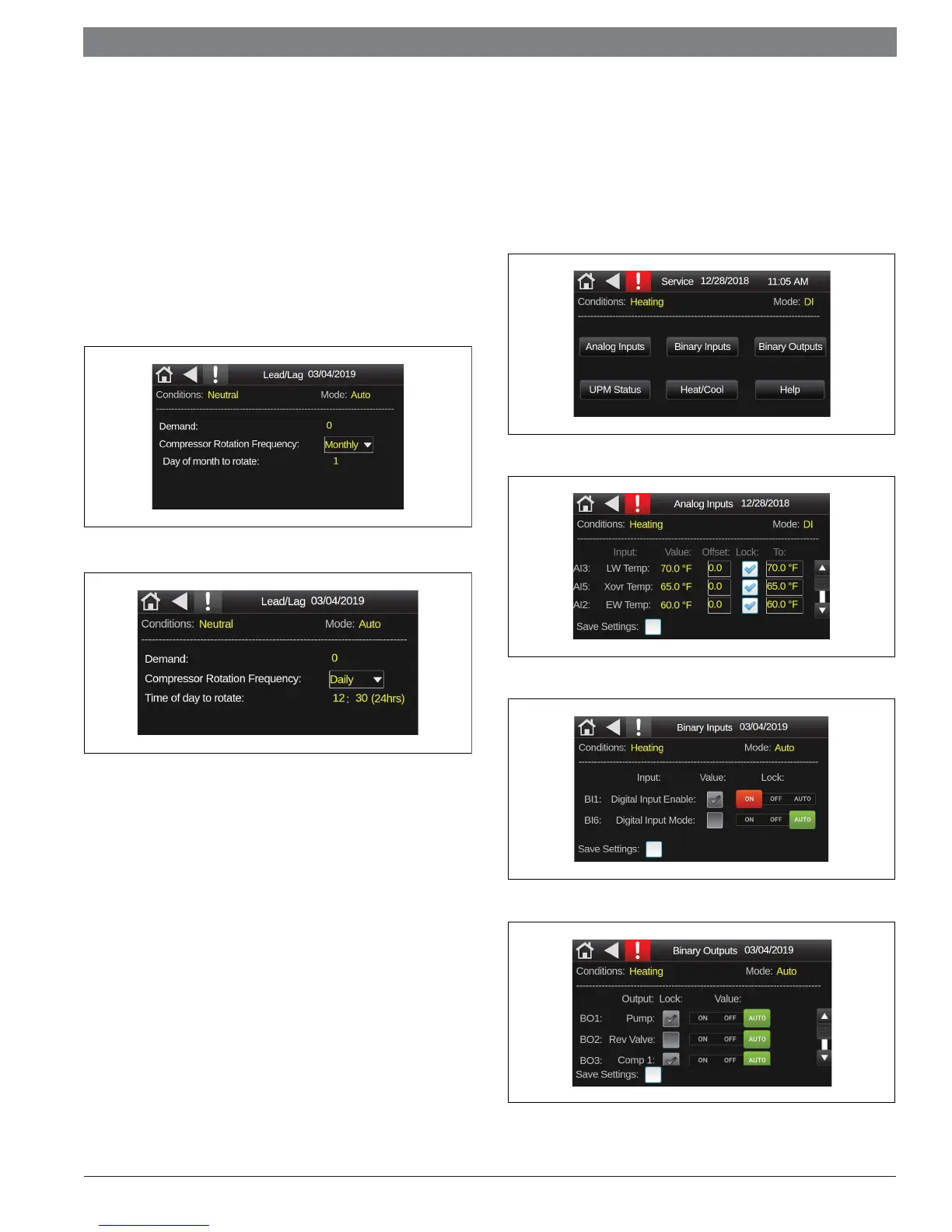
This screen is accessed from the Setting screen and allows the user to
confi gure the compressor rotation. This screen can only be accessed if the
unit has 2 separate compressors and i confi gured accordingly in the unit
settings screen. Under this menu, one can view and adjust the following:
Demand: This parameter displays how many compressors/
compressor stages are being called.
Compressor rotation frequency: This parameter gives the user
the option to set the frequency at which the compressors are
switched from lead to lag or vice-versa. Based on this selection the
user can set the next parameter value accordingly
Figure 40
Figure 41
9.3 Service Screen
The Service menu allows the qualifi ed technician to adjust or reset any
settings on the WSHP, and effi ciently troubleshoot and correct issues on
the unit. Under this menu, one can scroll up/down to view and adjust the
following:
Analog Inputs
Binary Inputs/Outputs
Figure 42
Figure 43
Figure 44
Figure 45


 To Next Page