Divar Archive Player | Operation Manual | Viewing images EN | 5
Bosch Security Systems
English
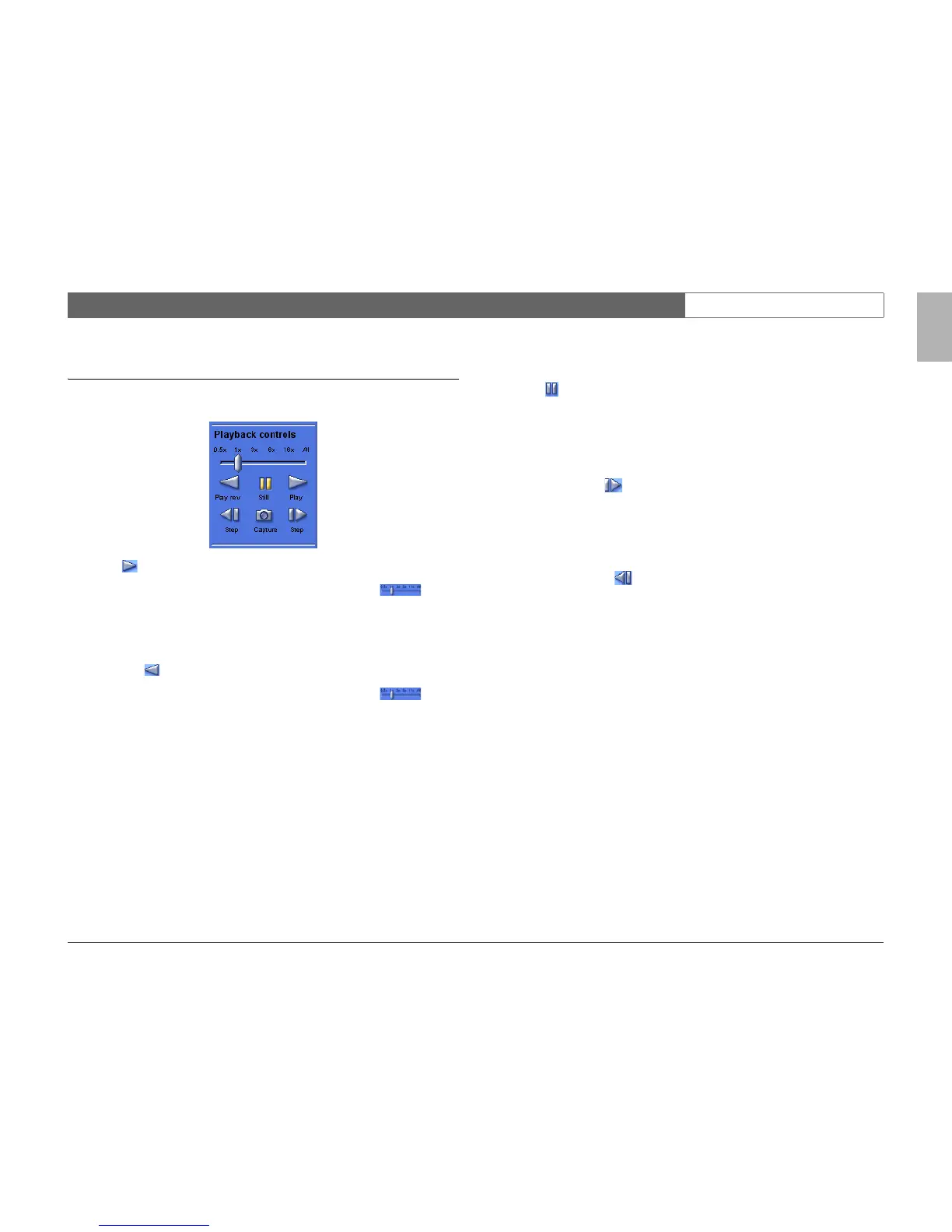
Using the playback controls
Play
Click Play to play forward recorded video in the playback window.
> The playback speed depends on the setting of the speed slider .
> Some frames may be dropped depending on the PC speed and the playback
speed.
Play Reverse
Click Play Rev to play recorded video in reverse in the playback window.
> The playback speed depends on the setting of the speed slider .
> Some frames may be dropped depending on the PC speed and the playback
speed.
Playback Speed
The slider controls the speed of the continuous reverse and continuous forward
play. The All value means that no images are dropped at the fastest rate
provided by the system.
Still
Click Still to pause playback.
> The last image is shown as a still in the playback window.
Step forward
The step function is only enabled in the still mode.
1. Click Step forward to advance the image one frame.
2. Hold it down to continue stepping at a maximum rate of 3 images per second.
Step backward
The step function is only enabled in the still mode.
1. Click Step backward to move the image one frame back in time.
2. Hold it down to continue stepping at a maximum rate of 3 images per second.



 To Next Page