DS7060-AUS Reference Guide Copyright 2001 Detection Systems, Inc. Page 19
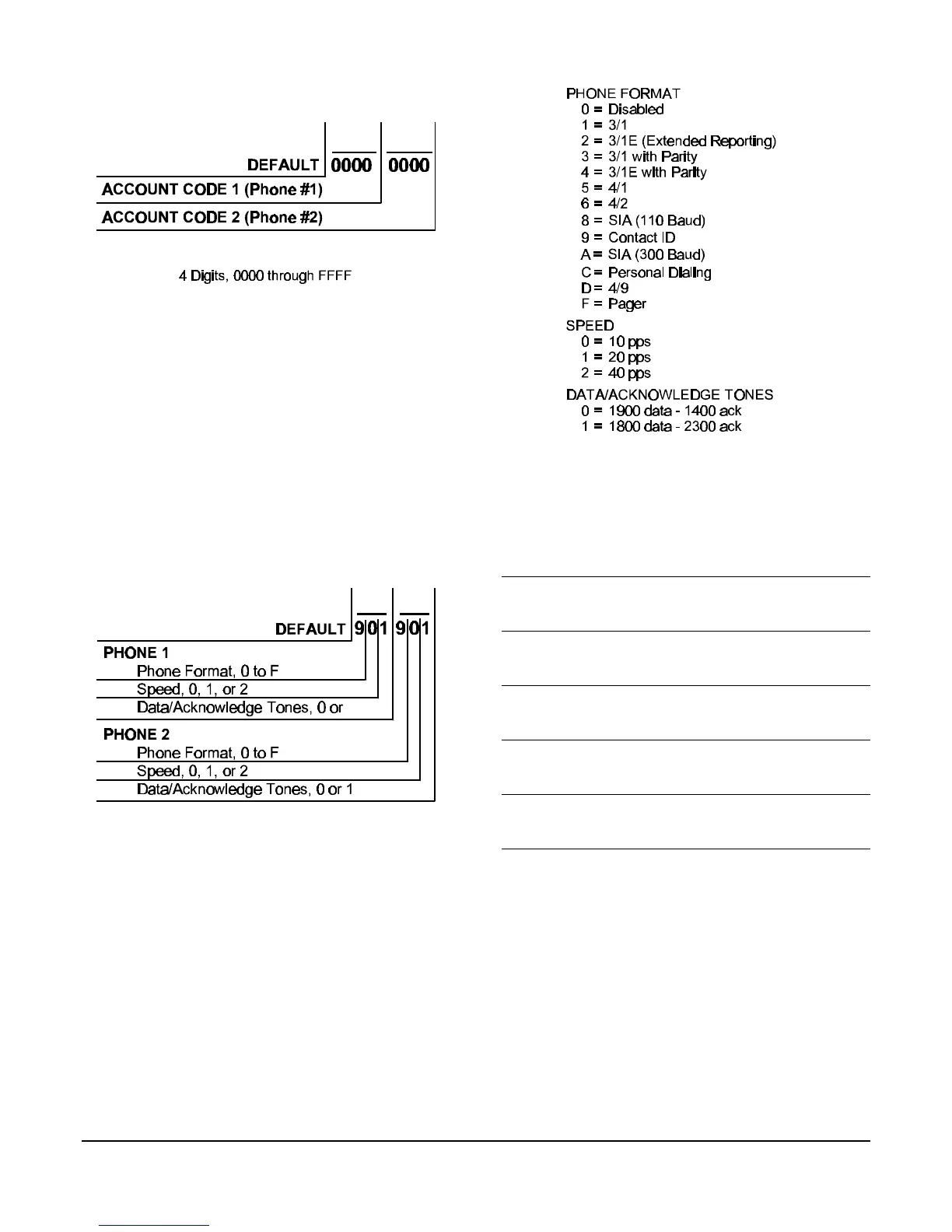
6.31 Address 37 - Account Codes
NOTE: If the account code is “0000” no reports will be
sent.
NOTE: If a 3-digit code is required (when using pulse
formats 3/1 and 3/1 with Parity) the fourth digit
must be 0. For example: If the account code is
121, program 1210 in the account code address.
NOTE: If using personal dialing or Pager format an
account code is still required, even if the system
does not report to a central station. The account
code must use digits 0-9. A-F cannot be
displayed on a pager.
6.32 Address 38 - Phone #1 Format
Address 39 - Phone #2 Format
6.33 Address 40-41 - Phone #1 (Reporting)
Address 42-43 - Phone #2 (Reporting)
Address 44-45 - Phone #3 (Remote
Programming)
Address 40 Phone #1 (digits 1-16)
Address 41 Phone #1 (digits 17-32)
Address 42 Phone #2 (digits 1-16)
Address 43 Phone #2 (digits 17-32)
Address 44 Phone #3 (digits 1-16)
Address 45 Phone #3 (digits 17-32)
Note: To dial the [*] character, enter *1 (the [*] character is sent as
“1” “1” when pulse dialing). The letter “B” will be displayed.
To dial the [#] character, enter *2 (the [#] character is only
valid when tone dialing). The letter “C” will be displayed.
To input a three second delay, enter *3. The letter “D” will be
displayed.
To wait for the dial tone, enter *4 in the first digit. The letter
“E” will be displayed.
To disable a phone number, enter *5 in the first digit. The
underscore “_” will de displayed.
To delete the phone number from the display window, enter
the *5 in all digits.
6.34 Address 46 - Programmer & Master Codes
See the Users Guide for more information on Personal
Identification Numbers.



 To Next Page