70
|
Bosch Greenstar Applications Manual
Bosch Thermotechnology Corp.Data subject to change
Appendix C: FW200 Quick Set-up Guide
Set type of heating system
There are three seperate default presets: Baseboard,
Radiators, Radiant Floor. They have an approximate
basepoint of 75°F. With this basepoint, the heating
system will take some time to raise the room
temperature in warmer weather. Please see the FW 200
Installation and Operating Instructions, “Heating circuit
parameters” for more details on those presets. For a
custom preset, see below.
— To open INSTALLER SETTINGS: press and hold
the menu button for approx. 5 seconds. System
Confi guration will be highlighted.
— Turn dial one click counter-clockwise to highlight
Heating Parameters.
— Press the dial, Heating Circuit 1 will be highlighted.
— Press dial and Heating circuit type will be highlighted.
— Press dial and Radiators will be highlighted.
— Press dial again and Radiators will fl ash.
— Turn the dial to choose Baseline/Design temp.
— Press the dial, Heating circuit type will be highlighted.
— Turn the dial counter-clockwise. Base Line will be
displayed.
— Press the dial and 78°F (25 °C) will fl ash. This is
the supply temperature at 65 °F (18 °C) outdoor
temperature.
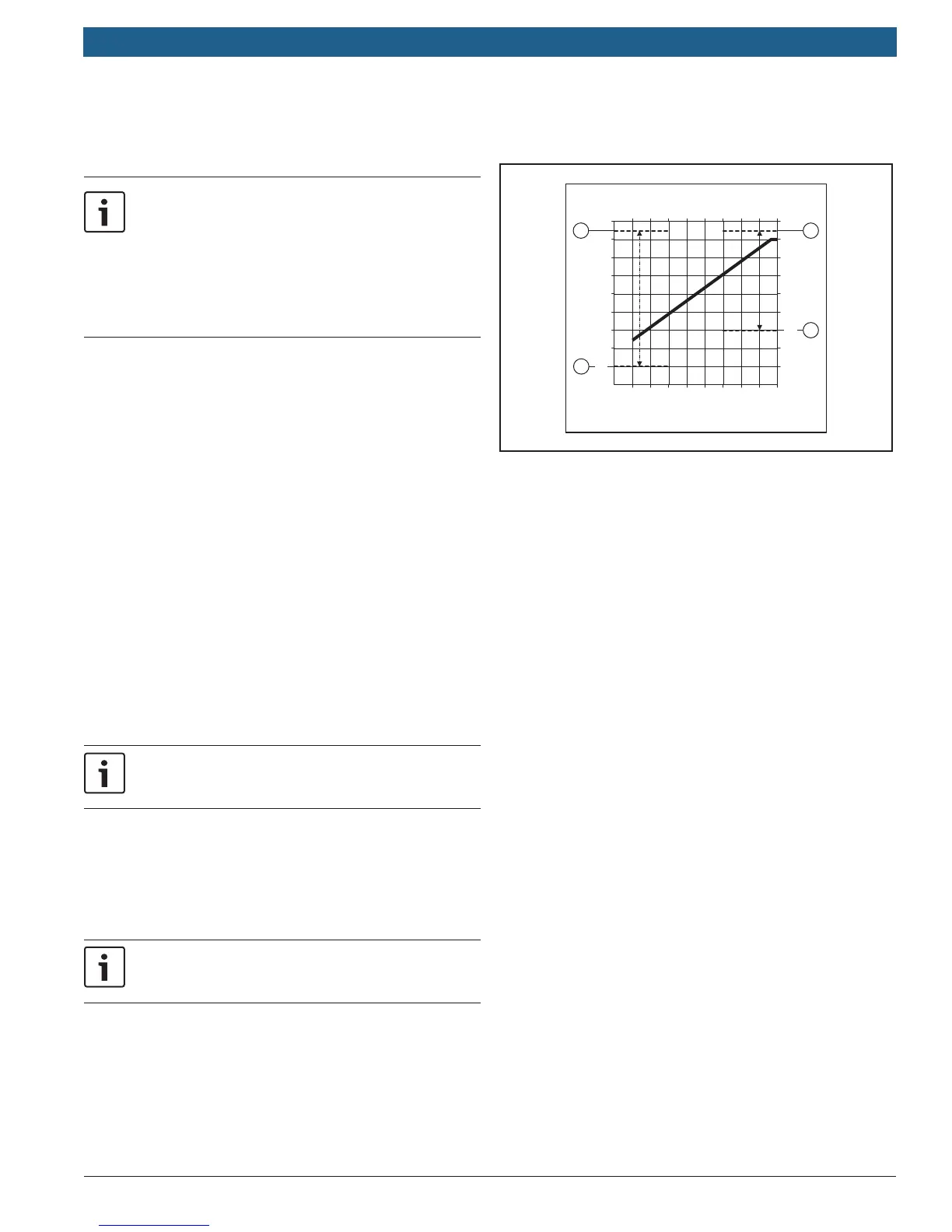
— Set accordingly (Fig. 2).
— Press the dial to confi rm the setting.
For hydroair systems, the minimum supply temperature
must be raised to the turn on temperature for that coil.
— Turn the dial until Design Temp is highlighted. Press
the dial and 168°F (75°C) will fl ash. This is the supply
temperature at 5 °F ( – 15 °C) outdoor temperature.
— Set accordingly (Fig.2).
— Press the dial to confi rm the setting.
Refer to FW 200 Installation and Operating
Instructions for more custom settings.
— Turn the dial counter-clockwise until Maximum heating
supply temperature is highlighted.
— Press the dial
— Turn the dial to set the desired value.
— Press the dial to confi rm the setting.
— Press menu button to return to main display.
6 720 806 992-07.1O
68 50 32 14 - 4
68
86
104
122
140
158
176
194
1
3
4
2
50
VL / °F
AT / °F
20 10 0 - 10 - 20
20
30
40
50
60
70
80
90
10
VL / °C
AT / °C
Fig. 2
Fig. 2 Legend
[1] Maximum Base Line Adjustment 186 °F (85 °C)
[2] Minimum Base Line Adjustment 50 °F (10 °C)
[3] Maximum Design Temperature Adjustment 186 °F (85 °C)
[4] Minimum Design Temperature Adjustment 86 °F (30 °C)
AT Outdoor temperature
VL Supply temperature
Adjust warm weather shut down (WWSD)
— Press and hold the menu button for about 5 seconds.
System Confi guration will be highlighted.
— Turn dial one click counter-clockwise to highlight
Heating Parameters and push dial to select.
— Heating Circuit 1 will be highlighted.
— Turn the dial counter-clockwise until Heating OFF at
outdoor temperature is highlighted.
— Press the dial and the display will fl ash. The default
value is 68 °F (20 °C) and is adjustable from 50 °F (10
°C) to 77 °F (25 °C). Turning above 77 °F (25 °C) will
move it to 210 °F (99 °C), which disables WWSD.
— Press the dial to confi rm the setting.
To restore to factory defaults, hold the Delete button (Fig.1,
pos.5) and the Menu button simultaneously for about 10 seconds.
A count down display will appear. This will restore factory
defaults. The only program that will be held is the date and time.



 To Next Page
 Loading...