66
|
Bosch Greenstar Applications Manual
Bosch Thermotechnology Corp.Data subject to change
CRC100 - Operation
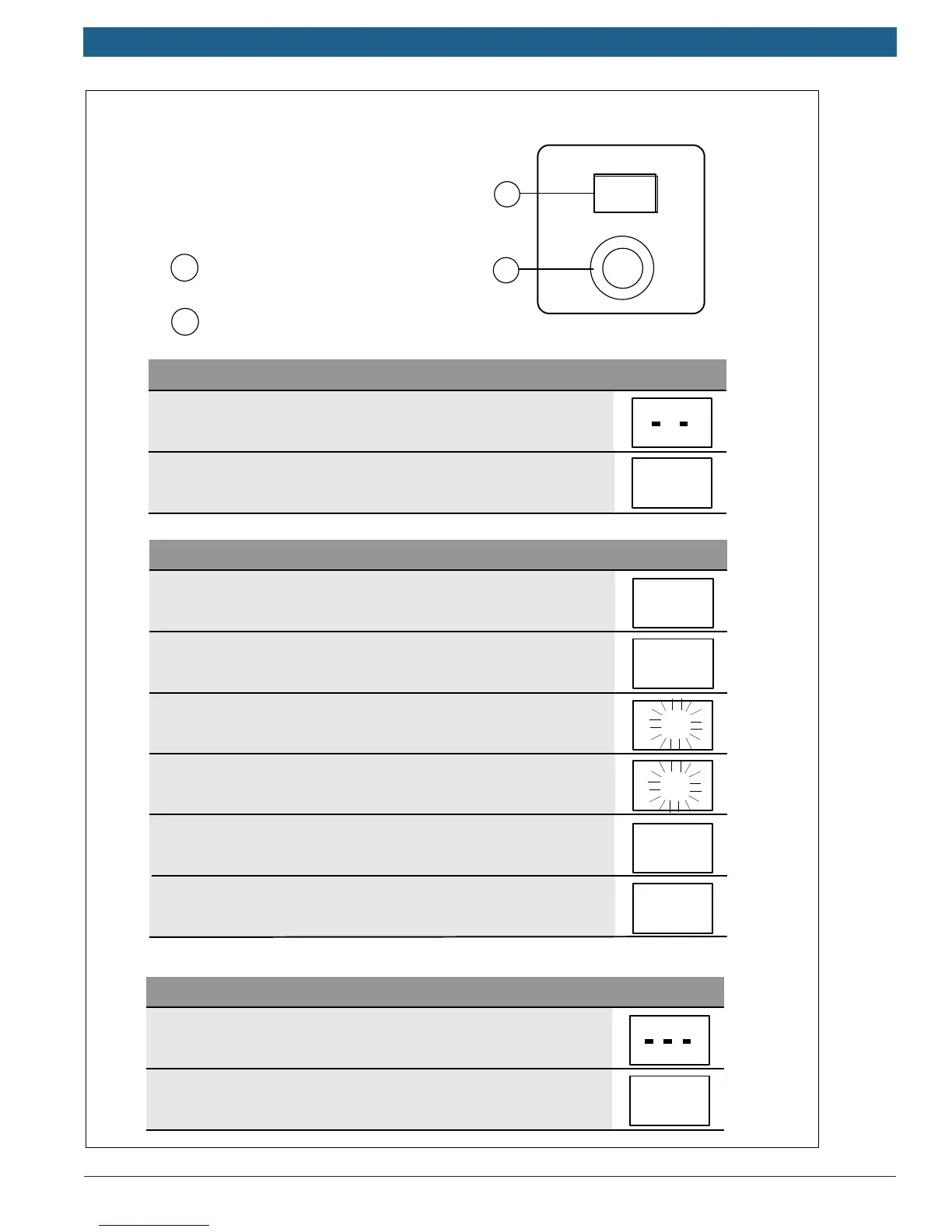
The following table shows how to
change a value in the service menu
of the CRC100
Close the service menu
Changing the setting (e.g. heating zone H.C)
Open the service menu
1. press and hold dial until two dashes appear.
2. Release dial to displaythe first setting.
1. Turn the dial to select a setting.
2. Press dial to show the current value.
3. Press dial to change the value.
4. Turn dial to set the required value.
5. Press the dial to store the value.
6. Press and hold dial until the setting is displayed again.
1. Press and hold idal until three dashes appear.
2. Release dial.
The display changes to the standard display, and the
user interface works with the changed setting.
67.0 °F
H.C
2
2
3
3
H.C
A . 1
1 = Display
2
= Dial
67.0 °F
1
2
Appendix A: Quick Set-up Guide for Room Controllers





 To Next Page