EasyManua.ls Logo

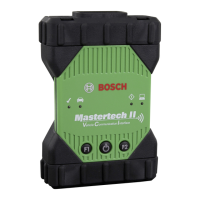
Bosch Mastertech II VCI - User Manual

Bosch Mastertech II VCI
8 pages
Print Icon
To Next Page IconTo Next Page
Loading...
Mastertech II VCI
en Quick Start
es Inicio rapido
fr Démarrage rapide
Question and Answer IconNeed help?

Do you have a question about the Bosch Mastertech II VCI and is the answer not in the manual?

Summary

Unpack Mastertech II VCI Kit

Mastertech II VCI Software Registration and Installation

Connect and Recover VCI for Update

Connect VCI, enter recovery mode, select device, and press Recover to initiate the update process.

Initiate and Complete Software Update

Start firmware update, confirm, wait for completion, and ensure VCI reboots successfully.

Connect Mastertech II VCI to Vehicle

Vehicle Connection and Diagnosis Steps

Connect VCI to vehicle OBD, launch diagnosis software, and follow on-screen instructions.

Mastertech II VCI Wireless Communication

Mastertech II VCI Data Protection Information

Summary

Unpack Mastertech II VCI Kit

Mastertech II VCI Software Registration and Installation

Connect and Recover VCI for Update

Connect VCI, enter recovery mode, select device, and press Recover to initiate the update process.

Initiate and Complete Software Update

Start firmware update, confirm, wait for completion, and ensure VCI reboots successfully.

Connect Mastertech II VCI to Vehicle

Vehicle Connection and Diagnosis Steps

Connect VCI to vehicle OBD, launch diagnosis software, and follow on-screen instructions.

Mastertech II VCI Wireless Communication

Mastertech II VCI Data Protection Information

Bosch Mastertech II VCI Specifications

General IconGeneral
ConnectivityUSB, Bluetooth
Supported ProtocolsCAN
CompatibilityBosch Diagnostic Software
Power SupplyVehicle Battery
PC ConnectionUSB, Bluetooth
FunctionalityECU programming

Related product manuals