Robert Bosch LLC M-VCI – NETGEAR® Router Installation Guide Index | Version 1.0 | April 2011
11 | Installation Steps | Step 4
Note: The S/N shown should agree
with the S/N on the label of the
M-VCI unit.
Step 4 – Setting up your
M-VCI (Applies to Types I,
II & III) (Clearing Existing
Network Settings)
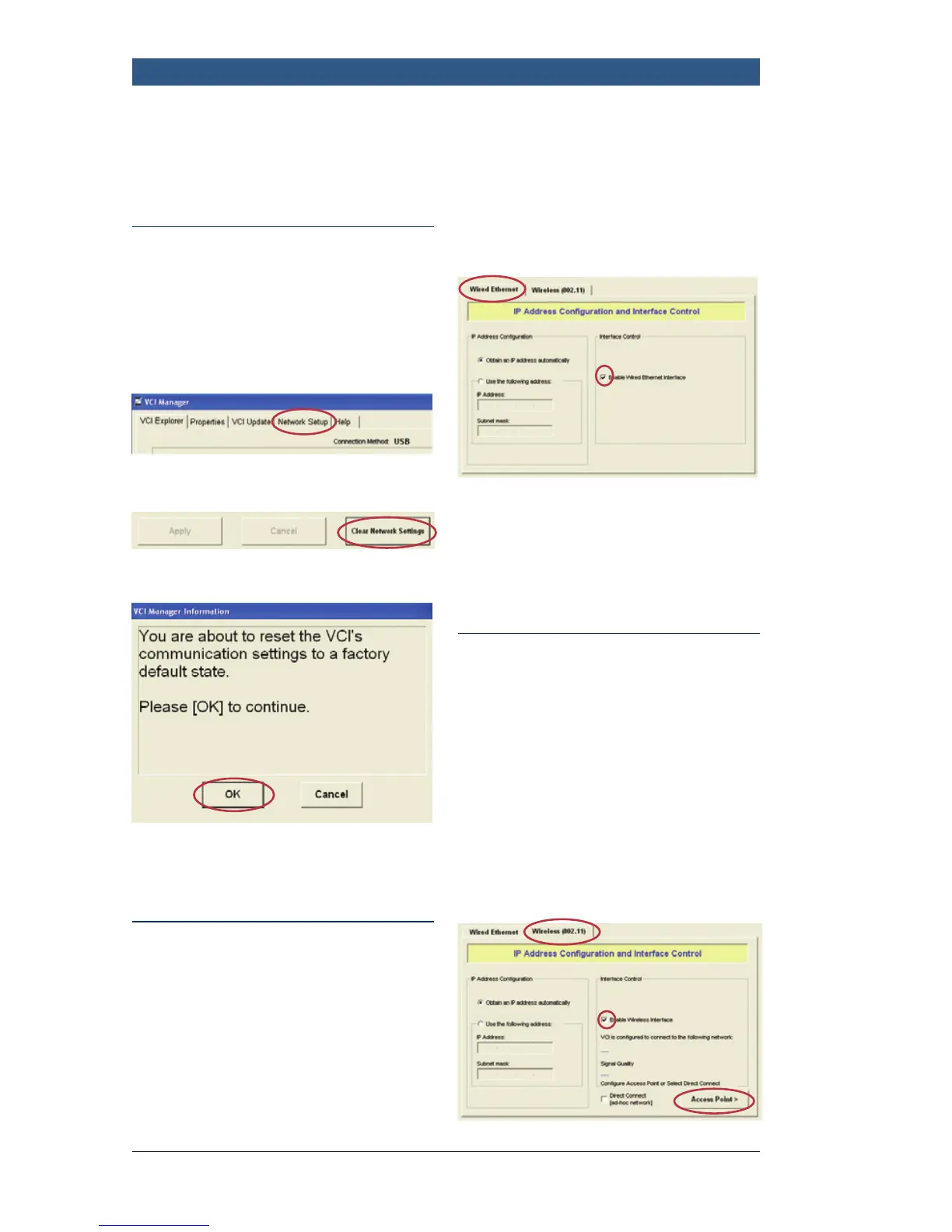
f Click: Network Setup Tab
f Click: Clear Network Settings
f Click: OK
f Wait for the “Configuration
Complete” Message
Step 4 – Setting up your
M-VCI (Applies to Types I,
II & III) (Configuring Wired
Ethernet Settings)
While in Network Setup:
f Click: Wired Ethernet Tab
f Click: Enable Wired Ethernet
Interface
Note: If your network utilizes
Static IP addresses, do not enable
Wired Interface with Static IP.
Note: This will allow M-VCI to
be connected to any network
Ethernet port if there is limited or
no wireless coverage.
Step 4 – Setting up your
M-VCI (Applies to Types I, II
& III) (Configuring Wireless
Connection Settings)
While in Network Setup:
f Click: Wireless (802.11) tab
f Click: Enable Wireless Interface
f Click: Access Point button



 To Next Page