Robert Bosch LLC M-VCI – NETGEAR® Router Installation Guide Index | Version 1.0 | April 2011
13 | Installation Steps | Step 4
Step 4 – Setting up your
M-VCI (Applies to Types
I, II & III) (Verifying your
Wireless Strength)
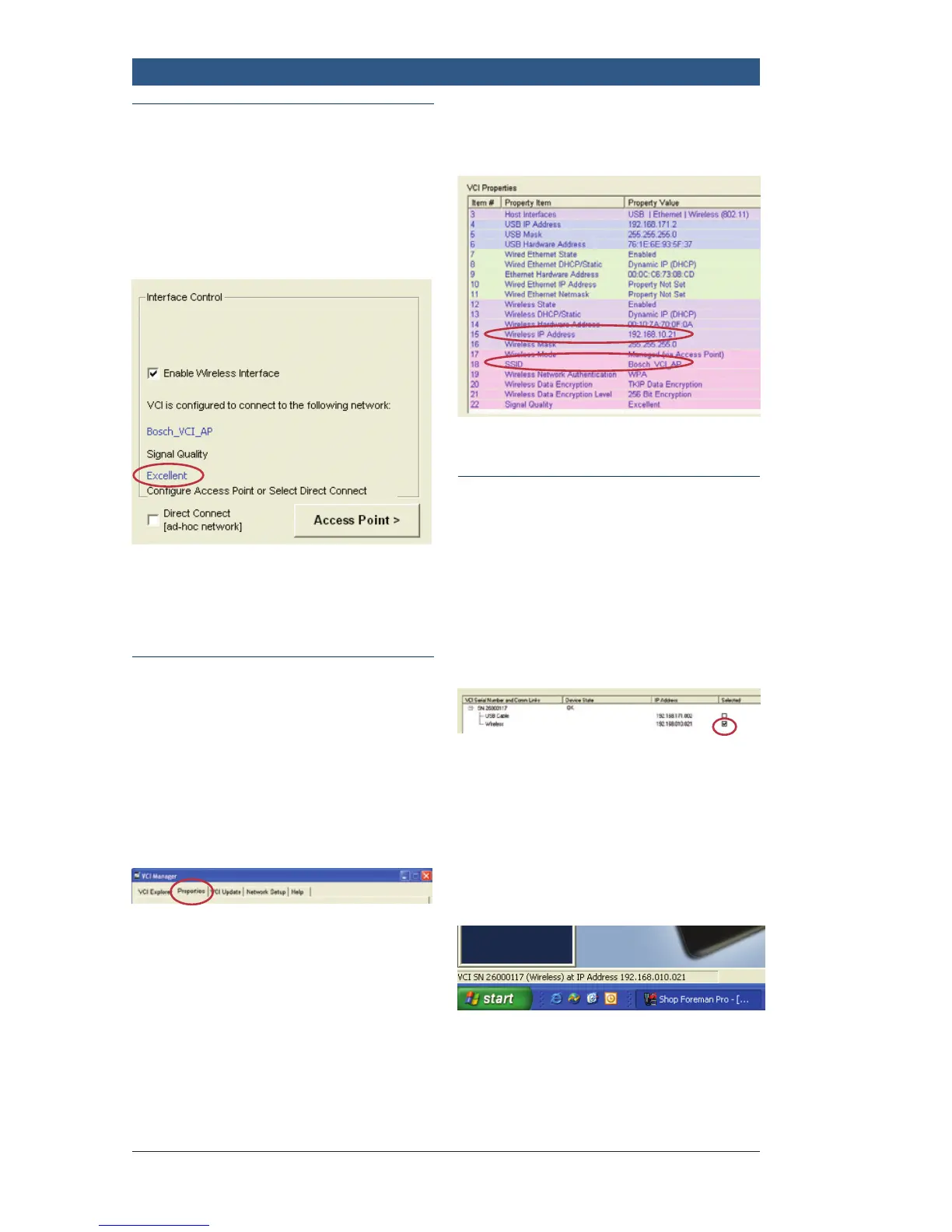
Search for “Signal Quality” below.
After configuration, confirm signal
quality.
Step 4 – Setting up your
M-VCI (Applies to Types I,
II & III) (Confirming your IP
Address)
Return to VCI Manager.
f Click: Properties Tab
f Confirm Wireless SSID
f Confirm Wireless IP
f If IP says “Not Set”, click
Refresh
f Close the VCI Manager
– Click the red “X” in the
upper right corner
Step 4 – Setting up your
M-VCI (Applies to Types I,
II & III) (Final step before
starting)
From “Mastertech VCI Setup”:
f Select: Wireless VCI
f Click: Apply
f Unplug the USB cable from the
M-VCI
f Verify the IP address in the
status bar
f Ready to Use



 To Next Page