The timer
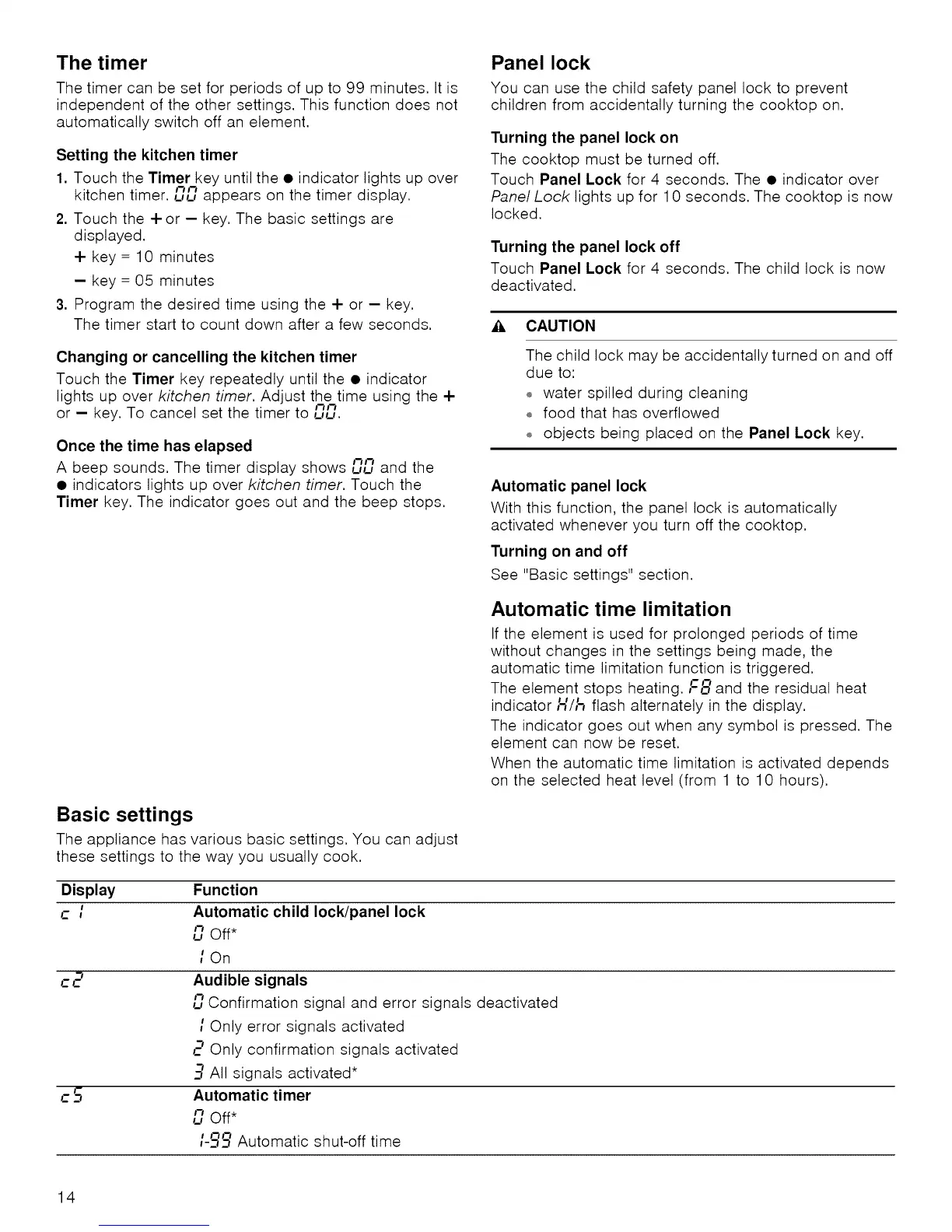
The timer can be set for periods of up to 99 minutes. It is
independent of the other settings. This function does not
automatically switch off an element.
Setting the kitchen timer
1. Touch the Timer key until the • indicator lights up over
kitchen timer. "_"_
LaLaappears on the timer display.
2. Touch the 4-or - key. The basic settings are
displayed.
4- key = 10 minutes
- key = 05 minutes
3. Program the desired time using the 4- or - key.
The timer start to count down after a few seconds.
Panel lock
You can use the child safety panel lock to prevent
children from accidentally turning the cooktop on.
Turning the panel lock on
The cooktop must be turned off.
Touch Panel Lock for 4 seconds. The • indicator over
Pane/Lock lights up for 10 seconds. The cooktop is now
locked.
Turning the panel lock off
Touch Panel Lock for 4 seconds. The child lock is now
deactivated.
• , CAUTION
Changing or cancelling the kitchen timer
Touch the Timer key repeatedly until the • indicator
lights up over kitchen timer. Adjust the time using the 4-
or - key. To cancel set the timer to LaLa.
Once the time has elapsed
A beep sounds. The timer display shows "_"_LaLaand the
• indicators lights up over kitchen timer. Touch the
Timer key. The indicator goes out and the beep stops.
The child lock may be accidentally turned on and off
due to:
o water spilled during cleaning
o food that has overflowed
o objects being placed on the Panel Lock key.
Automatic panel lock
With this function, the panel lock is automatically
activated whenever you turn off the cooktop.
Turning on and off
See "Basic settings" section.
Automatic time limitation
If the element is used for prolonged periods of time
without changes in the settings being made, the
automatic time limitation function is triggered.
The element stops heating. I--8 and the residual heat
indicator H/i'_ flash alternately in the display.
The indicator goes out when any symbol is pressed. The
element can now be reset.
When the automatic time limitation is activated depends
on the selected heat level (from 1 to 10 hours).
Basic settings
The appliance has various basic settings. You can adjust
these settings to the way you usually cook.
Display
I--
Function
Automatic child lock/panel lock
,_,Off*
i On
Audible signals
L'7Confirmation signal and error signals deactivated
i Only error signals activated
2 Only confirmation signals activated
3 All signals activated*
Automatic timer
LaOff*
i-_ Automatic shut-off time
14


 To Next Page