41
Operation
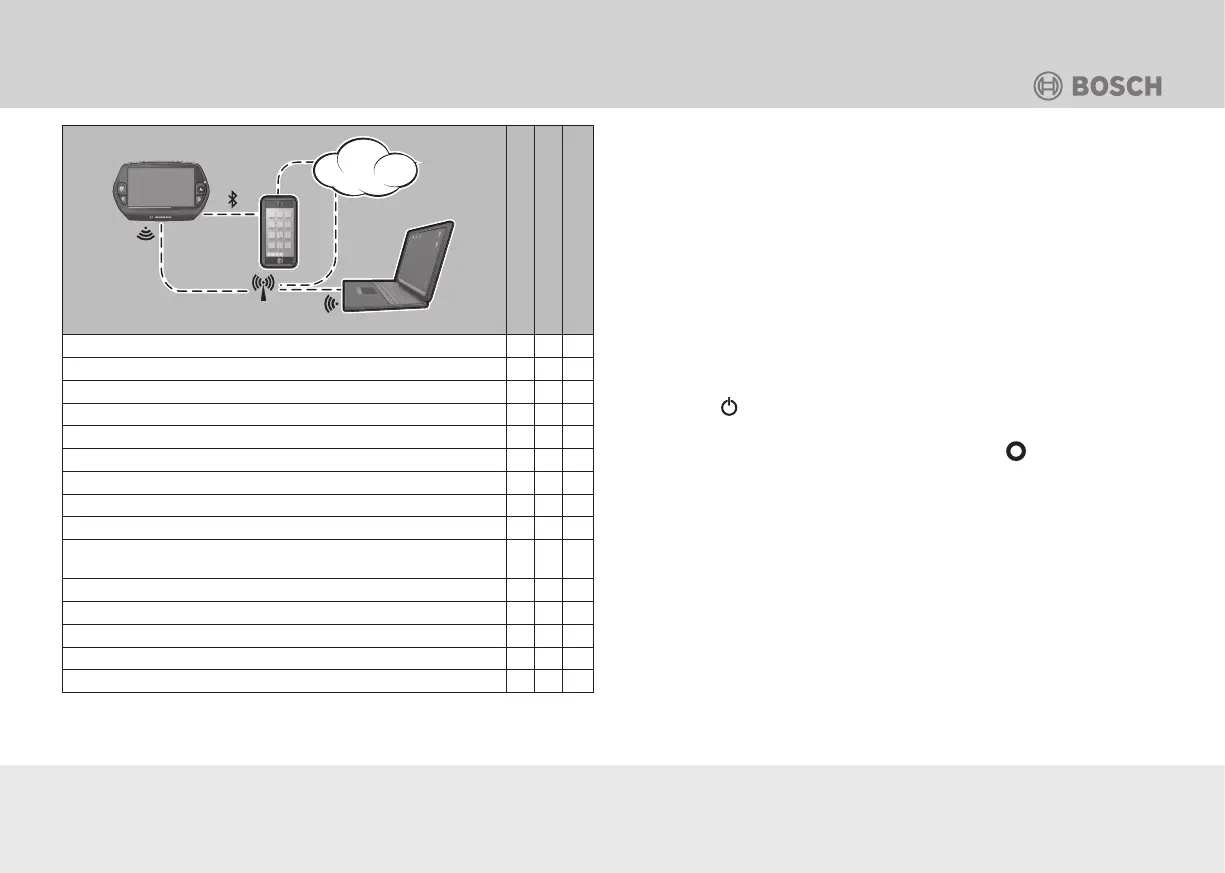
GSM
3G/4G
www
Nyon control computer
Smartphone app
Online portal
Login/registration
• • •
Changing the settings
• • •
Recording of cycling data
•
Real-time indicator of cycling data
•
Processing/analysis of cycling data
• •
Creation of custom indicators
• •
Current location indicator
• • •
Navigation
•
Route planning
• • •
Indicator for the remaining range
(radius around the current location)
• •
Fitness effect in real-time
•
Indicator for workout progress
•
Trip overview
• •
“Dashboard” statistics
• •
Purchase of “premium functions”
• •
Start-up
The Nyon control computer is shipped with a partially charged
rechargeable battery.
• Charge the rechargeable battery before first use (see chapter
“Operation > Control computer > Charging the control
computer”).
NOTICE: Registration is required to use the functions in their
entirety (see “Login with registration”).
Login without registration
“Nyon” can also be used without the registration. The functions
are available to a limited extent.
1. Use the
button to switch the control computer on
(see Figure B-23).
2. To select your desired language, push the
joystick and
follow the instructions.
3. For operation, select the type of login from the following
possibilities:
Test ride: For a test ride without the input of data. All cycling data
will be deleted after deactivation.
Start product demo: The most important functions of the “Nyon”
will be automatically cycled through. All values will be simulated.
The product demo restarts after a few minutes.




 To Next Page