9
Disconnect battery pack
from tool before making
any assembly, adjustments or changing
accessories. Such preventive safety mea-
sures reduce the risk of starting the tool acci-
dentally.
INSERTING AND REMOVING
ACCESSORIES
(Model PS42 only)
To avoid loss of control,
ensure bit is locked in
chuck by pulling on bit after it has been insert-
ed. The chuck accepts only standard 1/4”
hexagonal shank accessories with power
groove.
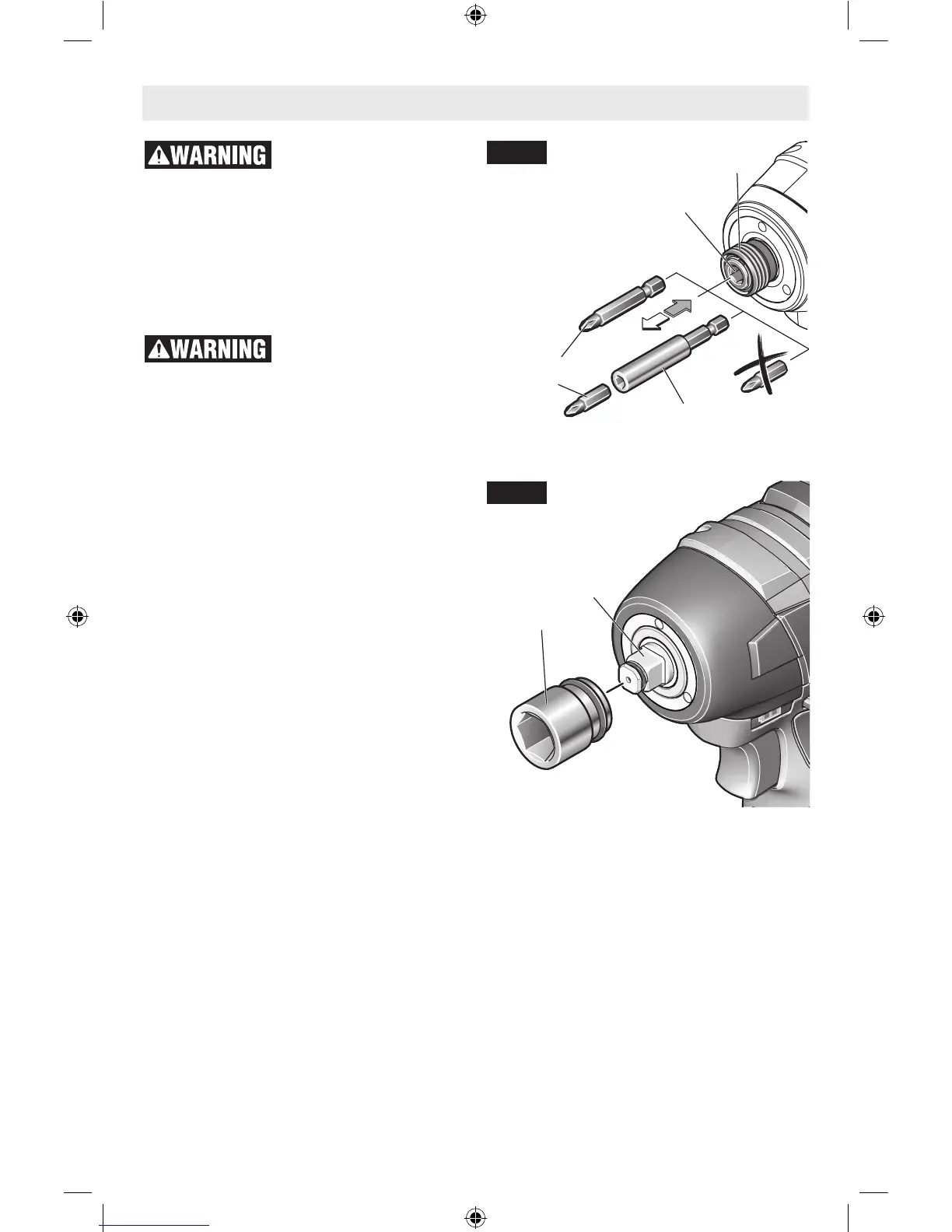
Your tool is equipped with a quick release
chuck. To insert an accessory, simply pull
locking sleeve forward, insert desired acces-
sory into chuck and release locking sleeve
(Fig. 2).
To remove an accessory, pull locking sleeve
forward and simply remove it from the chuck.
Do not use this tool as a drill. Tools equipped
with shut-off clutches are not designed for
drilling applications. The clutch can shut off
automatically and without warning. Attempt-
ing to restart drilling after shut-off has been
reached can cause the tool to twist out of your
hand until the clutch again reaches shut-off.
Do not attempt to insert quick-change type
drill bits into this chuck.
(Model PS82 only)
When using the 3/8” square drive, attach only
high quality impact ready accessories with the
proper size square drive designed for use with
impact wrenches. To install a socket, simply
push completely onto output drive (Fig. 3).
LOCKING
SLEEVE
OUTPUT
DRIVE
SOCKET
CHUCK
SCREWDRIVER
BIT
BIT HOLDER
Assembly
Fig. 2
Fig. 3
2610034966.indd 9 10/1/15 10:14 AM



 To Next Page