Get to knowde
5.2 Controls
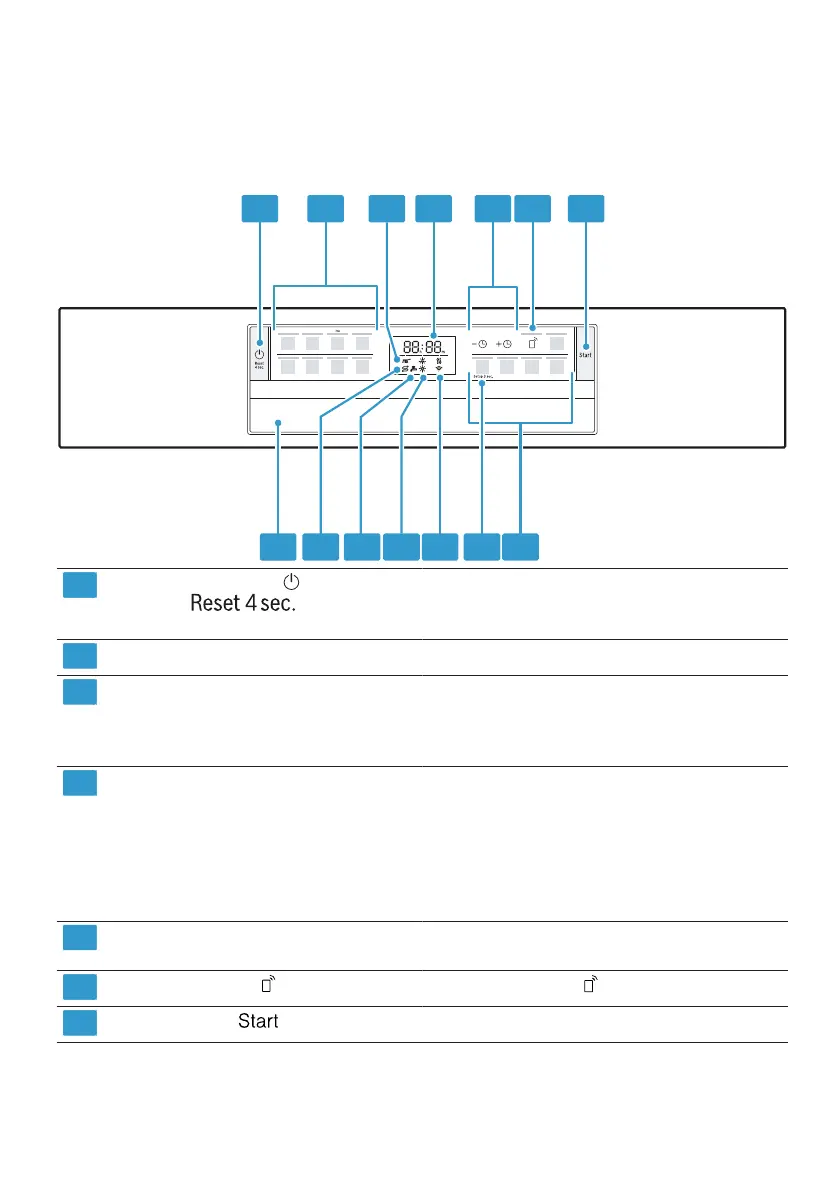
You can use the control panel to set all of your device's functions and receive
information about its operating status.
Some buttons allow you to perform different functions.
1 2 3 4 5 6 7
14 13 12 1110 9 8
1
ON/OFF button
button
and reset
Switch on device →
Page 37
Switch
off the device →
Page 39
Cancel
program →
Page 38
2
program keys
Program progress display
programs →
Page 20
3
The program sequence display shows
which program sequence the device is
in, e.g. B. Cleaning, rinsing or drying.
4
display The display shows you information about
the program sequence, the remaining
running time or basic settings. You can
use the display and the setting buttons
d Change basic settings.
→
""Change basic settings", page
43
She ie
5
Zeitvo rwahl and egg nput Keys
Z
G
a long time ago
around
Set choice →
Page 38
Change settings
6
Remote start
→
"Remote Start", page 45
tart →
Page 38
7
Start button
1Depending on the device equipment
program s
17



 To Next Page