31
deen
Menu settings
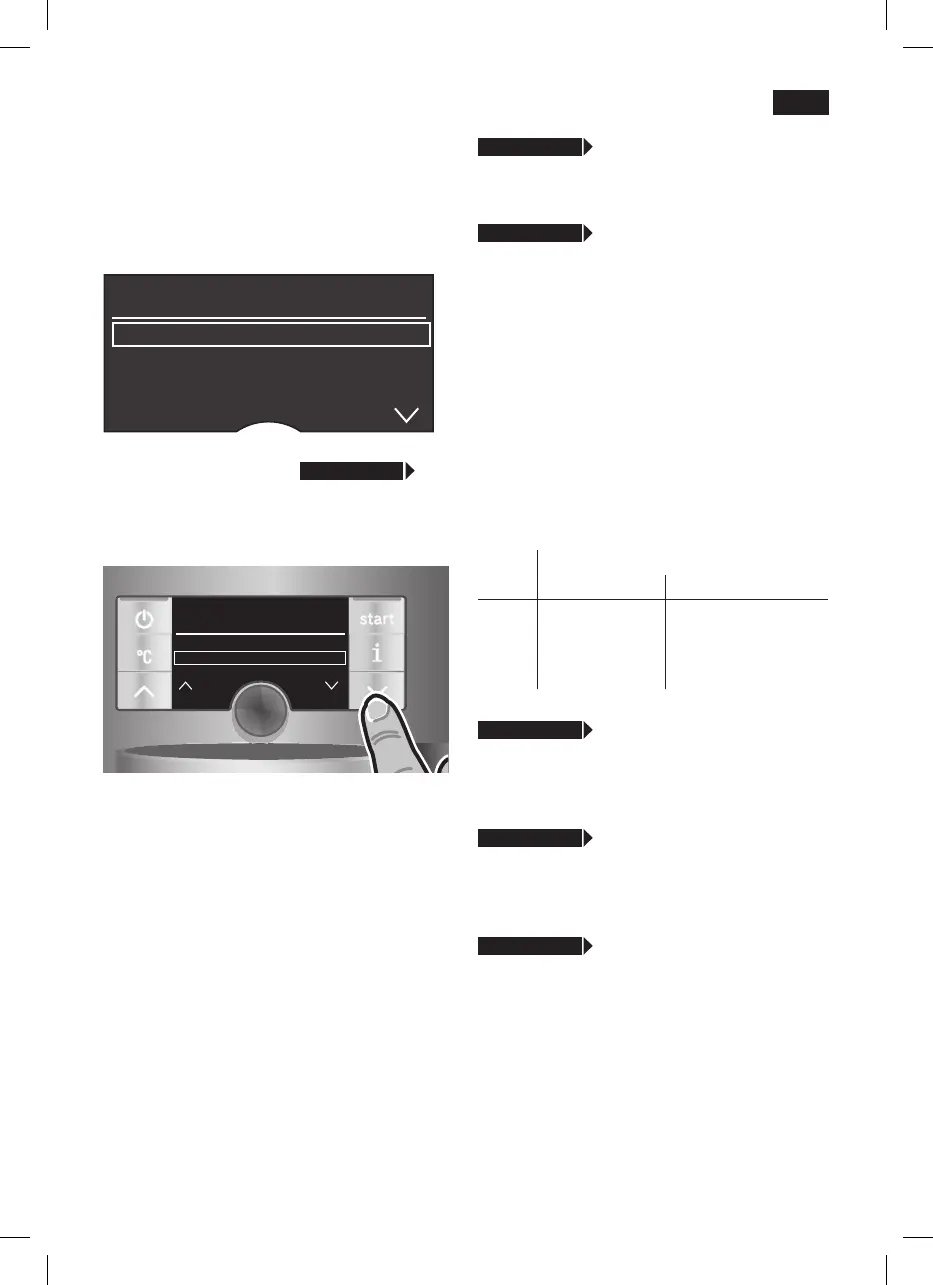
●Holdthej button down for at least 3
seconds.
The different setting options are now
displayed
settings
Language engLish
Water harDness
DescaLe
In the following operating instructions, each
new setting begins with
j 3 sec. + >
followed by an exact description.
The different setting options can be
selected with the
< and > buttons 4.
settings
Water harDness
DescaLe
start
cLean
N.B.: The changes you have made are
saved automatically.
Itisnotnecessarytoconrmthem
additionally.
j 3 sec. + >
Language
●Turntheknob6 to select the required
language
j 3 sec. + >
Water harDness
●Turntheknob6 to select the required
water hardness
1,2,3 or 4.
Note: It is important to set the water
hardness correctly, so that the appliance
indicates accurately when the descaling
programme should be run. The factory
setting for the water hardness is 4.
You can check the water hardness using
the enclosed test strip or by asking your
local water supplier.
●Diptheteststripinthewaterbrieyand
check the result after 1 minute.
Level Water hardness
German (°dH) French (°fH)
1
2
3
4
1-7
8-14
15-21
22-30
1-13
14-25
26-38
39-54
j 3 sec. + >
DescaLe
●Ifyouwanttodescaletheappliance,
press the
start
button 8 and run the
descaling programme (see “Descaling”).
j 3 sec. + >
cLean
●Ifyouwanttocleantheappliance,press
the
start
button 8 and run the cleaning
programme (see “Cleaning”).
j 3 sec. + >
caLc‘n‘cLean
●Ifyouwanttodescaleandcleanthe
appliance, press the
start
button 8 and
run the Calc‘n‘Clean programme (see
“Calc‘n‘Clean”).





 To Next Page