2nd Edition/Revision 0 (4/28/04)
R020031E
WFMC/WFXD Service Tips
WFMC/WFXD Service Tips
–
–
Test
Test
Pgm
Pgm
(5): Tests 6 & 7
63
/
(5): Tests 6 & 7
Operation WFMC64/WFXD84 Display Notes
Rotating selector knob For WFMC64/WFXD84,
display shows
P17 - P01
for
Permanent Press Cold
-
Regular/Cotton Cold
(rotating ccw through
each knob position).
Select
button
(WFMC64/WFXD84)
Menu
button
(WFMC64/WFXD84)
Spin Selection
button
(WFMC32/WFXD52)
No final spin
light stays on
while button is held.
Delay Start
button
(WFMC32/WFXD52)
Rinse
light stays on while
button is held.
Other buttons
(Bleach,
Rinse Plus, Power
Wash (WFMC32),
Reduced Ironing
(WFMC64/WFXD84))
Light above each button
will light up while button is
held.
Test
P7:SELECTOR
/
P:07
(Selector knob test program) -
Test 7 turns on the selector knob for a visual check. No fault codes are
generated.
Rotate knob ccw through all positions -- don't rotate through
Off
position or
test program will end. Stop test 7 by pushing the
Spin Selection
button
(WFMC32/WFXD52) or
Menu
button (WFMC64/WFXD84).
NOTE 1) For WFMC32/WFXD52, display shows L:15 - L: 1 for Permanent Press Cold -
Regular/Cotton Cold (rotating ccw through each knob position).
NOTE 2) If a display segment doesn’t come on, replace control module (since button &
knob switches are included with control modules).
P7:SELECTOR
P7:SELECTOR
P7:SELECTOR
P11
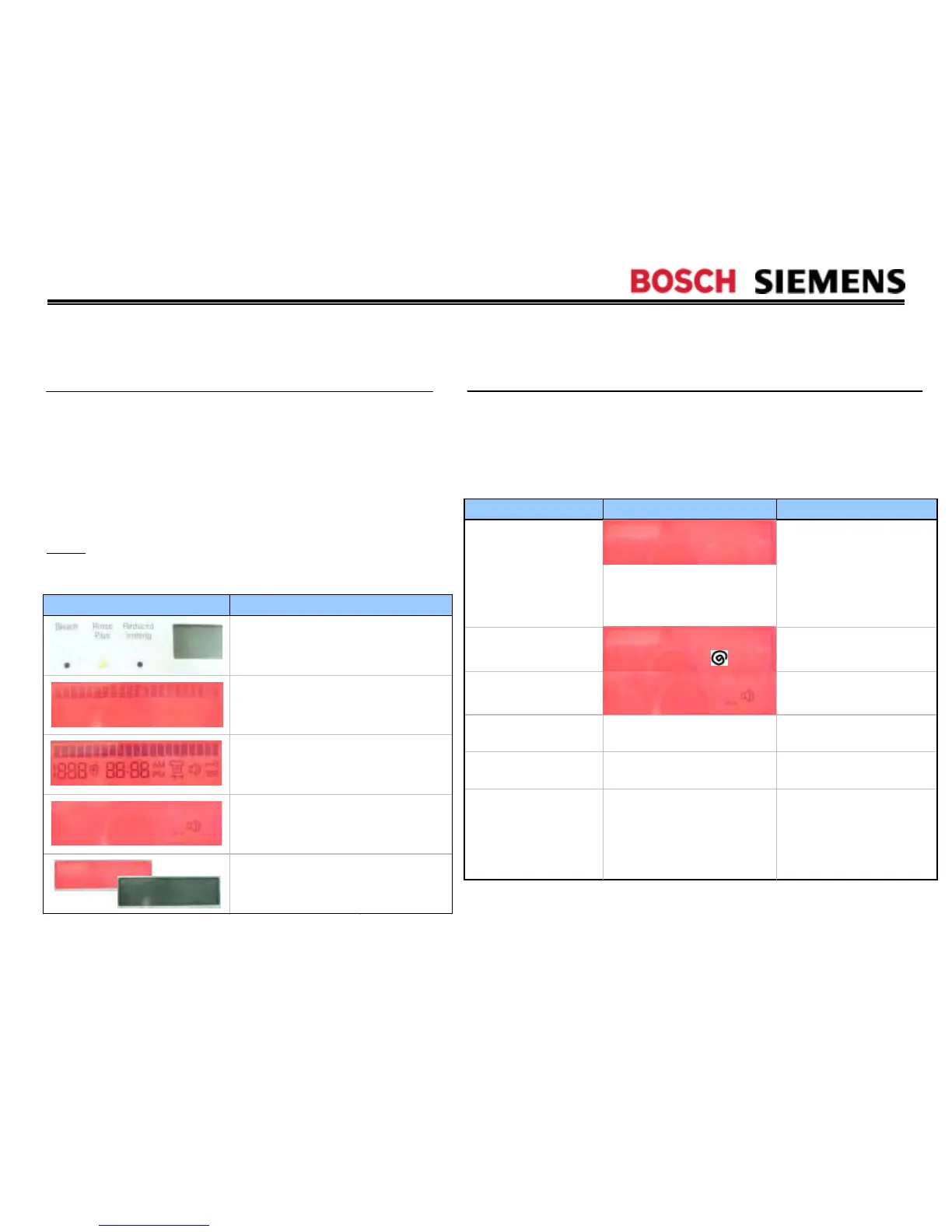
WFMC64/WFXD84 Display
Test
P6:DISPLAY
/
P:06
(Display test program) -
Test 6 turns on all displays for a visual check. The test ends on
its own (in ~ 50 seconds for WFMC64/WFXD84) - stop it by
pushing the
Spin Selection
button (WFMC32/WFXD52) or
Menu
button (WFMC64/WFXD84).
NOTE
: On WFMC32/WFXD52 models, all lights come on (in
sequence) -- all display #’s come on, then all display segments
come on.
No fault codes are generated. If a display segment doesn’t
come on, replace control module (since displays are included
with control modules).
Notes
The red background of the display
flashes on and off 5 times.
While WFMC64/WFXD84 lights
flash, the display is blank.
All upper (half of) display pixels are
turned on at once.
All lower (half of) display symbols are
turned on at once.
All lower (half of) display symbols are
turned on individually (one at a time).
on
off




 To Next Page