CONTROLS AND INDICATORS
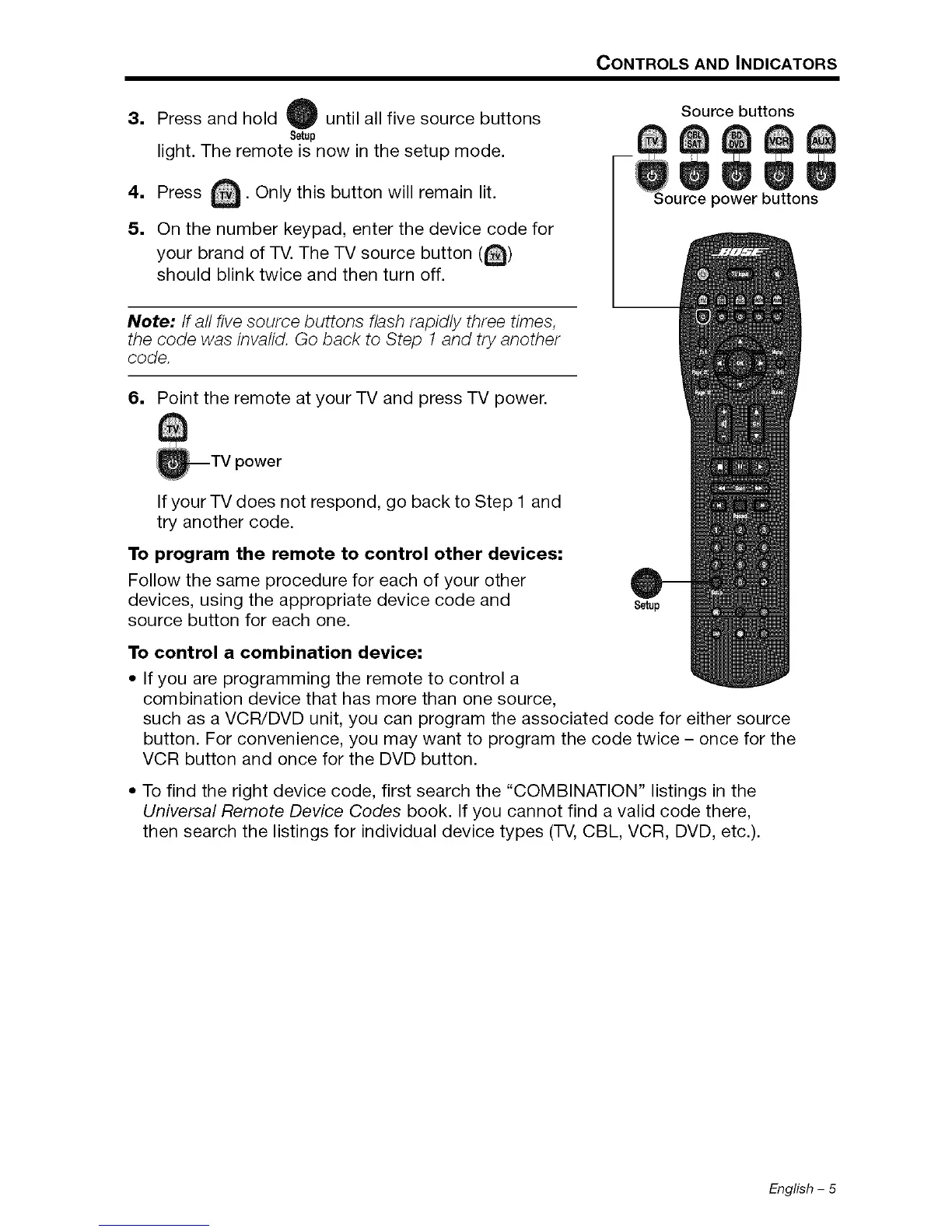
3, Press and hold W until all five source buttons
Setup
light. The remote is now in the setup mode.
A
4. Press _. Only this button will remain lit.
5. On the number keypad, enter the device code for
brand of TV. The TV source button (_)
your
should blink twice and then turn off.
Source buttons
Note:/f all five source buttons flash rapidly three times,
the code was invalid. Go back to Step 1 and try another
code.
6. Point the remote at your TV and press TV power.
_TV power
If your TV does not respond, go back to Step 1 and
try another code.
To program the remote to control other devices:
Follow the same procedure for each of your other
devices, using the appropriate device code and
source button for each one.
Setup
To control a combination device:
• If you are programming the remote to control a
combination device that has more than one source,
such as a VCR/DVD unit, you can program the associated code for either source
button. For convenience, you may want to program the code twice - once for the
VCR button and once for the DVD button.
• To find the right device code, first search the "COMBINATION" listings in the
Universal Remote Device Codes book. If you cannot find a valid code there,
then search the listings for individual device types (TV, CBL, VCR, DVD, etc.).
English - 5








 To Next Page