PHOTOS
PHOTOS
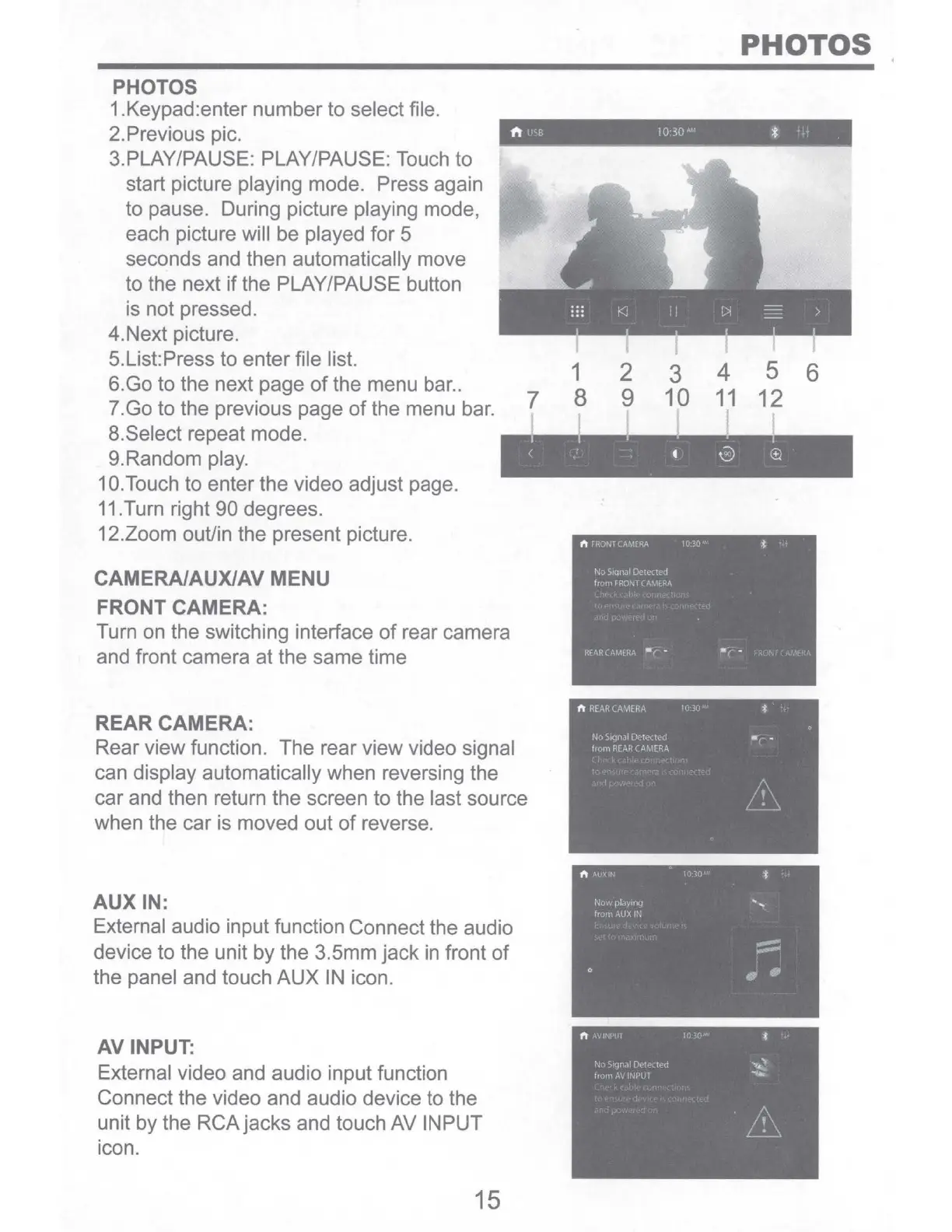
1.Keypad:enter number to select file.
2.Previous pie.
ft
l
fO
30
*
3.PLAY/PAUSE: PLAY/PAUSE: Touch to
start picture playing mode. Press again
to pause. During picture playing mode,
each picture will be played for 5
seconds and then automatically move
to the next
if
the PLAY/PAUSE button
is not pressed.
4.Next picture.
5.List:Press to enter file list.
1
6.Go to the next page
of
the menu bar
..
7.Go to the previous page
of
the menu bar.
8.Select repeat mode.
7 8
9.Random play.
1
O.Touch
to enter the video adjust page.
11.Turn right 90 degrees.
12.Zoom ouUin the present picture.
CAMERA/AUX/AV MENU
FRONT CAMERA:
Turn on the switching interface
of
rear camera
and front camera at the same time
REAR CAMERA:
Rear view function. The rear view video signal
can display automatically when reversing the
car and then return the screen to the last source
when the car is moved out
of
reverse.
AUX
IN:
External audio input function Connect the audio
device to the unit by the 3.5mm
jack
in
front
of
the panel and touch
AUX
IN
icon.
AV INPUT:
External video and audio input function
Connect the video and audio device to the
unit by the RCA jacks and touch AV INPUT
icon.
15
2 3 4 5 6
9 10
11
12


 To Next Page