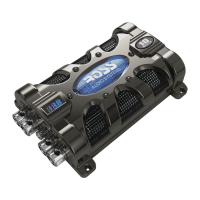
The BOSS Audio Systems CAP18 and CAP8 are super hybrid power capacitors designed to enhance a car's audio system by supplementing its charging system. These devices act as energy storage units, providing a rapid discharge of current on demand, particularly when the audio amplifier requires high current bursts, such as during loud, transient, deep bass signals in music. This capability helps to improve the overall bass response of the car audio system. In addition to their primary function of energy storage, these capacitors also serve to filter out audio noise caused by AC voltage induced in the amplifier's power supply, contributing to a cleaner audio signal.
Usage Features:
Both the CAP18 and CAP8 models come equipped with a 3-digit blue LED display that shows the voltage, with a measurement accuracy of +/- 0.1VDC. A blue illuminated window further enhances the aesthetic, with its light following the rhythm of the playing music. To conserve energy and prevent unnecessary drain, the devices feature an automatic sleep status that activates when the volume is low or when there is no voltage variation present.
For user safety and system protection, the capacitors incorporate audible warning tones. These alerts notify the user of critical conditions such as reverse polarity connection, low battery voltage, and voltage overload, helping to prevent potential damage to the device or the vehicle's electrical system.
The CAP18 model includes distinct input and output terminals for both positive and negative connections, along with a remote terminal for power on/off control. Specifically, the CAP18 has a Negative Input Terminal (-) for connection to the chassis ground point (vehicle's metal frame), a Negative Output Terminal (-) for connection to the negative/ground wire of the amplifier, a Positive Input Terminal (+) for connection to the positive power wire of the car battery, and a Positive Output Terminal (+) for connection to the positive power wire of the amplifier. It also features a Remote Terminal to connect to the amplifier's remote wire for power control.
The CAP8 model simplifies the connection points, featuring a single Positive Terminal (+) for connection to both the car battery and the amplifier's positive power wire, and a Negative Terminal (-) for connection to the chassis ground point. Like the CAP18, it also includes a Remote Terminal for power on/off control. Both models are equipped with screw mounting holes for secure installation.
Installation and Charging:
Installation of these capacitors requires careful attention to safety precautions. It is strongly recommended that installation be performed by a professional. Before any drilling or cutting, users must thoroughly investigate the car's layout, paying special attention to the fuel tank, fuel lines, hydraulic lines, and electrical wiring. The capacitor should be mounted in a location free from moisture, where connection cables will not be pinched or damaged by sharp objects.
A critical step before connecting the power cable to the positive terminal of the capacitor is to charge the capacitor. Failure to do so can result in a large, dangerous spark due to the rapid inflow of current, potentially damaging the capacitor, battery, and other audio devices. The charging process involves connecting one end of a supplied resistor (1 watt / 51 Ω) to the power cable from the positive battery terminal and the other end to the positive terminal on the capacitor. During this process, the resistor will become hot, which is normal, and caution should be exercised. The capacitor will automatically begin charging, with the 3-digit display showing the voltage rising rapidly, then slowly, until it matches the car battery's voltage. This process typically takes between 5 to 60 seconds. Once fully charged, the resistor should be removed, and the power cable immediately connected to the positive terminal of the capacitor. The resistor should be stored safely for future use when discharging the capacitor.
Discharging:
Before storing the capacitor, it must be discharged. This is crucial for safety, as stored power can cause a dangerous electrical shock even after disconnection. The discharge process involves disconnecting the positive, ground, and remote cables from the capacitor in that specific order. Then, one end of the supplied resistor is connected to the positive terminal and the other end to the negative terminal. After 1-5 minutes, the capacitor will be discharged, indicated by the absence of a buzzer sound. Similar to charging, the resistor will become hot during discharge, requiring caution.
Maintenance Features:
To ensure the longevity and proper functioning of the device, several maintenance precautions are outlined. Users are advised not to open or attempt to repair the product themselves, as dangerous high voltages are present. The product should be kept away from water or other liquids to avoid electronic shock or damage. In case of exposure to moisture, the power wires must be immediately unplugged, and the product sent to a local dealer or service center.
Any signs of smoke, strange noise, odor, or other abnormal operational behavior necessitate immediate disconnection from the power supply and discontinuation of use. In such cases, contact with the dealer or technical support is recommended to prevent permanent damage to the system. Servicing should only be carried out by a qualified technician.
For cleaning, aggressive cleaning agents should be avoided. The product should be cleaned with a dry, fiber-free cloth.
Environmental Care:
At the end of its life, the product should not be disposed of with normal household waste. Users are encouraged to follow local laws for the disposal of electronic products to help preserve the environment.
Troubleshooting:
A basic troubleshooting guide is provided for common issues. If the voltage display does not turn on when charging the capacitor, users should check that the REMOTE terminal is properly and securely connected to the amplifier and that the amplifier is turned on. If the capacitor is not fully charged, the displayed voltage will stop rising when it matches the car battery's voltage. To accurately verify full charge, users can measure the car battery's voltage using a voltmeter and compare it to the capacitor's display. For any persistent problems, contacting technical support is advised.



 To Next Page
 General