- 3 -
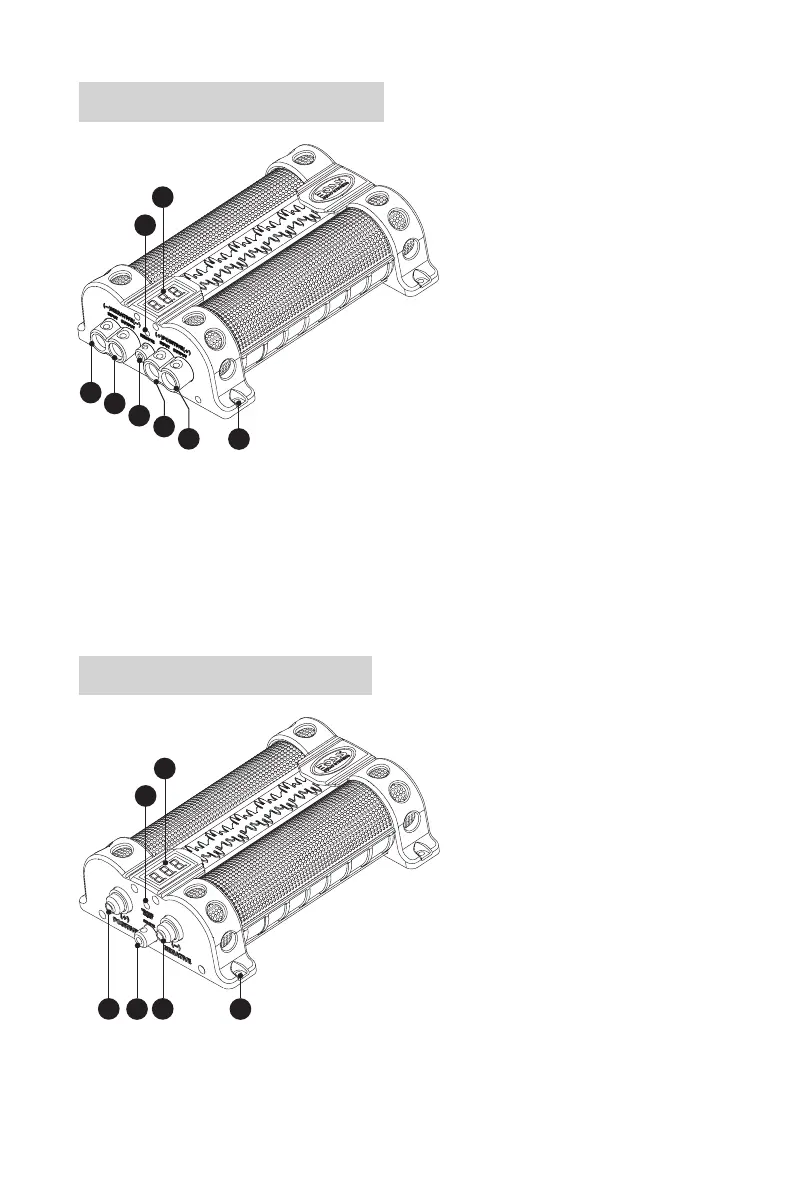
Product overview for CAP18
1. 3-digit voltage display
2. Voltage Adjust (for only manufacture
use in voltage calibration)
3. Negative Input Terminal (-)
Connect to the chassis ground point
(vehicle’s metal frame).
4. Negative Output Terminal (-)
Connect to the negative/ground wire of
your amplier.
5. Remote Terminal
Connect to the remote wire of your
amplier for power on/off control.
6. Positive Input Terminal (+)
Connect to the positive power wire of
your car battery.
7. Positive Output Terminal (+)
Connect to the positive power wire of
your amplier.
8. Screw mounting hole
1
2
3
4
5
6
7
8
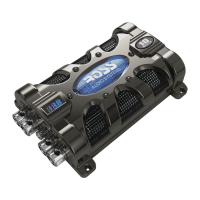
Product overview for CAP8
1. 3-digit voltage display
2. Voltage Adjust (for only manufacture
use in voltage calibration)
3. Positive Terminal (+)
Connect to the positive power wire of
your car battery and amplier.
4. Remote Terminal
Connect to the remote wire of your
amplier for power on/off control.
5. Negative Terminal (-)
Connect to the chassis ground point
(vehicle’s metal frame).
6. Screw mounting hole
1
2
3
4
5
6



 To Next Page