- 8 -
Discharging the capacitor
Discharge the capacitor before you store the capacitor.
IMPORTANT!
Never remove the capacitor without discharging the stored power. This can cause a dangerous electrical shock
even after disconnection.
1. Disconnect the cables from the capacitor in the following order:
a. Positive cable (from the POSITIVE terminal)
b. Ground cable (from the NEGATIVE terminal)
c. Remote cable (from the REMOTE terminal)
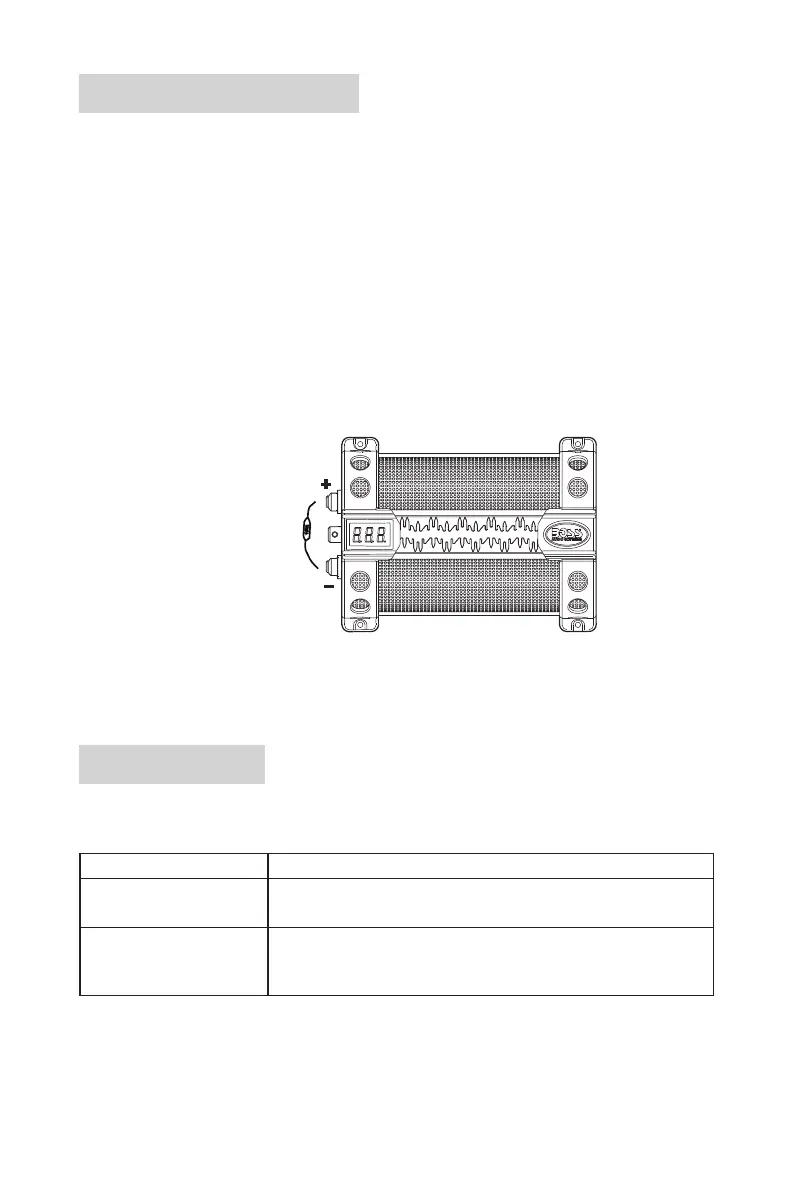
2. Connect one end of the supplied resistor to the POSITIVE (+) terminal, and the other end to the NEGATIVE
(-) terminal. After 1-5 minutes, the capacitor will be discharged (no sound from a buzzer can be heard).
Caution! During discharging, the resistor will become hot. This is normal. Exercise caution for the hot
resistor.
CAP8
(example only)
(1 watt/51 Ω)
Troubleshooting
If you have problems using this product, check the following points before you request service. If you still have
a problem, contact our technical support.
Problem Solution
Voltage display not turned on
when charging the capacitor
Check that the REMOTE terminal on the capacitor is properly and
securely connected to your amplier, and the amplier is turned on.
Capacitor not fully charged When fully charged, the displayed voltage will stop rising to show the
voltage of your car battery. To check with accuracy on full charge,
measure the voltage of your car battery using a voltmeter.



 To Next Page