EasyManua.ls Logo

Boss Blues Driver BD-2 - Panel Descriptions

Boss Blues Driver BD-2
10 pages
Print Icon
To Next Page IconTo Next Page
To Previous Page IconTo Previous Page
Loading...
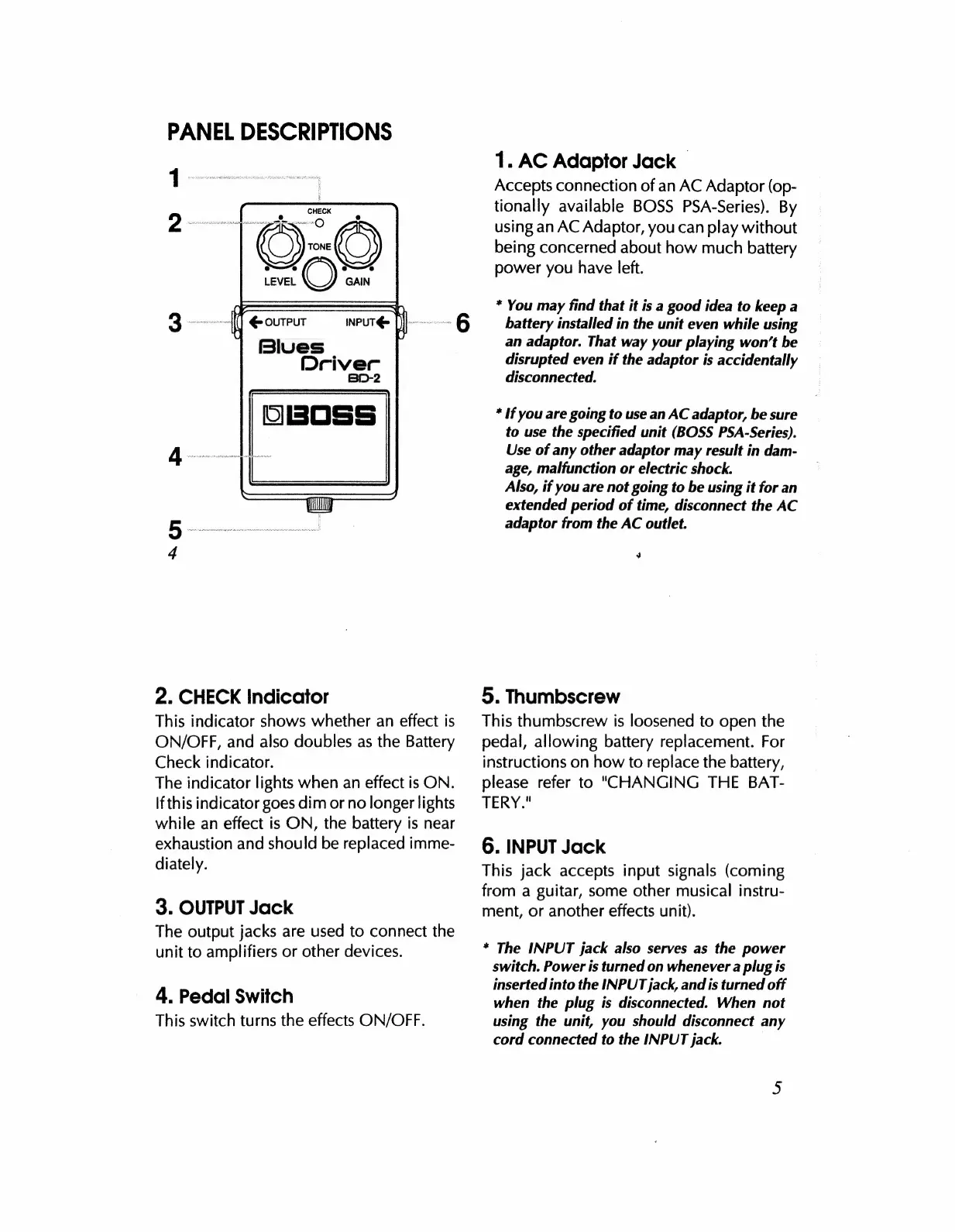
PANEL
DESCRIPTIONS
LEVEL
OUTPUT
Blues
INPUT
(>
Driver
530-2
a
Y
2.
CHECK
Indicator
This
indicator
shows
whether
an
effect
is
ON/OFF,
and
also
doubles
as
the
Battery
Check
indicator.
The
indicator
lights
when
an
effect
is
ON.
Ifthis
indicator
goes
dim
or
no
longer
lights
while
an
effect
is
ON,
the
battery
is
near
exhaustion
and
should
be
replaced
imme-
diately.
3.
OUTPUT
Jack
The
output
jacks
are
used
to
connect
the
unit
to
amplifiers
or
other
devices.
4.
Pedal
Switch
This
switch
turns
the
effects
ON/OFF.
1.
AC
Adaptor
Jack
Accepts
connection
of
an
AC
Adaptor
(op-
tionally
available
BOSS
PSA-Series).
By
using
an
AC
Adaptor,
you
can
play
without
being
concerned
about
how
much
battery
power
you
have
left.
*
You
may
find
that
it
is
a
good
idea
to
keep
a
battery
installed
in
the
unit
even
while
using
an
adaptor.
That
way
your
playing
won't
be
disrupted
even
if
the
adaptor
is
accidentally
disconnected.
*
If
you
are
going
to
use
an
AC
adaptor,
be
sure
to
use
the
specified
unit
(BOSS
PSA-Series).
Use
of
any
other
adaptor
may
result
in
dam-
age,
malfunction
or
electric
shock.
Also,
if
you
are
not
going
to
be
using
it
for
an
extended
period
of
time,
disconnect
the
AC
adaptor
from
the
AC
outlet.
4
5.
Thumbscrew
This
thumbscrew
is
loosened
to
open
the
pedal,
allowing
battery
replacement.
For
instructions
on
how
to
replace
the
battery,
please
refer
to
"CHANGING
THE
BAT-
TERY."
6.
INPUT
Jack
This
jack
accepts
input
signals
(coming
from
a
guitar,
some
other
musical
instru-
ment,
or
another
effects
unit).
*
The
INPUT
jack
also
serves
as
the
power
switch.
Power
is
turned
on
whenever
a
plug
is
inserted
into
the
INPUT
jack,
and
is
turned
off
when
the
plug
is
disconnected.
When
not
using
the
unit,
you
should
disconnect
any
cord
connected
to
the
INPUT
jack.

Related product manuals