EasyManua.ls Logo

Boss Blues Driver BD-2 - Making the Connections

Boss Blues Driver BD-2
10 pages
Print Icon
To Next Page IconTo Next Page
To Previous Page IconTo Previous Page
Loading...
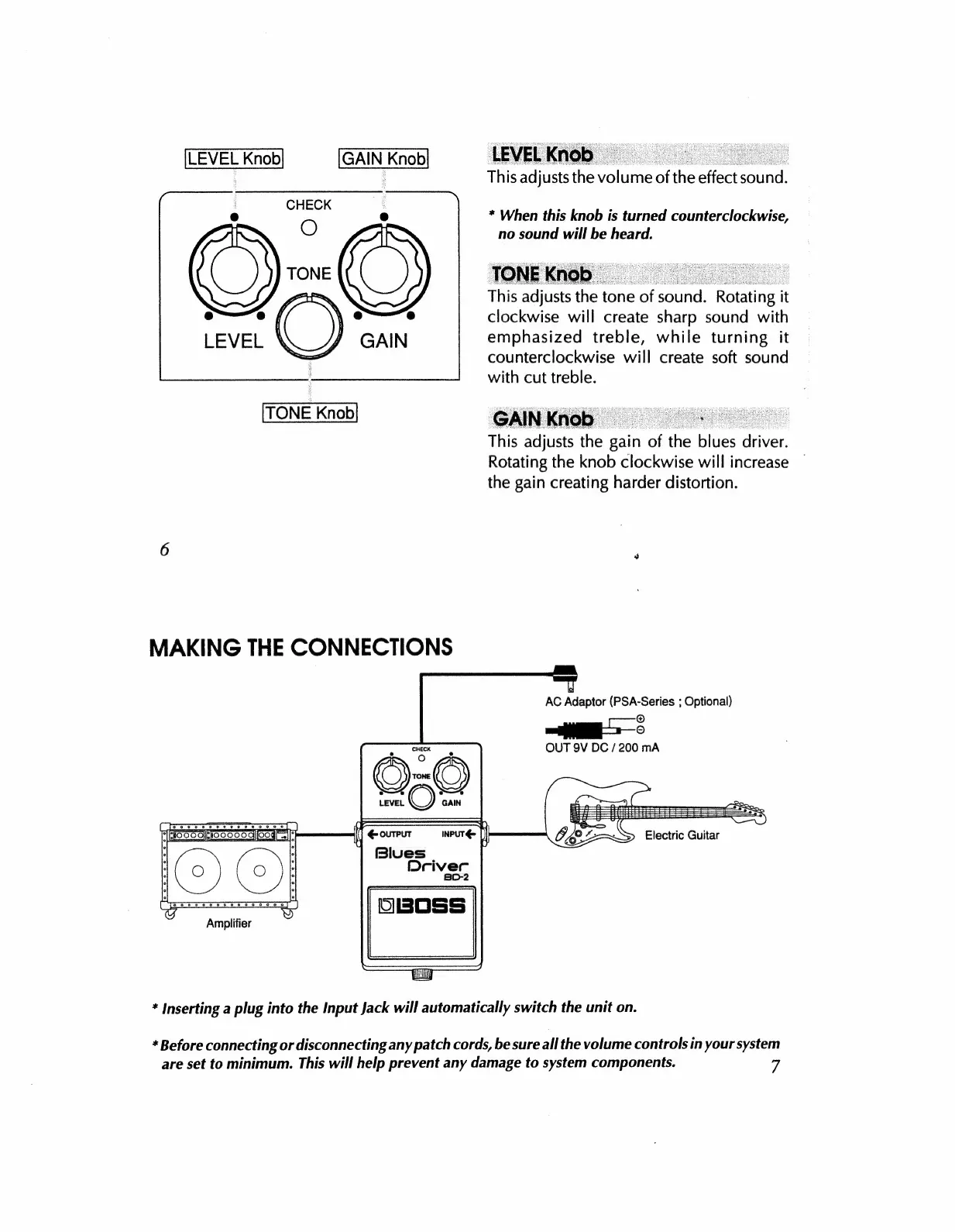
LEVEL
Knob
GAIN
Knob
This
adjusts
the
volume
ofthe
effect
sound.
*
When
this
knob
is
turned
counterclockwise,
no
sound
will
be
heard.
This
adjusts
the
tone
of
sound.
Rotating
it
clockwise
will
create
sharp
sound
with
emphasized
treble,
while
turning
it
counterclockwise
will
create
soft
sound
with
cut
treble.
TONE
Knob
This
adjusts
the
gain
of
the
blues
driver.
Rotating
the
knob
clockwise
will
increase
the
gain
creating
harder
distortion.
6
s
MAKING
THE
CONNECTIONS
AC
Adaptor
(PSA-Series
;
Optional)
©
OUT
9V
DC
/
200
mA
a
ewe
oe
EEEE
TEGOLO
[O
NIE
rok
E
ist
Iag
¡OJO]
o-o
o 0
o
o
o
5
0 0 9
0
8
9.5.
©
if
€ourput
INPUT-
ji
Blues
Driver
BD-2
Amplifier
*
Inserting
a
plug
into
the
Input
Jack
will
automatically
switch
the
unit
on.
*
Before
connecting
or
disconnecting
any
patch
cords,
be
sure
all
the
volume
controls
in
your
system
are
set
to
minimum.
This
will
help
prevent
any
damage
to
system
components.
7

Related product manuals