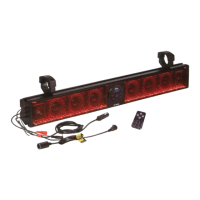
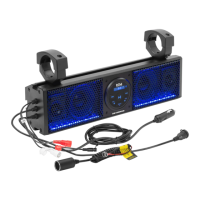
The BOSS BRT26RGB is a 26-inch amplified sound bar designed for all-terrain use, featuring Bluetooth connectivity, a built-in Class A/B amplifier, and multicolor illumination options. This device allows users to stream music wirelessly from their Bluetooth-enabled devices, play audio via an auxiliary input, and access music from a USB flash drive.
Function Description
The primary function of the BRT26RGB is to provide amplified audio in various outdoor and mobile environments. It integrates an amplifier and speakers into a single, weather-resistant unit, making it suitable for vehicles like ATVs, UTVs, and boats. The Bluetooth functionality enables wireless audio streaming, offering convenience and flexibility for users to play music from their smartphones or other compatible devices. The auxiliary input provides a wired connection option for devices without Bluetooth, while the USB input allows for direct playback of MP3 and WMA audio files from a flash drive, also providing 1A current for charging. The multicolor illumination options enhance the user experience by adding visual flair, with various modes and brightness settings controllable via a remote.
Usage Features
Powering On and Off:
To power on the BRT26RGB, plug the male cigarette lighter adapter into a female cigarette lighter receptacle. The device can also be hardwired directly to a vehicle's battery using an optional relay/accessory switch, ensuring a secure and consistent power supply. When hardwiring, it's crucial to disconnect the battery's negative terminal first and use an optional 15 Amp fuse in line with the positive battery terminal. The ground cable should not exceed 18 inches. The remote control offers both long press (for the main remote) and short press (for the RGB remote) options to power the unit on or off.
Bluetooth Operation:
- Pairing: Once powered on, the BRT26RGB automatically enters pairing mode.
- Android Users: Navigate to the Settings Menu, then the Bluetooth Menu, turn on Bluetooth, and press SCAN. "Boss Audio BRT26RGB" will appear under AVAILABLE DEVICES. If prompted, enter passcode "0000".
- iOS Users: Go to the Settings Menu, then the Bluetooth Menu, turn on Bluetooth. "Boss Audio BRT26RGB" will display. If prompted, enter passcode "0000".
- Note: Users have a 2-minute window to complete the pairing process before needing to restart. If the device isn't seen, repeat the steps to refresh the "Device List."
- Reconnection: The unit will automatically reconnect to the last paired Bluetooth device when powered on. If a different device was previously paired, ensure no other devices are currently paired, then navigate to the Bluetooth Menu on the desired device, select "Boss Audio BRT26RGB" from AVAILABLE DEVICES to reconnect. If the device moves out of range, the BRT26RGB will automatically disconnect and then reconnect once back in range.
- Streaming Music:
- Play/Pause: Press the PLAY/PAUSE button on the control panel or the remote, or use the PLAY button on your device's touchscreen.
- Skip Tracks: Press the NEXT TRACK button to advance to the next song, or the PREVIOUS TRACK button to select the previous song.
- Volume Control: Use the VOLUME UP and VOLUME DOWN buttons on the control panel or remote, or adjust the volume directly from your connected device. For optimal audio performance, ensure your device's Bluetooth volume is set to a minimum of 75% before stowing.
- Connection: Power on the BRT26RGB. Connect the integrated 3.5mm AUX-IN cable to your device's headphone jack.
- Volume Control: Adjust the volume using the VOLUME UP and VOLUME DOWN buttons on the control panel or remote, or through your device's controls. For maximum audio performance, ensure your device's headphone volume is set to a minimum of 75% before stowing.
- Connection: Power on the BRT26RGB. Insert a USB Flash drive into the USB JACK. Music will play automatically.
- Play/Pause: Press the PLAY/PAUSE button to start or pause music.
- Skip Tracks: Use the NEXT TRACK button to skip forward and the PREVIOUS TRACK button to go back.
- Volume Control: Adjust the volume using the VOLUME UP and VOLUME DOWN buttons on the control panel or remote, or through your device's controls. The USB port also provides 1A current for charging devices.
Remote Control (RGB and Main):
The BRT26RGB comes with two remote controls: a main remote and an RGB remote, each offering distinct functionalities.
- Main Remote: Controls power, mode selection, track navigation (previous/next), play/pause, volume up/down, and EQ settings. The RF controller has a range of up to 25ft (Line of Sight).
- RGB Remote: Specifically controls the multicolor illumination options, including power on/off, mode up/down, flashing mode, auto demo, speed up/down, brightness up/down, and color up/down.
- Battery Replacement: Both remotes use a CR2025 battery.
- Remote Usage Tips: Do not obstruct the RF remote with metal. Keep remotes away from small children. Do not store remotes in direct sunlight.
Installation:
The BRT26RGB is designed for easy installation using the supplied adjustable bracket to secure it to rails. It is crucial to recheck the bracket before every ride to ensure it remains secure.
Maintenance Features
General Care:
The BRT26RGB features a weather-resistant design, but it should not be submerged in or under water under any circumstances. To clean the unit, use a mild soap or detergent with lukewarm water and a clean sponge or soft cloth. Rinse well with clean water.
Important "Don'ts" for Maintenance:
- Do not clean the unit in hot sun or on very hot days.
- Do not use abrasive or highly alkaline cleaners on the main body.
- Do not scrape the main body with razor blades or other sharp instruments.
- Never use gasoline, acetone, or carbon tetrachloride for cleaning.
Safety Precautions:
- Do not operate mobile equipment while driving. Safe driving and the safety of others are paramount.
- If you notice smoke, strange noises, or odors from the product, immediately turn off the power and consult a dealer or authorized service center to prevent permanent damage.
- Set the volume control at a low setting and gradually increase it to a comfortable level without distortion.
- Do not turn up the volume so high that you cannot hear what is around you, especially in potentially hazardous situations.
- Always consult a professional installer for installation. Attempting to service the product without professional training can be dangerous and may expose you to electric shock or injury.
- When wiring directly to the vehicle's battery, disconnect the battery's negative terminal wire before starting any wiring procedures.
- Using mounting methods other than those provided may void the warranty.
Battery Management:
To avoid battery exhaustion, occasionally run the vehicle's engine while using the product. Using the BRT26RGB without running the engine can drain the battery.

 Need help?
 General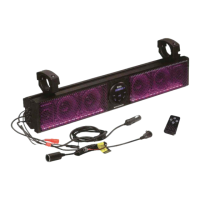

 To Next Page