10.General
setup
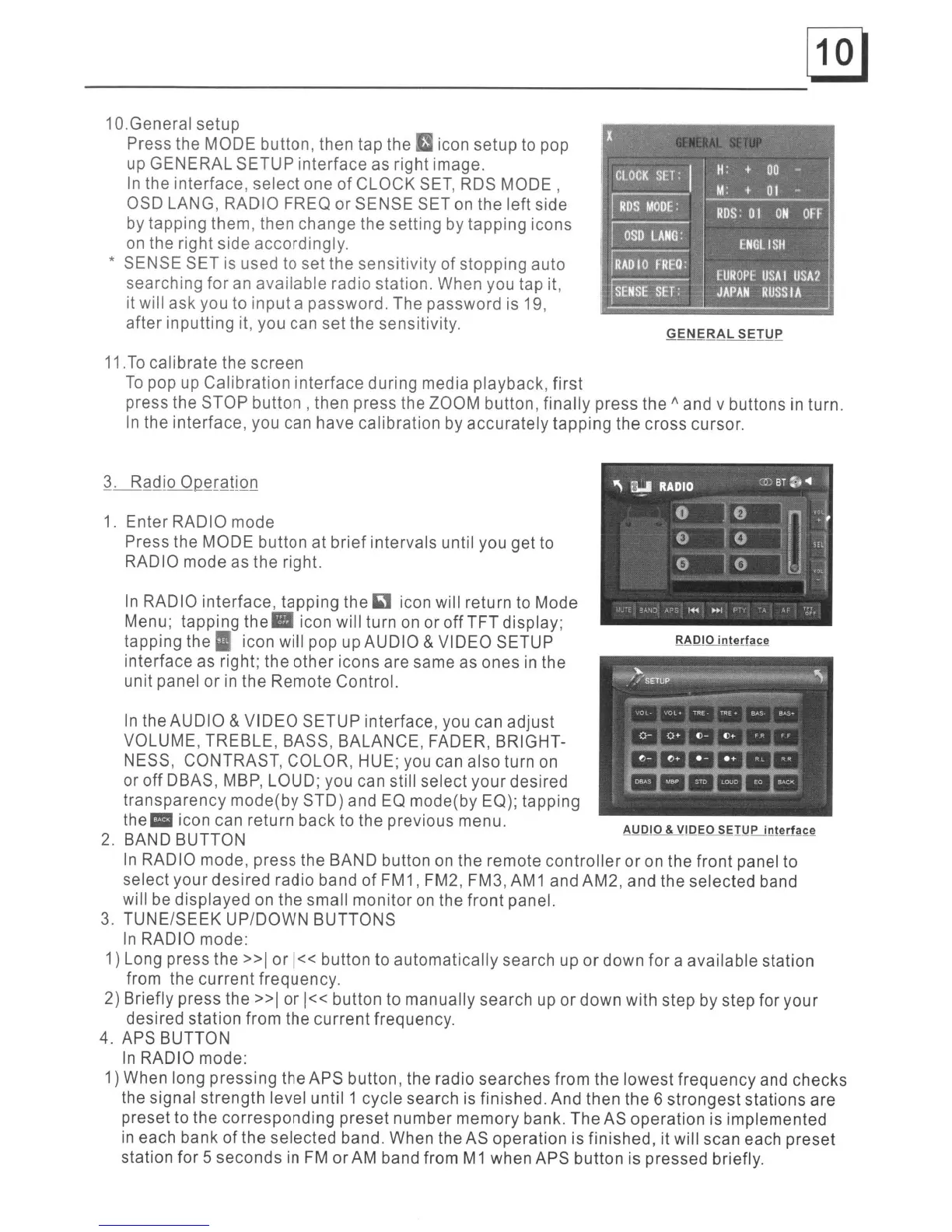
Press the MODE
button,
then
tap the icon
setup
to pop
up
GENERAL
SETUP
interface
as right image.
In
the
interface,
select
one
of
CLOCK
SET, RDS
MODE,
OSD LANG, RADIO FREO
or
SENSE SET on the
left
side
by
tapping
them, then
change
the setting by
tapping
icons
on the right side
accordingly.
* SENSE
SET
is used to set the
sensitivity
of
stopping
auto
searching
for
an
available
radio station. When you tap it,
it will
ask
you to
input
a
password.
The
password
is 19,
after
inputting
it, you can
set
the sensitivity.
11.
To
calibrate
the
screen
To
pop up
Calibration
interface
during media
playback,
first
press the STOP
button,
then press the ZOOM button,
finally
press the 1\ and v
buttons
in turn.
In the
interface,
you can
have
calibration
by
accurately
tapping
the cross cursor.
In
RADIO
interface,
tapping
the icon will return to Mode
Menu;
tapping
the'
icon will turn on or
off
TFT
display;
tapping
the'
icon will pop up
AUDIO
&
VIDEO
SETUP
interface
as right;
the
other
icons
are same as
ones
in
the
unit panel
or
in
the
Remote
Control.
In
the
AUDIO
&
VIDEO
SETUP
interface, you can
adjust
VOLUME,
TREBLE,
BASS,
BALANCE,
FADER, BRIGHT-
NESS, CONTRAST, COLOR, HUE; you can also turn on
or
off
DBAS, MBP, LOUD; you can still select
your
desired
transparency
mode(by
STD)
and EO mode(by EO); tapping
the:
icon can return
back
to
the previous menu.
2. BAND BUTTON
In
RADIO mode,
press
the BAND button on the remote
controller
or
on the
front
panel to
select
your
desired
radio
band
of
FM
1,
FM2, FM3, AM 1 and AM2, and the selected band
will be
displayed
on
the
small
monitor
on the
front
panel.
3.
TUNE/SEEK
UP/DOWN
BUTTONS
In
RADIO mode:
1) Long press the
»1
or
1«
button to
automatically
search up
or
down
for
a
available
station
from the
current
frequency.
2) Briefly press the
»1
or
1«
button
to
manually
search
up
or
down
with step by step
for
your
desired
station
from the
current
frequency.
4. APS BUTTON
In
RADIO mode:
1) When long
pressing
the APS button, the radio
searches
from
the
lowest
frequency
and
checks
the signal
strength
level
until 1 cycle search is finished. And then the 6
strongest
stations
are
preset
to the
corresponding
preset
number
memory
bank.
The
AS
operation
is
implemented
in
each bank
of
the
selected
band. When the AS
operation
is
finished,
it will scan each
preset
station
for
5
seconds
in
FM
or
AM band from M1 when APS
button
is pressed briefly.
1.
Enter
RADIO mode
Press the MODE
button
at
brief
intervals
until you get to
RADIO mode as
the
right.


 To Next Page
 Loading...









