11
Advanced Use (Performing)
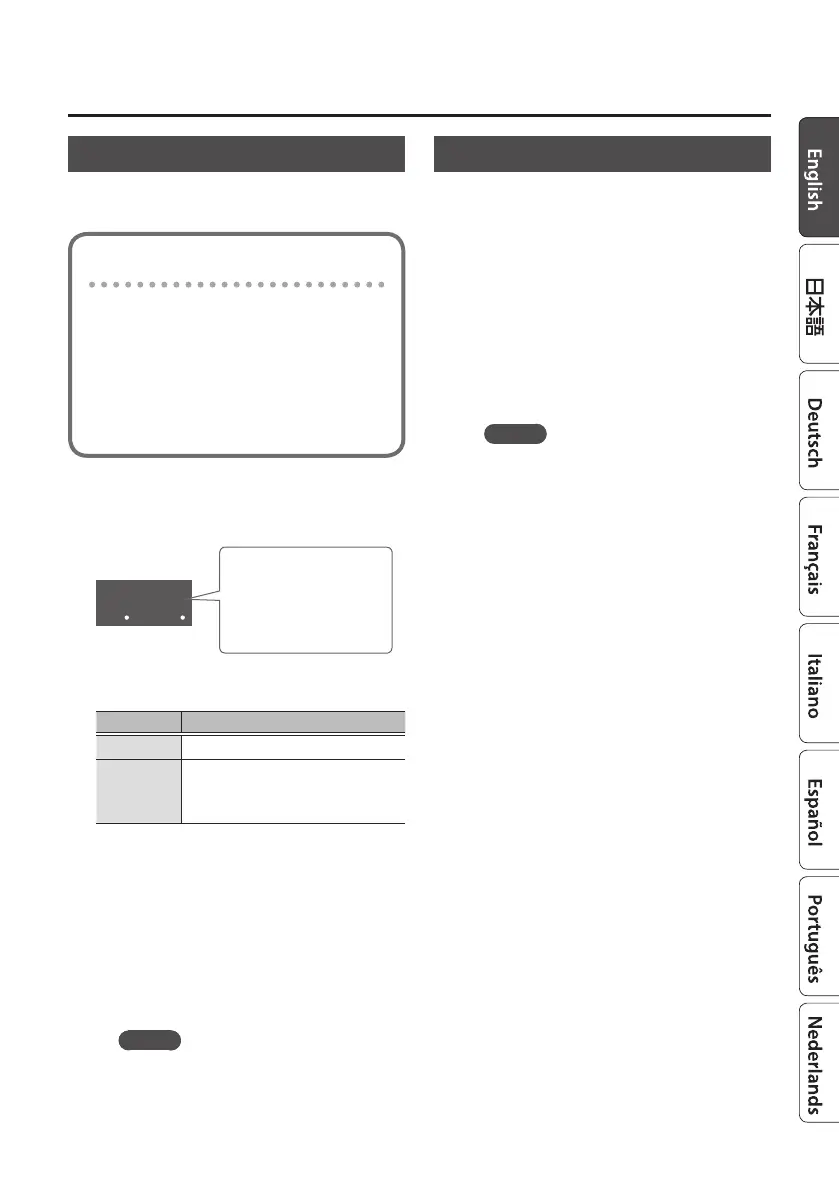
Fading-Out the Rhythm
You can gradually decrease (fade-out) the
volume of the rhythm, and then stop.
Here’s how you can use fade-out
Suddenly stopping the rhythm at the
end of a performance might create
an unnatural impression.
For example, it is eective to fade-
out when you want to insert an
expressive break (rest).
1. Hold down the [EXIT] button, and
press the [s] button.
05
Fade-out length
Indicates the length
(seconds) taken by the
fade-out.
The value of the setting changes each time
you press the [s] button.
Indication Explanation
.00.
The rhythm does not fade-out.
.02.
:
.40.
The rhythm fades-out over the
specied number of seconds.
2. Release the [EXIT] button.
3. Press the [s] button.
The rhythm plays.
4. Press the [s] button.
The rhythm fades-out and stops.
The display shows “F.o” during the fade-
out.
MEMO
If you press the [s] button once
again during the fade-out, the rhythm
stops immediately.
Doubling or Halving the Tempo
Here’s how to double or halve the tempo
setting.
1. Hold down the [EXIT] button, and
use the TEMPO [I] [H] buttons.
5 Hold down the [EXIT] button and press
the TEMPO [H] button to double the
tempo.
5 Hold down the [EXIT] button and press
the TEMPO [I] button to halve the
tempo.
MEMO
5 The tempo’s upper limit is 300, and
its lower limit is 40. If doubling or
halving the tempo would set the
tempo outside these limits, the
tempo is restricted to the upper limit
(300) or lower limit (40).
5 When you halve the tempo, the value
below the decimal point is rounded
down. For example, halving a tempo
of 151 changes it to 75.



 To Next Page