6
Playing Rhythms
Turning On the Power
1. Press the [L] button
The power turns on.
To turn o the power, press the [L] button
once again.
Selecting Instruments
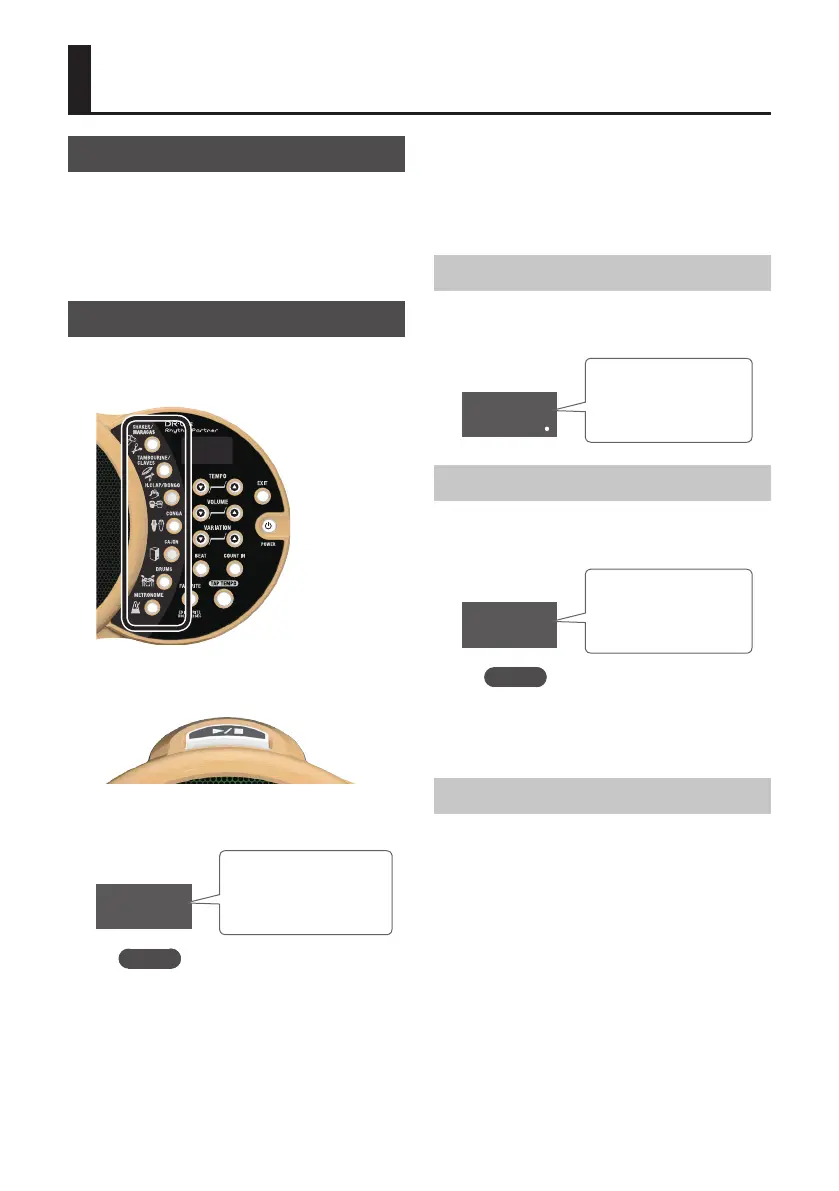
1. Press an instrument button to
select a sound (p. 2).
The instrument button you pressed is lit.
2. Press the [s] button.
The rhythm plays using the instrument you
selected.
2
Measure
Indicates the measure
of the rhythm.
MEMO
5 You can press multiple instrument
buttons. The rhythm plays with the
selected instruments layered.
5 You can switch the measure
indication between displayed
and hidden by holding down the
[EXIT] button and pressing the
[COUNT IN] button.
Adjusting the Volume
1. Use the VOLUME [I] [H] buttons to
adjust the volume of the rhythm.
100
Volume
Indicates the volume
of the DR-01s.
Adjusting the Tempo
1. Use the VOLUME [I] [H] buttons to
adjust the tempo of the rhythm.
120
Tempo
Indicates the tempo
of the rhythm.
MEMO
You can set the tempo by pressing
the [TAP TEMPO] button multiple
times at the desired interval of timing.
Stopping the Rhythm
1. Press the [s] button.
The rhythm stops.











 To Next Page