2
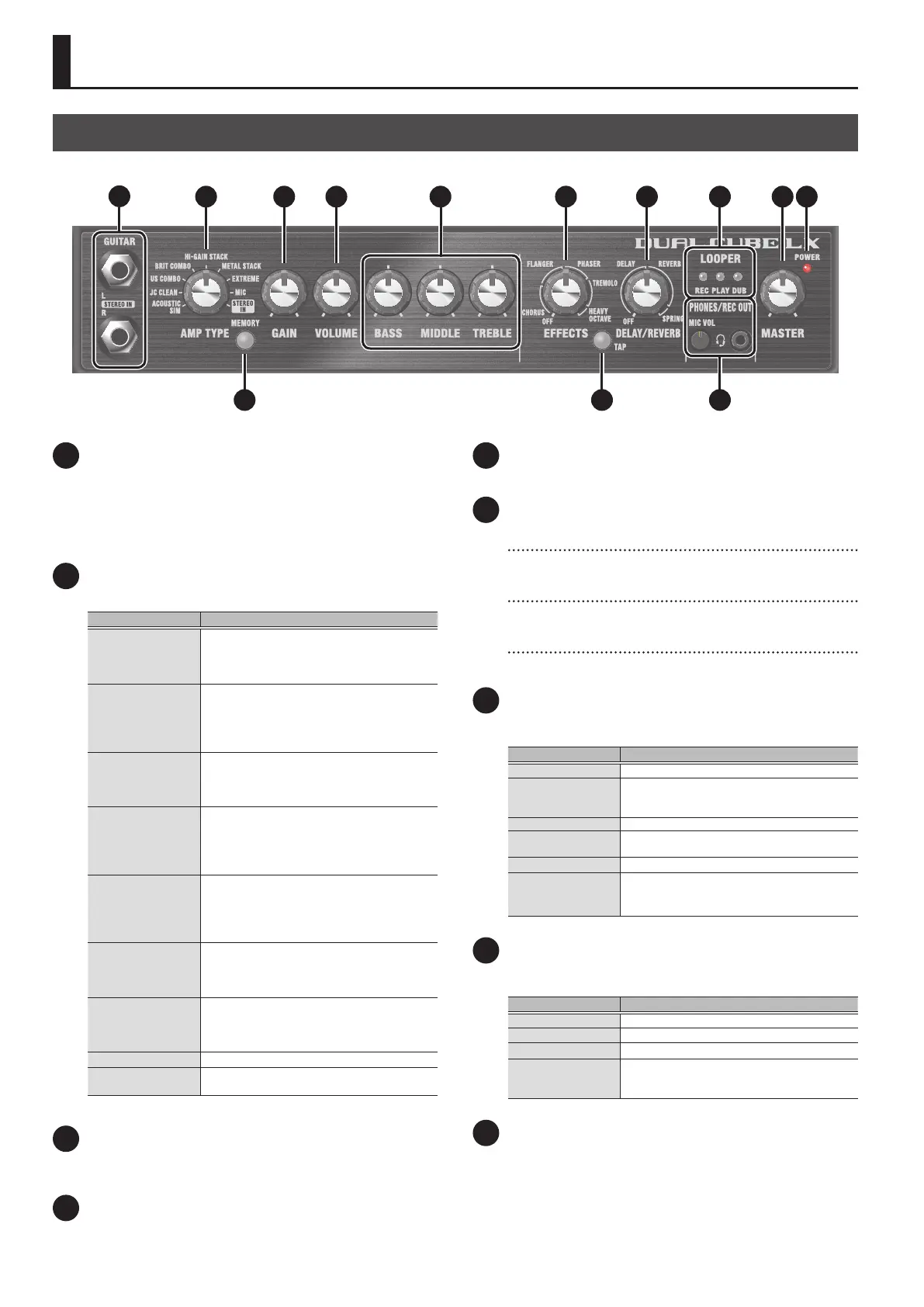
Panel Descriptions
1 GUITAR jack/STEREO IN L, R jack
Connect your electric guitar, mic, multi-eect unit, eect units with
stereo outputs or other such devices here.
When inputting in stereo, set the amp type to “STEREO IN”.
* If you connect the L jack from your device to this unit using the
“STEREO IN” setting, only the L-side output is heard.
2 [AMP TYPE] knob
Selects the amp type.
Type Explanation
ACOUSTIC SIM
The sound of an original amplier with built-in
acoustic simulator.
This transforms your electric guitar sound into that
of a clear, delicate-sounding acoustic guitar.
JC CLEAN
Models the Roland JC-120. This gives a clean sound
with a distinct high end.
You can achieve an even more eective tone when
using this type in combination with a external
eect unit.
US COMBO
This models a Fender Deluxe Reverb.
Usable for a wide range of genres including
country, blues, jazz and rock music. This type
features a characteristically bright high-end sound.
BRIT COMBO
This is a model of the Vox AC-30TB, the rock
amplier that created the Liverpool sound of the
1960s.
Oers a broad range of sounds, from clean to
overdrive.
HI-GAIN STACK
A model of the Marshall 1959 sound, with inputs I
and II connected in parallel.
This is a rock amp distinctive for its fat, solid
sound, with a smooth tone that extends into the
“presence” frequency range.
METAL STACK
A model of the lead channel of the Peavey
EVH5150.
This gives you a lead sound that’s distinctively thick
with a long sustain.
EXTREME
Models the sound of the Channel 2 MODERN Mode
on the MESA/Boogie DUAL Rectier.
This type gives you a wide range of lead sounds for
music such as thrash metal and grunge.
MIC Select this if you’ve connected a microphone.
STEREO IN
Select this when connecting a multi-eect unit or
eect unit with stereo outputs.
3 [MEMORY] button
Use the memory feature to store three dierent sets of knob
congurations for each amp type (p. 6).
4 [GAIN] knob
Adjusts the gain (amount of distortion).
5 [VOLUME] knob
Adjusts the volume before equalization and eects are applied.
6 EQUALIZER
[BASS] knob
Adjusts the sound level of the low-frequency range.
[MIDDLE] knob
Adjusts the sound level of the middle-frequency range.
[TREBLE] knob
Adjusts the sound level of the high-frequency range.
7 [EFFECTS] knob
Use this knob to switch between eects such as chorus or anger,
depending on the knob’s position.
Type Explanation
OFF Eects are not applied.
CHORUS
Chorus is an eect that creates a beautiful tonal
spaciousness and depth by adding a slightly
modulated sound.
FLANGER Gives a twisting, anged character to the sound.
PHASER
Gives the original sound a whooshing, swirling
character by adding a slight phase variance.
TREMOLO
Creates a cyclic change in volume.
HEAVY OCTAVE
Adds pitches at lower octaves to the original sound.
This also applies when you play chords, adding
thickness to the chords you play.
8 [DELAY/REVERB] knob
Use this knob to switch between eects such as delay or reverb,
depending on the knob’s position.
Type Explanation
OFF Eects are not applied.
DELAY
Changes the delay time and eect.
REVERB
Adjusts the volume of the reverb.
SPRING
A reverb that models a spring reverb, with the
characteristic sound of running the signal through
springs.
9 [TAP] button
Sets the delay time. When you press this button two or more times,
the delay time is set to the interval between presses.
Top Panel
1
2
4
3
65 7 8
9
10
11
12 13



 To Next Page