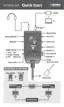
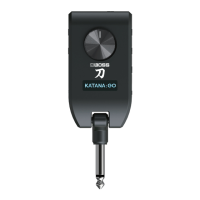
The BOSS KATANA:GO is a compact, portable guitar and bass amplifier designed for practice and on-the-go playing. It features a direct input plug for connecting to your instrument and a PHONES jack for headphones, earphones, or recording equipment, allowing for silent practice. The device is powered by a built-in lithium-ion battery, rechargeable via a USB port, which also enables connection to a computer for audio data exchange and firmware updates.
Function Description
The core function of the KATANA:GO is to provide a wide range of amplifier and effect settings, referred to as "memories," for both guitar and bass. These memories are organized into "banks," with 30 banks available for each instrument mode (GUITAR and BASS). Each bank contains three channels (A, B, C), allowing users to quickly switch between different sound configurations.
The device supports two main modes: GUITAR and BASS. Users can switch between these modes by holding down the Bluetooth button while turning the power on, then using the multi-function button to select the desired mode. This ensures the device is optimized for the connected instrument.
A multi-function button serves several purposes:
- Bank Switching: Pressing towards the '+' or '-' side cycles through the available banks.
- Tuner Activation: A single press activates the built-in tuner, which displays the note name and pitch deviation, aiding in accurate instrument tuning.
- Mode Selection (during startup): Used in conjunction with the Bluetooth button to select between GUITAR and BASS modes.
The [A], [B], and [C] buttons allow for direct selection of the three channels within the currently active bank, providing quick access to different memory settings.
The KATANA:GO also incorporates a "STAGE FEEL" function, accessible via a dedicated button. This feature simulates the experience of a guitarist standing on stage, altering how the guitar amp sound and Bluetooth audio are perceived. There are several STAGE FEEL modes:
- OFF: Turns off the stage feel function.
- MODE1: Guitar amp sound from the front, Bluetooth audio from the rear.
- MODE2: Guitar amp sound and Bluetooth audio from the rear.
- CUSTOM: Allows for personalized stage feel settings, with default settings placing the guitar amp sound to the left and rear, and Bluetooth audio to the right and rear. Customization is possible through the BOSS TONE STUDIO app.
Usage Features
- Volume Control: A master volume knob adjusts the output level to the PHONES jack. It is recommended to turn the master volume all the way down before powering on to avoid loud sounds.
- Display: An integrated display shows essential information such as the bank number, channel, and memory name. To conserve battery, the display enters a screen saver mode after a period of inactivity, returning to normal upon button press.
- Bluetooth Connectivity: The Bluetooth button enables wireless connection to mobile devices. This allows users to stream audio from their smartphone or tablet to the KATANA:GO, facilitating practice with backing tracks or music. The device can also connect to external pedals like the FS-1-WL or EV-1-WL via Bluetooth for expanded control. Pairing involves pressing the Bluetooth button, then selecting "KATANA:GO AUDIO" on the mobile device. Long-pressing the Bluetooth button temporarily severs the connection, which is reestablished upon power cycle.
- BOSS TONE STUDIO App Integration: The KATANA:GO is designed to work seamlessly with the BOSS TONE STUDIO app for KATANA:GO (available for iOS and Android). This app provides advanced capabilities for editing sounds, managing the sound library, and customizing various settings, including the STAGE FEEL functions and tuner reference pitch.
- USB Audio Interface: The USB port allows the KATANA:GO to function as an audio interface, enabling playback and recording of its sound directly to a computer, iPad, or iPhone using standard USB drivers.
- Input Plug Design: The input plug is designed to fold out. When connecting or disconnecting, it is crucial to hold the base of the input plug rather than the main housing to prevent scratching the instrument.
- Power Management: The [POWER] switch turns the unit on and off. The CHARGE indicator provides visual feedback on the power supply status:
- Orange: Charging.
- Green: Charging completed.
- Blinks green and orange: Charging error (contact service if persistent).
- Red: Low battery (unit powers down within 30 minutes).
- Unlit: No power supplied.
Maintenance Features
- Battery Care: The internal lithium-ion battery requires periodic recharging. Even if not used for extended periods, it is recommended to recharge the battery every three months to prevent degradation. Optimal charging temperature is between 10-30°C, with a wider operational range of 5-35°C.
- Firmware Updates: To ensure optimal performance and access to the latest features, users should update the device's firmware to the latest version. This can typically be done by connecting the KATANA:GO to a computer via USB.
- Factory Reset: In cases of data corruption or persistent issues, a factory reset can restore the unit to its original settings. This process involves holding down the [A] button and the Bluetooth button while turning the power on, then confirming the reset by pressing the [STAGE FEEL] button. A factory reset will erase all user data and unpair all connected Bluetooth devices, requiring re-pairing for future use.
- Troubleshooting: The manual provides a troubleshooting section for common issues, such as charging errors (blinking green and orange indicator), "MEMORY DAMAGED!" messages, and power-on failures. These guidelines direct users to check ambient temperature, perform factory resets, update firmware, or contact customer support if necessary.

 Need help?
 General


 To Next Page